Activity
Mon
Wed
Fri
Sun
Aug
Sep
Oct
Nov
Dec
Jan
Feb
Mar
Apr
May
Jun
What is this?
Less
More
Owned by Richard
Build smarter with AI, faster than everyone else. Join creators leveling up with frameworks, tools & wins you won’t get anywhere else.
Memberships
Sniper Nation
5.9k members • Free
Lovable AI
1.4k members • Free
Built For The Dip
7 members • Free
Growth Hub 365
10.1k members • Free
The AI Advantage
126.2k members • Free
AI Automation Agency Hub
327.5k members • Free
Ai Fueled Profits: Live
4.2k members • Free
11 contributions to Apex AI Builders Guild

Dec '25 •
Start With an AI Platform Roadmap Before You Build Anything, You Need a Roadmap.
Most people jump straight into building—pages, automations, workflows—without a clear plan. That’s how projects stall, systems break, and money gets wasted. The platforms aren’t the problem. The lack of sequence is. What the Roadmap Is An AI Platform Roadmap is a step-by-step plan that tells you: What to build first (and what to ignore) Which platform should do what How everything fits together before you spend time or money Where automation actually makes sense—and where it doesn’t This roadmap becomes the single source of truth for your entire build. Why This Matters Anyone can build pages. Very few people can design a system that actually works end-to-end. That’s why Apex Intelligence www.apexartificialintelligence.com starts every engagement with a roadmap—whether you plan to build it yourself or have us do it for you. Once the roadmap is clear, execution becomes simple. No guesswork. No rebuilds. No wasted momentum. DM "Roadmap" to Get Your Platform Roadmap
0
0
Dec '25 •
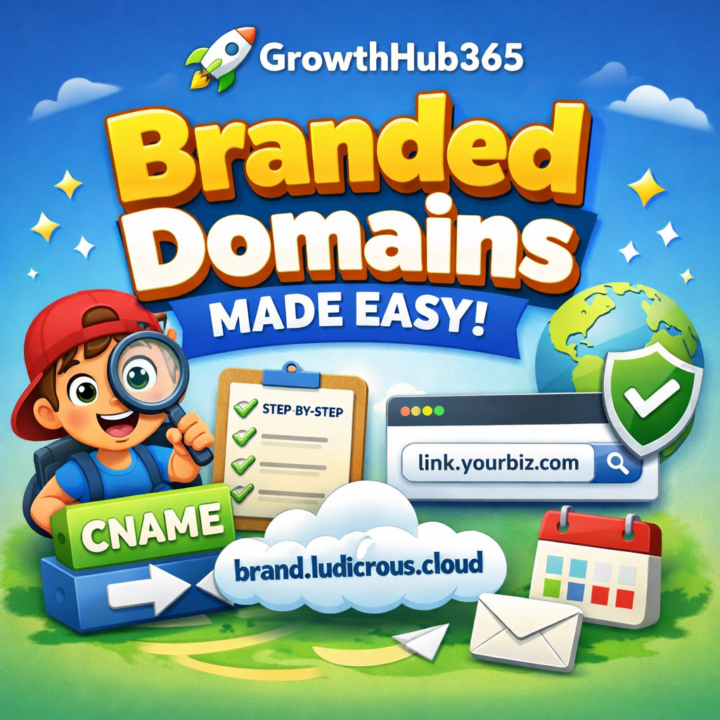
📘 GrowthHub365 Branded Domains A Super Simple, Step-By-Step Guide
🎯 EXECUTIVE SUMMARY This guide explains how to set up a Branded Domain in GrowthHub365 using very simple language. You’ll learn what a branded domain is, why it matters, and exactly what buttons to click—one tiny step at a time. By the end, all your links, invoices, and messages will show your brand instead of a shared system link. 🧠 First: What Is a Branded Domain? Imagine this: GrowthHub365 is like a big school. Lots of kids (businesses) use it. Before, everyone had to use the same return address on their letters. That got confusing… and sometimes caused trouble. A Branded Domain is like putting your name and home address on your letters instead of using the school’s address. So instead of links looking like: > something.growthhub365.com They look like: > link.yourbusiness.com That makes you look more professional and helps emails land in the inbox instead of spam. 📋 KEY INSIGHTS (Plain & Simple) A branded domain = your own custom link name It protects your email reputation It makes your business look more trustworthy GrowthHub365 helps you connect it safely You only need to do this once 🧭 STEP-BY-STEP WALKTHROUGH We’ll go slow, clear, and one step at a time. 🧩 STEP 1: Create a Special Connection (CNAME Record) 🧠 What is this? Think of this like putting a mail-forwarding sign on your mailbox that says: > “If someone sends mail here, send it to GrowthHub365.” 🔧 What You Do: 1. Go to where you bought your domain Examples: GoDaddy, Cloudflare, Squarespace 2. Find a section called: “DNS” or “Domain Settings” 3. Create a new record called a CNAME 4. Fill it out like this: Field What to Put Type CNAME Name / Host link Points To / Target brand.ludicrous.cloud 👉 Important: You must type brand.ludicrous.cloud exactly. No spaces. No extra letters. ⚙️ STEP 2: Tell GrowthHub365 About Your Domain Now we go inside GrowthHub365. 1. Log in to GrowthHub365 2. Click Settings 3. Click Business Profile / Info 4. Find the field called Branded Domain
0
0
Dec '25 •
Most teams are still working harder instead of working smarter—and they don’t even realize it.
Here’s the uncomfortable truth 👇 The biggest productivity gains right now aren’t coming from new hires, longer hours, or better meetings… They’re coming from people who quietly know how to use AI inside the tools they already open every day. Microsoft 365 Copilot isn’t just “another AI feature.” Used correctly, it becomes a workflow accelerator that: • Turns long email threads into instant summaries • Generates clean, usable content in seconds • Pulls insights out of messy information without effort • Keeps communication consistent across Teams, Outlook, and Word • Helps ideas move forward instead of getting stuck in drafts But here’s where most people miss the opportunity 👀 They assume Copilot is “plug-and-play.” It’s not. The real advantage goes to the people who learn: • What to ask • When to use it • When NOT to use it • How to apply it to real business problems—not demos That’s why trainings like this matter—not because they teach features, but because they retrain how you think about work itself. This is the gap between: ❌ Busy teams constantly reacting ✅ Operators who quietly compound efficiency every week If you’re serious about building with AI—not talking about it—this is exactly the kind of leverage you should be paying attention to now, not later when it’s table stakes. 💡 Strategic Implications (What to Do Next) • Start treating AI as a workflow layer, not a novelty • Focus on real outputs: summaries, drafts, decisions, clarity • Learn Copilot inside your existing tools before adding new platforms • Position yourself as the “AI-capable operator” inside your org or business 🔍 Confidence Assessment Confidence Level: High (90–95%) Basis: The post aligns with verified Microsoft 365 Copilot capabilities (content generation, summarization, cross-app support) and proven AI adoption patterns observed in enterprise productivity transformations.
0
0

Dec '25 •
✅ GrowthHub 365 Smart Defaults Checklist The Boring Setup That Quietly Saves You Weeks Later
🎯 EXECUTIVE SUMMARY Most rebuilds don’t happen because GrowthHub 365 is limited. They happen because the wrong defaults were left unchecked early. Smart operators lock in a few key defaults up front—and avoid painful rewrites later. 📋 KEY INSIGHTS 🧠 Why Smart Defaults Matter Defaults are not “best practice.” They’re safe practice for the platform, not optimal practice for your workflow. If you don’t choose intentionally: GrowthHub chooses flexibility over focus You inherit options you never needed Complexity creeps in silently 🔒 The Smart Defaults Checklist (Operator Mode) 1️⃣ Lock Structure Before Styling Don’t optimize appearance first. Defaults should favor: Clear section hierarchy Predictable page flow Reusable layouts Visual polish comes after structure is proven. 2️⃣ Reduce Choice Early (Yes, On Purpose) GrowthHub allows a lot of freedom—which is great later. Early on, smart defaults: Limit unnecessary variations Prevent branching logic too soon Keep builds easy to reason about Less choice = faster execution. 3️⃣ Choose Stability Over “Advanced” Advanced defaults look powerful—but often introduce: Hidden dependencies Edge-case behavior Debugging you didn’t plan for Operators stick with stable defaults until the use-case forces change. 4️⃣ Lock Anything You Don’t Want to Revisit If you might change it later, don’t lock it. If you never want to rethink it—lock it now. Examples: Core layout logic Primary data flow Foundational page behavior Future-you will thank present-you. 🚫 What Most Users Get Wrong They: Leave everything open “just in case” Assume defaults are beginner-friendly Customize before clarity exists That’s how rework sneaks in. 💡 STRATEGIC IMPLICATIONS (How Operators Think) GrowthHub 365 operators: Use defaults as guardrails, not suggestions Optimize for clarity today, scalability tomorrow Prevent problems instead of fixing them later This is how builds stay clean as they grow. ⚡ THE REAL PAYOFF Smart defaults don’t feel exciting.
0
0
Dec '25 •
⚠️ GrowthHub 365 The 3 Settings That Cause Rebuilds Later
🎯 EXECUTIVE SUMMARY Most GrowthHub 365 rebuilds don’t come from “bad ideas.” They come from touching the wrong settings too early—settings that quietly lock you into decisions you didn’t realize you were making. If you know these three, you avoid weeks of cleanup later. 📋 KEY INSIGHTS 🔥 Setting #1: Structural Logic Before Validation This is the #1 silent killer. When users: Over-engineer page structure Add conditional logic too early Build for “future possibilities” They hard-code assumptions that haven’t been proven yet. Operator move: Keep structure simple until real usage forces complexity. Validate flow first. Lock logic later. 🔥 Setting #2: Advanced Automation Without Stable Inputs Automation feels productive—but only when inputs are stable. Rebuilds happen when: Automations are built on changing fields Logic depends on assumptions instead of patterns Data structure isn’t finalized When inputs change, everything downstream breaks. Operator move: Delay automation until inputs stop changing. Manual first. Automated second. Always. 🔥 Setting #3: Customization That Breaks Reusability Customization feels like progress—but often creates isolation. Common mistakes: Highly specific layouts One-off logic that can’t be reused Tweaks that only make sense for this one page This forces rebuilds when you try to scale or duplicate. Operator move: Design for reuse, not perfection. If it can’t be reused, it’s probably premature. 🚫 Why These Hurt So Much Later These settings: Feel harmless early Create hidden dependencies Lock decisions you didn’t mean to lock By the time the problem shows up, the fix isn’t a tweak—it’s a rebuild. 💡 STRATEGIC IMPLICATIONS (How Operators Think) GrowthHub 365 operators: Treat early builds as prototypes, not final systems Protect flexibility until clarity exists Optimize after reality—not before it That’s how they move fast without creating messes. ⚡ THE REAL DIFFERENCE Rebuilders think: > “I’ll fix it later.”
0
0
1-10 of 11

@richard-spencer-7384
Certified AI Consultant | AI Platform Roadmaps & Done-For-You Builds | Lovable • GrowthHub 365 • Durable • GoHighLevel | Founder, Apex Intelligence
Active 7d ago
Joined Dec 12, 2025
Tallahassee