Activity
Mon
Wed
Fri
Sun
Aug
Sep
Oct
Nov
Dec
Jan
Feb
Mar
Apr
May
Jun
Jul
What is this?
Less
More
Memberships
Stock Image AI Prompt Lab
192 members • $5/month
AI Art Sellers Collective FREE
9.4k members • Free
6 contributions to Stock Image AI Prompt Lab

Feb 3 •
😲 Wow, that was quick!
I uploaded something on Jan 30th and it just sold today! So cool to see a quick sale. Anyone else have something sell almost immediately after uploading?
2 likes • Feb 4
@Michael van der Voort Nice, did it lead to a regular seller in your case?

Feb 1 •
🚀 January Adobe Stock Recap – Full Transparency
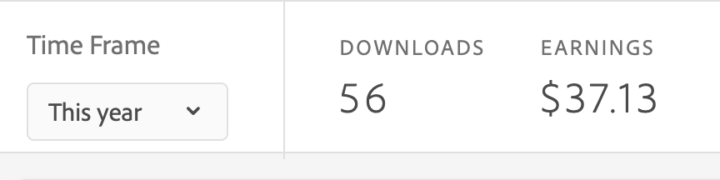
Sharing my Adobe Stock stats for January so you can see how this side of the business is actually performing 👇 📊 January Adobe Stock Stats • Downloads: 56 • Earnings: $37.13 Is this life-changing money? Not yet — and that’s the point. Here’s the real takeaway: Stock is a long game. Every image you upload is a small asset that can sell over and over again. One month doesn’t define the outcome — your upload consistency does. What matters more than this snapshot:• Building a growing portfolio• Uploading regularly• Learning from approvals and rejections• Letting time + volume do the work Most people quit before the compound effect kicks in. I’m not here for quick wins — I’m here to build a catalog that pays me long-term. If your numbers are small right now, good. That means you’re early, not failing. 👇 How many images did you upload in January, and what’s your goal for February?
2 likes • Feb 2
Here’s where I’m at right now. Out of my last batch of 67 uploads, 34 got rejected and only 15 were approved so far.
Jan 20 •
Seasonal vs Niche Uploads?
Curious what everyone’s focusing on right now. Are you working on seasonal images or digging into low competition niches?
4 likes • Jan 20
A bit of both, but I haven’t had much time lately to dig deep into niche research. I have uploaded the ones you shared though, thanks for that!

Jan 4 •
2. How I Reduced Adobe Stock Rejections with a Free AI Upscaler
After a year on Adobe Stock I’ve road-tested most free upscalers; the one that’s stayed in my workflow is Upscayl (https://upscayl.org). Why Upscayl? - 100 % free, open-source, runs locally → no subscriptions, no uploads, total privacy. - Several built-in AI models (Realistic, Digital Art, Standard…). - My go-to is “Standard”—it gives clean, natural-looking enlargements on photos and has noticeably lowered my Adobe Stock rejection rate for resolution or softness issues. Hardware reality check Upscayl needs a dedicated GPU with ≥ 4 GB VRAM. On that hardware a 24 MP image up-scales in seconds. On iGPUs or CPU-only machines the same file can take hours, making batch work painful. No GPU? Fallback plan When I’m on a lightweight laptop I switch to iLoveIMG’s online upscaler (https://www.iloveimg.com/upscale-image). Pros: zero install, drag-and-drop simple. Cons: - Only a handful of free files per day. - No real bulk queue. - Paywall appears quickly. Quick loophole: open an incognito window or switch browsers—most days the counter resets and you can squeeze in a few extra images. Bottom line - Have a decent graphics card? Use Upscayl—best free quality you’ll get. - Stuck on integrated graphics? iLoveIMG keeps you moving while you’re away from your main rig. Both tools keep my portfolio at Adobe’s required pixel count and technical standard; hope they do the same for you. Fun Fact : I worked as Content Reviewer for Adobe stock for almost 2 years. Well i know a lot will be sharing most of my tips. Hope this Helps!!
6 likes • Jan 4
Upscayl is great. I use it for all types of images. I have found that the Remacri model is best for images of people.
Jan 1 •
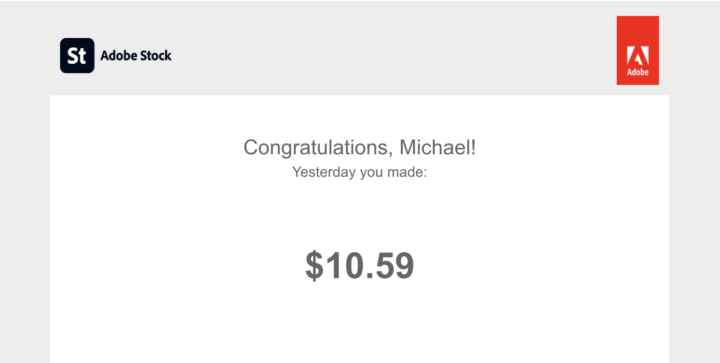
🚀 Best Day Ever on Adobe Stock (So Far 😅) 🚀
Yesterday turned into my best day ever on Adobe Stock and today is already shaping up to be just as good… maybe even better. Nothing wild or viral. Just consistency, uploading, and letting the work compound over time. This is exactly why I keep saying stock images are a long game that rewards patience. I could definitely get used to days like this. If you’re in the grind phase right now, keep going. These days don’t show up out of nowhere — they’re built quietly in advance.
3 likes • Jan 3
Nice work! I've been doing Adobe Stock for over a year and have about 1K images, and I don’t think I’ve had a day like that. Definitely going to pay more attention to the niche and number of results from now on.
1-6 of 6