Activity
Mon
Wed
Fri
Sun
Oct
Nov
Dec
Jan
Feb
Mar
Apr
May
Jun
Jul
Aug
Sep
What is this?
Less
More
Claude Code Club
8.3k members • $9/month
ADHD & Hormones: Harmonise You
658 members • Free
Clief Notes
48.5k members • Free
Fulltime Freedom
6.5k members • Free
Skool Gameplan
2.3k members • Free
ADHD Reset Roadmap
5.5k members • Free
SomethingInconspicuous
43 members • Free
ZISCA: Build with AI in Public
106 members • Free
AI Automation Vault
37.8k members • Free
15 contributions to Public Skool

18d •
✳️ September 2026 Skool Feature Updates
You know the call, click the 🔔 icon, if you'd like to follow the comments in this post. I'll be posting all the September updates I find out about here in the comment section. ➡️ If you want a free 14-day trial for your new Skool community, click here instead 🤪

1 like • 16d
@Marcin Hakemer-Fernandez I was going to comment, but as I started writing, I realized there was no way to prevent it from becoming a rant. 😂 For all the positives that the on platform meetings offer, the lack of auto-captioning is a deal breaker for me, so I'd also be relying on Zoom or Google meet.
1 like • 16d
@Marcin Hakemer-Fernandez my background is accessibility focused UX design, so I insist upon it as a matter of principle. Skool has a lot of room for improvement on the accessibility front. It'll be interesting to see if they eventually get slapped with lawsuits because of it.
Mar 16 •
🔥 Skool $9 Hobby Plan vs $99 Pro Plan - 2026 Comparison
I did another comparison video with all the updates 🤗 If you're looking to start a Skool community get your free 14-day Skool trial here. All links in this post are referral links. Skool Hobby Plan vs Pro Plan — here's the breakdown (with the math Skool doesn't show you up front) Just posted a full comparison video going through both plan comparison screens on Skool. Wanted to share the key things here too because a few of these surprised me when I first found them. The big one nobody talks about: It's not just 10% vs 2.9% transaction fees. There's also a 30 cent per transaction fee that isn't listed on the comparison screen. So if you're running a $1 community, on the Pro plan you're actually getting about 67 cents back per member. On 1,000 members paying $1 that's around $670 — not $1,000. Worth knowing before you set your pricing. The financial tipping point: Once you're bringing in around $1,200 a month from your community or courses, the fee savings from Pro roughly cover the cost of the plan. Before that, the Hobby plan at $9/month (or even cheaper annually) is honestly a solid place to start. What you're actually giving up on Hobby: * Webinars (one-to-many broadcasting with guests — Pro only) * Affiliate program for your members (Pro only) * Unlimited admins and moderators (Hobby caps you at one) * Custom URL * Auto DMs (this one I'd say is the biggest loss if you care about onboarding) * Sidebar links * Advanced analytics (blurred on Hobby) * Suggested community ads shown to your members (competitors can show up there) What I personally stay on Pro for: Honestly it comes down to three things — the custom URL (skool.com/educate looks way cleaner than the default), the auto DMs for onboarding new members, and the sidebar links. That's it. The affiliate program and webinars are nice but I don't use them as much.
1 like • Mar 16
@Marcin Hakemer-Fernandez You mock my pain.
1 like • Mar 19
@Marcin Hakemer-Fernandez
Nov '25 •
Part 2 - How to not get banned from a community (your Skool bio)
Hey everyone, Just wanted to share what I've learned from reviewing hundreds of member applications and why some people get rejected (or even banned) from Skool communities. This might help if you're trying to join communities or if you're a community owner trying to figure out who to let in. Here's what I actually look at when someone tries to join: - Profile picture - This is huge. If it looks AI-generated, that's a red flag. If the face is cut off weird or I can't see the face at all, probably not approving you. I need to see a real person because it helps me quickly tell if you're legit or not. - Real name - If I can Google your name and find you on other platforms, you're probably real. Simple as that. - Social media links - If you have your other profiles linked, it shows me you're serious about Skool. Also, click your own links to make sure they work. You'd be surprised how many broken links I find. - Communities you're in - I check if you're in free or paid communities, and I look at your comments to see if you're actually participating or just jumping in to spam and leave. - The Mayor Bridges thing - If you have this set up, that's a green flag. It means you took time to fill out your profile. - Country and email alignment - If your country matches where you're actually joining from and your email matches your name, that helps. What NOT to do: - Don't put "Hi I'm new" in your bio - spammers do this - Don't put your phone number or personal email in your bio - Don't use a company name as your profile name if you want people to engage with you - Make sure your bio is grammatically correct (use ChatGPT if English isn't your first language) Here's the thing, this stuff doesn't just matter for getting approved. It affects how people treat you INSIDE communities too. People engage more with profiles that look like real humans. For community owners - if you're wondering why you're not getting engagement, check your profile first. If you're using some random image or your company name instead of your real name and face, that might be why people aren't connecting with you.
3 likes • Nov '25
@Marcin Hakemer-Fernandez Hi. I watched the video and still have no idea what the Mayor Bridges thing is. 😭
2 likes • Nov '25
@Marcin Hakemer-Fernandez Oh! I've done that. You meant Myers-Briggs! 😂 I never heard it called Mayor Bridges before.
Oct '25 •
✳️ October 2025 Skool Feature Updates
You know the call, click the 🔔 icon, if you'd like to follow the comments in this post. I'll be posting all the October updates I find out about here. ➡️ If you want a free 14-day trial for your new Skool community, click here instead 🤪
1 like • Oct '25
@Marcin Hakemer-Fernandez What do the webinars entail? Most webinars I attend are hosted on zoom. How is this going to differ? Also, thanks for the update.
Sep '25 •
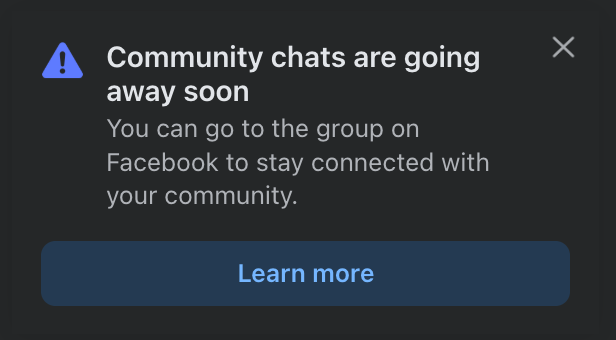
Facebook deleting community chats
This is interesting. I wonder if they are doing this so that there are more interactions in the community 🤔 Or maybe so they can serve more ads 😂
4 likes • Sep '25
I don't use Facebook, so I have no idea what y'all are talking about. 😂
1-10 of 15

@ren
Philomath who loves to share what I learn. I own 33 Van Damme films but would rather hang out with Dolph Lundgren.
Active 6h ago
Joined Jul 23, 2025
INTJ
Powered by