Activity
Mon
Wed
Fri
Sun
Aug
Sep
Oct
Nov
Dec
Jan
Feb
Mar
Apr
May
Jun
What is this?
Less
More
Owned by Peter
Master OpenClaw and other personal AI Agents (Hermes Agent, Claude Code). Build AI employees that run 24/7 to save hours and generate real income.
Mindful Dads Club: helping fathers live calmer, more present, and connected lives through mindfulness and support.
Memberships
Zebracat AI Community 🤖
2.2k members • Free
Zhang's AI Agency Playbook
2.2k members • $33/month
AI Ascension
197 members • Free
Applied AI Academy
3.6k members • Free
Linkedin Launchpad
2.3k members • Free
Accelerants
2k members • Free
Active Solutions
3.6k members • Free
AI Agents Academy
67 members • $20/m
Q's Mastermind
5.8k members • Free
19 contributions to Openclaw Builders Club

3d •
What did you learn, build, or accomplish this week?
Hey builders, keen to hear what everything tackled this week 💯 Drop your wins, challenges, or learnings. Big or small, it doesn't matter. Everyone can learn from someone else, so if you're working on something new, tinkering with massive projects, or trying to revive stale ones, drop it below! My updates: - Wrote three new OpenClaw walkthrough guides to share with everyone - Launched new landing pages and lead magnets focused on digital products - Set up new free guides on using agent systems and project spaces to share on socials Some struggles right now: - Need to redo my agents handling my Reddit outreach, currently running into API access barriers since Reddit updated their dev platform recently Drop yours below, you never know who already has the solution for you.


1 like • 2d
I've been working on an extensive GTM System built for Zo.computer and Openclaw. This will be available for our premium members soon.

14d •
Intro: managed OpenClaw hosting (EU), here to help with setup + security
Hey all, Peter pointed me here so dropping a quick intro. I run OneClickClaw, managed OpenClaw hosting based in the EU, for people who want their agent up 24/7 without babysitting the infra. Updates, security hardening, and the token-auth refresh that breaks silently always seem to eat people's time. Our angle is EU/GDPR plus security-hardened instances, so I'm mostly here to help on the hosting and security side and trade notes with other builders. If you're stuck on setup, a gateway you've exposed publicly, or updates breaking your install, happy to help, that's the day job. What's everyone working on?
0 likes • 13d
Welcome to the Club!
May 8 •
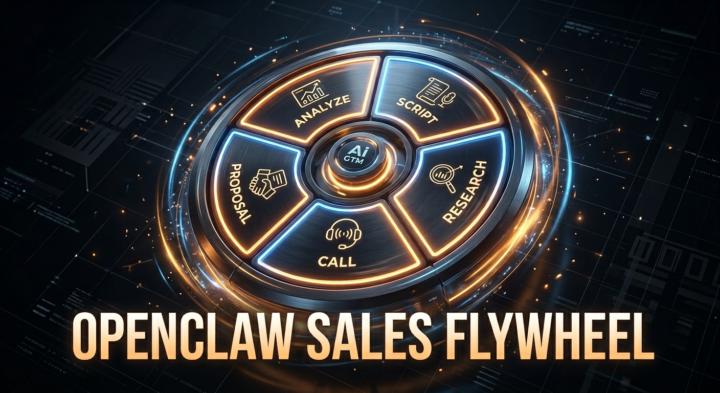
Introducing the Sales Flywheel — Openclaw AI Sales System (free for first 5 members)
You know the drill. Hours prepping for a sales call. More hours on the proposal. Then you replay the call in your head wondering what you should've said differently. What if you could compress all of that into ~5 minutes per deal? Meet the Sales Flywheel. A complete 5-phase sales system built into OpenClaw — no coding, no extra tools. Upload once, use on every deal. Phase 1 — Build Your Script Tell OpenClaw what you sell. It writes your elevator pitch, objection responses, qualifying questions, and competitive positioning. Save once, reuse forever. Phase 2 — Research Leads Drop a prospect name + company. OpenClaw pulls intel, trigger events, decision-maker profile, and an approach game plan. Phase 3 — Call Script Have a meeting coming up? OpenClaw merges your base script with the lead research into a tailored call plan — opening hooks, discovery questions, full objection prep. Phase 4 — Proposal Paste the call transcript (manually) or connect Fathom, Granola, Otter.ai, or any meeting recorder via API/MCP. OpenClaw drafts a professional proposal in the prospect's own words — their pain points, pricing, timeline, next steps. Ready to send. Phase 5 — Post-Call Analysis Same transcript feeds here too. OpenClaw scores your closing (1-10), objection handling (1-10), tells you what worked, what didn't, and the one thing to fix before your next call. You'll improve deal after deal. Bottom line: → 8-10 hours of sales prep per deal → ~5 minutes → Every touchpoint tailored to that specific prospect → Every call analyzed so you actually get better This will be only for our paid Skool subscribers, but we are giving access for free for the first 5 people. 👇 Like and Comment "flywheel" and I'll send you the access.
0 likes • May 11
@Edith Quecaño alvarez Access granted.
1 like • 15d
I am curious to hear your feedback! Have you tried the Sales Flywheel? @Dave Wunsch @Edith Quecaño alvarez @Jacobus van Niekerk @Jean Lorber
17d •
TasteClaw — Reverse-Engineer Any Website's Design DNA
New OpenClaw skill for the community members: 𝗪𝗵𝗮𝘁 𝗧𝗵𝗶𝘀 𝗦𝗸𝗶𝗹𝗹 𝗗𝗼𝗲𝘀 You give it a URL. It gives you: {domain}.md — the complete Design Map (exact colors, type scale, spacing, shadows, radii, grid) + Taste DNA (WHY the designer made each choice and what they rejected) {domain}.json — machine-parseable version for downstream tools Not vibes. Not "clean and modern." Actual px values, hex codes, and design trade-offs. Example: Run /taste https://linear.app and you'll get the exact font hierarchy, the 8px spacing rhythm, the shadow layering strategy, and WHY Linear chose monochrome icons over colorful ones. 𝗪𝗵𝘆 𝗧𝗵𝗶𝘀 𝗘𝘅𝗶𝘀𝘁𝘀 AI coding agents are terrible at design. They default to Inter font, blue buttons, 8px border-radius, and a card grid. Every AI-generated landing page looks the same because the agent has no taste — it just picks defaults. The Taste skill fixes this. Instead of "make it look good," you say "use the design DNA from stripe.com." The agent gets exact tokens AND understands the design philosophy behind them. Core insight: Design tokens alone are useless. "Spacing is 8px" means nothing. "Spacing is 8px because the designer chose readable rhythm over data density" — that's what makes an AI generate good design for a DIFFERENT page. 𝗛𝗼𝘄 𝗜𝘁 𝗪𝗼𝗿𝗸𝘀 Phase 1 — Capture: Playwright browser loads the URL, takes viewport + full-page screenshots, runs DOM extraction (colors, typography, spacing, cards, grids, effects). Phase 2 — 4-Step Analysis Pipeline: Step 1 (Measure): 20 categories of precise measurements from the screenshot + DOM Step 2 (Pattern): Detect systematic rules (8px grid? 1.25× type scale? accent used only on CTAs?) Step 3 (Taste): 4 design trade-offs — what they chose AND what they rejected. At least one must be a restraint trade-off (something they deliberately didn't do) Step 4 (Observer): Critique everything. Delete generic claims. Converge to 3-4 bulletproof principles. Anti-Slop Enforcement: The pipeline actively rejects "clean," "modern," "sleek," "elegant" — banned at the grep level. If it passes through, the file fails audit.
27d •
What did you accomplish this week?
Let's get after it this week! I want to hear about what you're tinkering with, what you're building, what you're learning, and just any wins you've had over this past week. Drop it below!
0 likes • 27d
@Adam Smith What are you building with Claude?
1 like • 23d
@Tamás Máté That sounds great, let me know if you are interested to see the BMAD implemented for Openclaw or Zo.computer.
1-10 of 19

Active 10h ago
Joined Jan 30, 2026
United States