Activity
Mon
Wed
Fri
Sun
Aug
Sep
Oct
Nov
Dec
Jan
Feb
Mar
Apr
May
Jun
Jul
What is this?
Less
More
Memberships
Home Lab Explorers
1.5k members • Free
7 contributions to Home Lab Explorers

Jun '25 •
🔥Video on ProxmenuX is out! MacRimi great work!
It seems to really be striking a chord with many! Check it out. @Pedro Rico

0 likes • 13d
¡Hello everyone! The pre-beta of the new Host Backup and Restore module is now available for those of you who volunteered to collaborate in the testing. This pre-beta is NOT an official release yet, so there will be no update notification in the Monitor or in the scripts. It is intended exclusively for lab environments, secondary servers, or machines where you can test it without risk. How to install On a Proxmox test host: bash <(curl -fsSL https://raw.githubusercontent.com/MacRimi/ProxMenux/main/install_proxmenux_beta.sh) Once installed, you will find the new functionality in: menu → Host Backup Monitor → Host Backup tab How to send feedback I have opened a dedicated thread in Discussions to centralize the feedback for this testing phase: https://github.com/MacRimi/ProxMenux/discussions/236 There you will find explanations of the tests needed, how to run the debug script after each restoration, and how to paste the result into the thread. The idea is to gather both successful and failed restorations, because comparing both cases is what allows us to detect subtle bugs that would otherwise go unnoticed. Thank you all in advance to those who participate. Your feedback is key to delivering this functionality to a stable, well-tested release. 😊
0 likes • 13d
@Brandon Lee @David Vincent if you want to try it, there you have it…
Nov '25 •
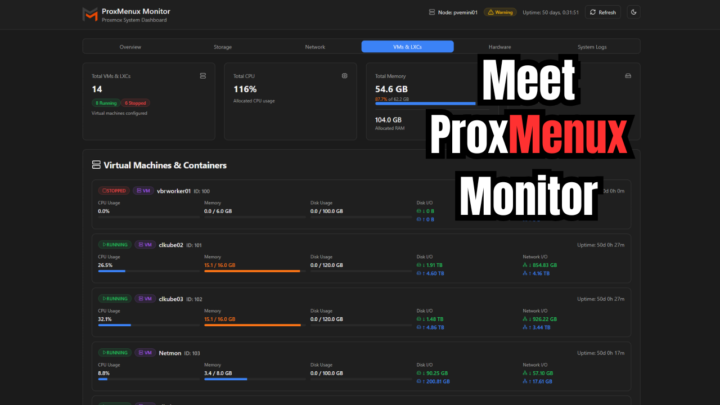
ProxMenux now has Monitoring! Very cool for Home Labs
Meet ProxMenux Monitor: The New Way to Monitor Proxmox Servers #proxmox #homelab #homeserver https://www.virtualizationhowto.com/2025/11/meet-proxmenux-monitor-the-new-way-to-monitor-proxmox-servers/
2 likes • Nov '25
@Jeremy Leik As you mentioned in your video, this is the first version, and it also served as a way to gauge user reception. It seems to have been well received, and I’ve gotten a flood of requests to add login functionality and proxy support. That’s why I’ve sped things up to release this update very soon. Little by little, I’ll keep adding new features and utilities, along with a major change in ProxMenux — in the next version, it will no longer rely on online mode but work offline, independent from GitHub. The next step will also be to make it installable through an official APT package. In the future, ProxMenux will include a testing and performance section, tools to generate security audit reports, and full graphical interaction with ProxMenux itself. It will also add cluster support with node monitoring and management features, allowing centralized control and visibility across all nodes in the cluster. All of this will be added progressively with each update.
2 likes • Nov '25
@Brandon Lee If everything goes as planned, I’ll release the new version of ProxMenux this weekend. This update includes a major structural change: from this version onward, ProxMenux will run locally and will no longer depend on GitHub requests. It will also include the new version of PMX Monitor, which incorporates the features requested by the users.
Oct '25 •
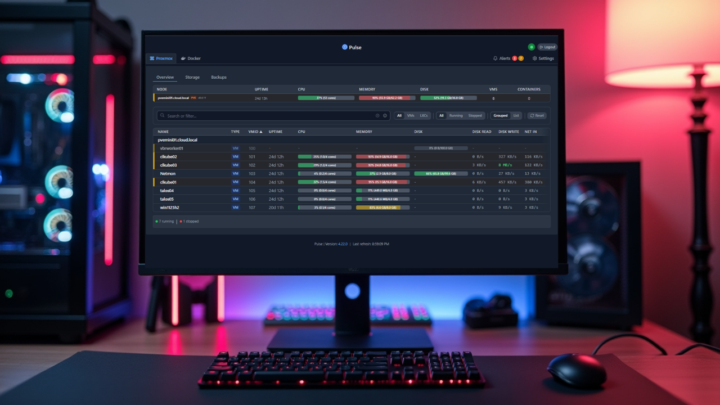
New Proxmox Monitoring Tool Pulse for Monitoring Dashboard
If you are looking for a cool Proxmox and Docker monitoring app, Pulse looks like a great option. I spun it up in the home lab over the weekend. Check out my thoughts and how to install it here: https://www.virtualizationhowto.com/2025/10/this-free-tool-gives-proxmox-the-monitoring-dashboard-it-always-needed/
3 likes • Oct '25
Pulse is very good. I’m working on a similar Proxmox monitoring panel for hardware and VMs & LXCs — I hope to release it soon.
Aug '25 •
How to Upgrade from Proxmox VE 8 to 9 post
For those interested in upgrading....I posted a new detailed walkthrough of steps and things to think about with upgrading Proxmox VE 8 to 9: https://www.virtualizationhowto.com/2025/08/how-to-upgrade-from-proxmox-ve-8-to-9-fast-and-hassle-free/

2 likes • Sep '25
Great article, Brandon — really well explained step by step. Just in case anyone’s interested, in ProxMenux there’s a tool to upgrade Proxmox from version 8 to 9, either automatically or with guidance. ☺️
May '25 •
🔥ProxMenuX - In case you haven't tried this, you need to!
This little tool is extremely awesome and provides menu-driven administration for your Proxmox server, including even setting up automated virtual machine installs! Very cool. Check it out: https://www.virtualizationhowto.com/2025/05/proxmenux-might-be-the-best-proxmox-management-tool-youre-not-using/
1 like • Jun '25
Hey everyone, We’ve got a new changelog update that we think you’ll really enjoy. https://macrimi.github.io/ProxMenux/changelog#2025-06-06 The Helper Scripts menu is now officially part of ProxMenux. It’s a cleaner, faster and much more user-friendly way to browse and run community scripts. What’s new: - You can search scripts by name, instantly - All scripts are grouped by category to make things easier to find And when you run a script, you’ll now see a configuration screen with: - A short description of what it does - Extra notes, in case there’s something to keep in mind - Default credentials (if the script uses any) When the script finishes, those notes and credentials will be shown again — so you can copy and paste anything you need without going back. We’ll keep adding more features little by little, not just for new users but also for sysadmins who want to speed things up. As always, your feedback and ideas are more than welcome!
1-7 of 7

@pedro-rico-3613
Enthusiast of technology, servers, Proxmox VE, computers, home automation, retro games, The Goonies, Star Wars… And developer of ProxMenux
Active 2d ago
Joined May 10, 2025
Alicante - SPAIN
Powered by