Activity
Mon
Wed
Fri
Sun
Nov
Dec
Jan
Feb
Mar
Apr
May
Jun
Jul
Aug
Sep
Oct
What is this?
Less
More
Clief Notes
52.9k
5.0
Free
18 contributions to Clief Notes

12d •
Codex extension inside VS Code - how hard can it be
I work with the Codex extension inside VS Code and like my setup the way Jake has it. It looks like this: - File explorer open in the sidebar to the left - Editing area open in the middle with individual chat sessions as tabs - A window to the right where I can see content of any .md file I want to look at For testing purposes I had to start a few new sessions and found something frustrating. Neither clicking the little pencil icon to start a new chat nor the command Codex:New Codex agent via the common palette opens a new tab in the editing area. What's worse, it almost seems nothing is happening and you're still in the same chat. I found a workaround by clicking the Codex icon in the activity bar to the far left which opens a new chat in the sidebar. While doing this you cannot see the file explorer, which is OK but you just hope you're in the right project. Then when you submit your new chat you can access it via the chat history button inside the editing area and selecting it will open a new tab with that chat. So, I finally see my new chat as new tab. Why can this not happen automatically when I select open new chat? Am I missing something here? Let me know what your experiences are.

1 like • 9d
for the file explorer topic, generally I open the extension of interest (antigravity, continue, claude), I right click and say move side bar to the right. Then from the menu I find explorer which opens on the left. Get to have your cake and eat it :) Overall , explorer on the left , Claude in the main screen when spun up, extensions (claude) on the right.

👑
24d •
I think I cooked with this one...
Finally giving my view on JEV in my classic history and fundamentals fashion but... This one is a little different. It's my first time making a fully animated, pixel art video, and I'd honestly love to know what you think of the style. Should I make more like this? I made an ICM that fully automates most of the process i was able to get this video built in about three or four hours. Talk about a fun animation style right? Might redo a bunch of the videos in the classroom with this.
1 like • 23d
This definitely wets the appetite to make things more efficient and use the right tiol for the right job. A world of possibilities open and I'm glad I finally saw Jev through the ICM lens (I was ignoring due to thinking of a new light weight model). Aside from efficiencies, this lowers the bar for the whole local setup.
Sep 6 •
Deep Research - How are you doing yours?
Hi all, I ask the question as my deep research process feels very inefficient. I generally use the Gemini Deep research option with an iterated prompt (even this should be a process to get closer :) ). On youtube there's alot of fluff on my feed with no real concrete way of doing things and more importantly, process for doing this .

0 likes • Sep 6
@Leo Saraiva this is a good point. Thinking on it , it's usually a seed for an idea that I'm yet to try out. But even this is worth the effort otherwise I would spend it trying to figure out what to try rather than applying
1 like • Sep 6
@Gabriel Azoulay after writing the post I asked Gemini about it's process so that I could build it out. I used matt pockcocks grill-me skill to then do as you suggested and work on the outcome and go backwards to formulate the process. I like the grill me skill alot that it is part of the first step and creates the plan (as does Gemini) but this does it better) So far testing and going through different webscrapers for content. I'm still interested in how others are doing it though

Jul 10 •
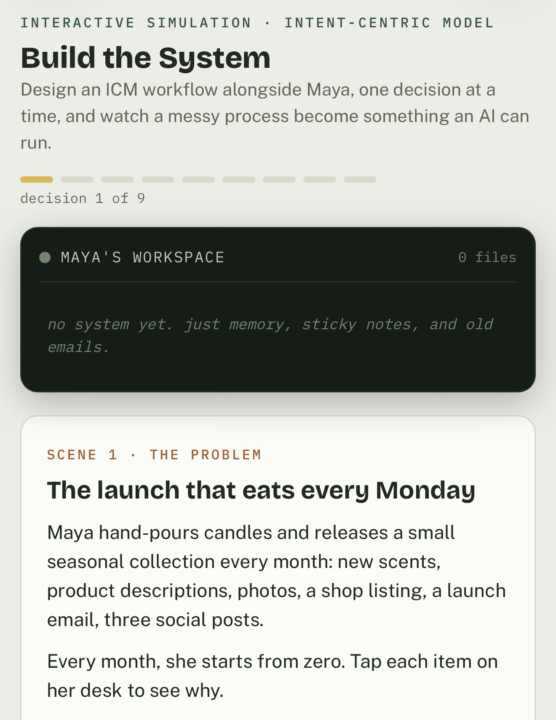
New to ICM? Get hands on learning experience here
Step-by-step interactive guide from idea to output. Design an ICM workflow alongside Maya, one decision at a time, and watch a messy process become something an AI can run again and again. Right now, Maya has to try to remember what needs to be done and where each piece of information is kept. She needs a better solution. https://claude.ai/public/artifacts/7c9618f4-8324-4048-902c-cbcf77c9c102 Let’s build one with her. 😀
2 likes • Aug 31
more like this please. So glad this was added
1 like • Sep 1
Honestly, the product here is walking through guided and getting the generated icm setup. A wizard whilst teaching ....hmmm

Aug 31 •
Gggggit
Inspired by ffffoound and wearehunted websites from back when the internet was fun. https://ajpaschka.github.io/gggggit/ It's fun to materialize an idea and get it shipped in under an hour.
1 like • Aug 31
Found a few gems already, thanks for sharing
1-10 of 18
Active 2d ago
Joined Apr 5, 2026
Powered by