Activity
Mon
Wed
Fri
Sun
Nov
Dec
Jan
Feb
Mar
Apr
May
Jun
Jul
Aug
Sep
Oct
What is this?
Less
More
5 contributions to AuraGraph Academy

Mar 18 •
🎬 Day 3 Challenge: Make Your Creator Talk
your character has a face... now let's give them a voice today you're turning one of your Day 2 images into a talking video using VEO Step 1: Pick your best image from yesterday, the one that looks most like a real UGC creator Step 2: Drag the handle from that image node and connect it to a Video Gen node Step 3: In the prompt, write what you want your creator to say. Keep it around 15-20 words... that's the sweet spot for a clean 8-second clip. For example: 🎬 "@maria says honestly this is the easiest way to create AI content, you just type and it makes videos" 🎬 "@maria says I've been using this app for a week and the quality is insane, you have to try it" 🎬 "@maria says stop scrolling, let me show you how I made this entire video with just one prompt" Step 4: Hit Enhance and the AI will turn your rough script into a production-ready video prompt Step 5: Generate and wait... in about 30 seconds your still image just became a talking video bonus: if you want 4K quality, drag the handle from your video then connect to an Enhance node. It upscales everything and cleans up any AI artifacts your challenge: make your creator say something UGC-style... a product review, a hook, a testimonial, anything that feels real. drop your video in the comments 👇


0 likes • Mar 21
Mar 16 •
🎯 Day 2 Challenge: Bring Your Creator to Life
nice work on Day 1... now let's lock in your creator forever today you're going to create a Character using those 4 photos you made yesterday. once it's saved, you can @ mention them in any prompt and the AI will always know exactly what they look like Step 1: Click on any Image node then click Character then + to create a new Character Step 2: Give your creator a name... something simple like "Mia" or "Alex" Step 3: Upload the 4 reference photos you generated yesterday (portraits, side profile, full body). The more angles the better — this is what the AI learns from Step 4: Hit Create and wait about a minute... it's generating face grids and body grids so your character stays consistent across all your future content Step 5: Now the fun part. Drop an Image Gen node on the canvas. In the prompt, type @ and select your character's name. Then describe them doing something: 📸 "@Mia sitting in a modern podcast studio, holding a coffee, talking to camera" 📸 "@Mia walking through Times Square at night, city lights in the background" 📸 "@Mia filming a selfie video on the beach at sunset, phone in hand" 📸 "@Mia in a professional studio unboxing a product, clean white background" Hit Enhance on each one → then generate Your challenge: Generate 4 action shots of your character doing something UGC-style. Get creative with it... put them in scenes, give them a vibe drop your best shots in the comments 👇
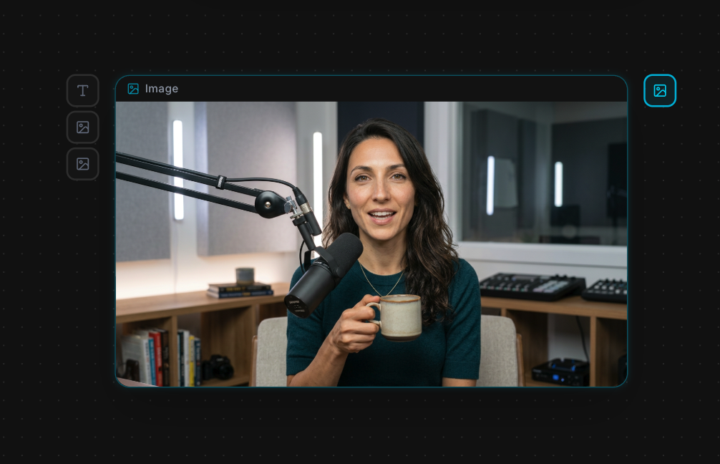
1 like • Mar 21
[attachments]
Mar 15 •
🎯 Day 1 Challenge: Create Your AI Creator
Welcome to Day 1! Before we make any videos, we need to build YOUR digital creator. Here's what to do: Step 1: Right-click the canvas → drop in an Image Gen node. Set model to Nano Banana. Step 2: Describe your UGC creator. Be specific! For example: "Hyperrealistic portrait of a 28-year-old woman, olive skin, dark brown hair, hazel eyes, soft natural lighting, no makeup, neutral grey background." Think about: - Male or female? - Age, skin tone, hair color & style - Eye color - Expression & vibe Step 3: Hit Enhance, and Aura will turn your rough description into a detailed, photorealistic prompt. Generate your first image. Step 4: Now link your first generated image to 3 more Image Gen nodes (drag the handle → Image Gen). This keeps your creator's face consistent. Use these example prompts before hitting Enhance: 📸 Close-up portrait smiling: "Hyperrealistic close-up portrait, same person, warm genuine smile, soft studio lighting, grey background" 📸 Side profile: "Hyperrealistic side profile view, same person, looking left, clean neutral background, studio lighting" 📸 Full body front: "Hyperrealistic full body photograph, same person, wearing casual outfit, standing naturally, clean white background, 85mm lens Hit Enhance on each one before generating! These 4 reference photos will be the foundation for your UGC. Drop your 4 photos in the comments below! 👇
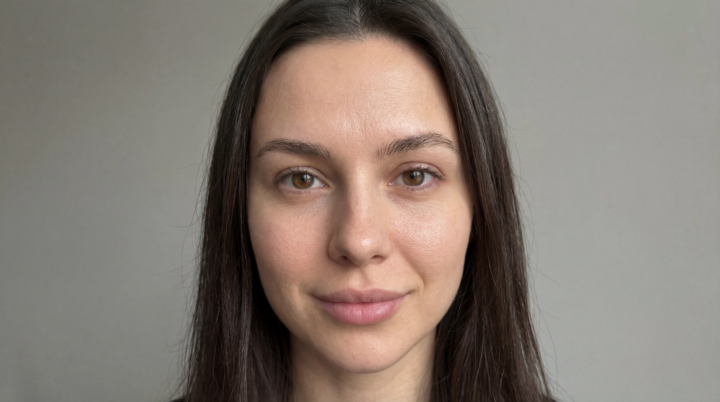
0 likes • Mar 21
[attachments]
Feb 12 •
🎬 How The Academy Works
Everything you need is in the Classroom tab at the top of the page. The course is designed to take you from zero to publishing viral AI content. Each phase builds on the last, so follow them in order. YOUR JOURNEY: Phase 0 — Welcome and setup (start here) Phase 1 — Research and finding viral ideas Phase 2 — Generating AI images Phase 3 — Bringing images to life with video Phase 4 — Sound design and music Phase 5 — Character consistency (the game changer) Phase 6 — Cinematic AI ads and UGC Phase 7 — Social media strategy Phase 8 — Cloning and automation HOW TO USE AURAGRAPH: 1. Go to auragraph.ai and log in 2. Your free credits are already loaded 3. Follow along with each lesson and build as you go 4. Post your homework in 📝 Homework 5. Share anything you're proud of in 🎬 Show Your Work One phase at a time. Don't skip. Each one builds the foundation for the next. Questions? Drop them in 💬 General Discussion. I check daily.
0 likes • Feb 13
[attachment]
Feb 12 •
Welcome to AuraGraph Academy 👋 Read this first
Hey, I'm Yasser. I built this because I kept hitting the same wall. You have an amazing idea for a video, but then you're juggling 10 different AI tools, the character looks different in every scene, and you've burned through $50 in credits with nothing to show for it. I've been there. It sucks. So I built AuraGraph. One canvas, consistent characters, actual results. This community is where we figure it out together. You follow along, build real stuff, and post what you make. I'll be here to help. Introduce yourself in the comments 👇 - Where are you from? - What do you want to create? - What's your biggest struggle with AI right now? Let's build something viral together 🔥
Poll
9 members have voted
1 like • Feb 13
- Where are you from? Bangalore, India - What do you want to create? Currently working on AI Ads, looking at creating them faster & more efficient Also looking at exploring how to create AI Avatar with consistent character with b rolls in them 60 seconds kind of clip to build brand account - What's your biggest struggle with AI right now? Consistency with no mistakes by AI.
1-5 of 5
@mohammed-kamal-1685
AI Automation Specialist (Python & Google Sheets) | Enabling Companies To Save Hours & Better Team Mgmt By Automating & Streamlining Their Processes
Active 1d ago
Joined Feb 13, 2026
Bangalore, India