Activity
Mon
Wed
Fri
Sun
Jun
Jul
Aug
Sep
Oct
Nov
Dec
Jan
Feb
Mar
Apr
May
What is this?
Less
More
Memberships
AI Automation Society
356.9k members • Free
Brendan's AI Community
24.5k members • Free
The AI Advantage
121.6k members • Free
Agency Owners
19.9k members • Free
Claude Community
8k members • Free
Wholesaling Real Estate
73.3k members • Free
Selling Online / Prime Mover
36.7k members • Free
Voice AI Alliance
3.4k members • Free
Chase AI Community
60.8k members • Free
68 contributions to Brendan's AI Community

1d •
Help Me Build an AI Appointment Setter
I’m looking for someone experienced with AI agents/chatbots to help me build an appointment setter that can handle leads, reply naturally, qualify prospects, and book calls automatically. I already have the idea , just need the right person to help me set it up properly. Happy to pay for quality help If you’ve built something similar before, please DM me

2 likes • 1d
@Manu Rai Manu, this is a pretty standard build with the right stack. The core is a voice or chat AI, VAPI for voice or Manychat for text, wired into a CRM like GHL with Calendly handling the booking side. The qualification layer is where most people mess up, Manu, you need to tune the intent scoring to your offer or bad-fit leads slip through to calls. If you want text-based, n8n or Make can handle the orchestration without much overhead. For voice, VAPI is probably the cleanest option right now. Feel free to DM me, Manu, and I'll be happy to look at your setup and give you a honest assessment of whats needed.
0 likes • 10h
@Manu Rai No worries. Here’s my Emai : mofedulalamjoy09@ gmail.com Here’s my WhatsApp: +8801628675223

3d •
Instagram Account Warm-Up
Hey everyone, if any of you are doing Instagram DMs as outbound, how do you warm up accounts? I don't plan on buying them but creating the gmail from scratch and warming them up. The goal is to have 5 accounts running at limit which from what I've seen is 25 DMs/day. The online resources kind of say different methods. Do I really need to use proxies and vpns or could I do it lean, 5 accounts sending manually every day? Would love your input!
1 like • 3d
@Luka Švenda Luka the proxy question depends on how you're running the accounts. Five accounts on the same IP from the same device is a flag for Instagram, they pattern-match on that pretty fast. Cheapest lean setup: one account per device if you have spare phones, or mobile data per account. Not ideal but avoids the shared IP problem without paying for proxies. Residential proxies are better than VPNs for this, VPNs get flagged way more. For warmup, the method that works is 2 weeks of normal behaviour before any outreach. Follow people, watch stories, post once or twice, engage with comments. Instagram needs to see the account as real before you start DMing strangers. Start at 5 DMs a day Luka, not 25. Ramp up over 3-4 weeks. Jumping straight to the limit on a fresh account is what gets you restricted. Feel free to DM me if you want to compare notes on what warmup cadence has been working, Luka.
0 likes • 3d
@Luka Švenda I think there are some easier solutions and third-party tools or software that you can use to spin up a separate environment for those five accounts. Feel free to reach out to discuss this further: Here's my Emai : mofedulalamjoy09@ gmail.com Here's my WhatsApp: +8801628675223

7d •
BUILD AN ai caller for a restaurant
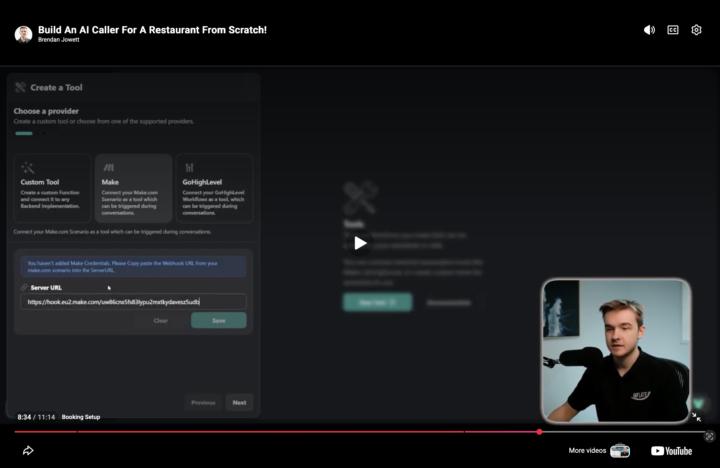
hi GUYs I HAVE GOT TO THE STAGE ON BUILD AN ai caller for a restaurant, where I need to add tool on Vapi. It shows on video that I have to click make tool. However I do not see this option. I see google calendar option instead. (please see right side image attached) Do I need to paste the make template attached to video somewhere to add tool?
3 likes • 6d
@Scott Hamilton Hey Scott, I can see exactly whats happening from your screenshots and its just a UI update in VAPI, nothing is broken on your end. VAPI added native Google Calendar and Google Sheets tools directly into their platform since that video was recorded a year ago. So instead of needing to connect Make.com as a middleman for calendar booking you can now use the google_calendar_tool directly inside VAPI which is actually simpler and more reliable. You have two options. First option is use the native Google Calendar tool you can already see in your VAPI dashboard, fill in your Calendar ID and timezone, connect your Google account and your done. No Make webhook needed at all for the booking piece. This is the cleaner approach for most restaurant builds. Second option if you specifically want to follow the video and use Make, scroll back in the Create Tool screen, there should still be a Custom Tool option which lets you paste in a webhook URL from Make. Thats the equivalent of what the video shows as the Make tool, just got renamed or moved in the UI update Scott. Given that you already have the Google Calendar tool sitting right there in your VAPI dashboard I'd honestly just use that instead of following the Make route from the video. Saves you building the Make scenario entirely and does the same job with fewer moving parts. Fill in your Calendar ID from Google Calendar settings, set your timezone, and connect your Google account. Feel free to DM me if you get stuck on the Google Calendar connection step!
0 likes • 3d
@Scott Hamilton You're welcome brother. Feel free to reach out if you have any question or confussion. Here's my Emai : mofedulalamjoy09@ gmail.com Here's my WhatsApp: +8801628675223

11d •
n8n (self-hosted) Google Sheets/Drive credentials keep disconnecting every few days
Running into a recurring issue with n8n self-hosted and Google integrations (Sheets + Drive). The OAuth connection works fine initially, but after a few days the credentials disconnect and workflows fail until I manually reconnect. From what I understand, this might be tied to the app being in testing mode in Google Cloud (refresh tokens expiring after ~7 days), but I want to confirm: * Has anyone here solved this properly? * Did you go through full Google verification, or is there a workaround? * Has switching to service accounts fully eliminated this issue for you? * Any gotchas with refresh tokens or scopes that I might be missing? Context: * Self-hosted n8n * Using standard Google OAuth2 credentials * No major infra changes between disconnects Trying to figure out the most stable long-term fix instead of reconnecting every few days. Would appreciate real-world setups that are working reliably.
0 likes • 6d
@Adarsh Yadav Hey Adarsh, you've diagnosed this correctly, the 7 day refresh token expiry on testing mode apps is exactly what's biting you. The permanent fix without going through Google's full verification process is switching to a service account for Sheets and Drive. Service accounts dont use OAuth refresh tokens at all, they use a JSON key file that never expires until you manually revoke it. Zero reconnection issues once its set up properly. This works perfectly for Sheets and Drive since those are server to server operations where you dont need user consent flows. To set it up go into Google Cloud, create a service account, download the JSON key, then share your specific Google Sheets or Drive folders with the service account email address just like you'd share with a regular person. In n8n create a Google credentials using the service account option and paste in the JSON key contents. Done, never disconnects. The one gotcha is service accounts cant access files in My Drive unless explicitly shared with them. So if your workflows read files from personal Drive folders you need to share those specific files or folders with the service account email. For Sheets this is usually a non issue since you just share the sheet once during setup. If you genuinely need OAuth for some reason rather than service accounts the other fix is publishing your Google Cloud app which removes the 7 day limit but requires going through Google's verification process which takes weeks and requires a privacy policy Adarsh. Service account is the move for 95 percent of n8n use cases. Feel free to DM me if you need help with the exact setup steps in Google Cloud!

8d •
i doesnt work for me
I've been trying to make the fully automated video editing with Claude Code and Remotion like he did in the video, but it's just not good. It gives me shitty results, and I have to do everything way more manually than he did in his video. The preview doesn't work well either. I'm thinking about a few things I might need to change: 1. Maybe change it from Sonnet to Opus. 2. Check if I have the latest version of Claude downloaded on my MacBook (even though I downloaded Claude about five days ago). Has anyone who has done the fully automated video editing with Claude and Remotion got a tip for it? Also, if anyone has a prompt to make the Claude code understand better how to invoke and how to edit the videos, i would love to hear from your experience!

0 likes • 6d
@Elad Rosenberg Hey Elad, yeah the Remotion plus Claude Code setup has a steeper learning curve than the videos make it look so your not alone here. On your two questions, switching to Opus is worth trying for complex video composition logic but honestly the bigger issue is usually prompt structure not model capability. And five days old is fine, Claude Code version isnt your problem here. The real issue with Remotion specifically is Claude doesnt have deep training on Remotion's component structure so it makes plausible looking code that renders wrong or breaks the preview. The fix is to give Claude the exact Remotion component patterns it should follow before asking it to build anything. Start every session by pasting in a working minimal Remotion component as a reference, tell Claude explicitly to follow that exact structure for every new component it creates. Something like "use this exact pattern for all components, do not deviate from this structure." That alone cuts bad output dramatically. For the preview issues check that your Remotion version in package.json matches what the video uses because Remotion has breaking changes between major versions and older tutorial code breaks on newer installs. Run npx remotion versions to check for mismatches. Also tell Claude to make one small change at a time and preview after each change rather than building large chunks. Smaller iterations with visual verification between steps is way more reliable than generating a full video composition in one shot Elad. What specifically is going wrong with your output, wrong timing, broken layout, render errors? That would help narrow it down faster. Feel free to DM me with your current prompt and I can help you restructure it!
1-10 of 68

@mofedul-alam-joy-3118
AI automation engineer helping businesses adopt AI through 1-on-1 coaching and building automated systems.
Contact: [email protected]
Active 2h ago
Joined Nov 30, 2025
Powered by