Activity
Mon
Wed
Fri
Sun
Aug
Sep
Oct
Nov
Dec
Jan
Feb
Mar
Apr
May
Jun
What is this?
Less
More
Memberships
Free AI Creator Academy
2.7k members • Free
ALPHA OFM IA
11.8k members • Free
MechaPizzAI Community
2.1k members • Free
THE LAB | AI Creative Academy
76 members • $39/month
AI Video Bootcamp
24.3k members • $9/month
Creative Accelerator
197 members • $59/month
Thomas Skool Community
2.2k members • $15/month
Next Creators Community
3k members • $9/month
Creatives Club
118 members • Free
7 contributions to The Weavy Way™ | Master Nodes

Apr 14 •
Three canvas updates just dropped in Weavy — and they're ones you'll actually use daily.
1. Drag to Connect. Pull a wire, hover over a node, and it locks in automatically. 2. Router from Handle. Double-click any handle and a router spins up instantly. No extra steps. 3. Multi-Wire Select. Draw a box around your wires. Delete the whole mess in one go. Small changes. Big difference in how fast you can build. What feature would make your workflow feel smoother? Drop it below 👇


1 like • Apr 14
Yes same, I rename and group all the routeurs, not my favorite part, but I like to see my workflow well organised. And it motivate me to push it the workflow further because everything is connected. I have so many workflows to build !
1 like • Apr 14
@Jamy Vodegel nice ! Love to see I am not the only one !
Mar 28 •
🏁 Rims Workflow — Your Turn
Drop your biggest takeaway from this classroom lesson. One sentence is enough. Now the real challenge: this workflow is not about rims. It's about placing any product in any context. A sneaker. A piece of furniture. A bag. A bike. How would you make this work for your own projects? What would you change? Share your workflow or your idea below. 👇

0 likes • Mar 28
@Jamy Vodegel I love this version. Creating the artistic direction is the most interesting part for me. When I’m able to turn a vision into something real, that’s the part I enjoy the most.
1 like • Apr 3
@Jirka Stávek yes this month possible. Actually I'm working for a big client to create him a garment and model editorial studio photoshoot system inside weavy. Fashion domain is the biggest Ai market actually. Agencies try to know how to do it with volumes, consistency and reproductibility
Apr 2 •
New filter update.
A small visual update to the Weavy platform: you can now select your input and output, and filters will automatically match the appropriate models. Nice use of color!

2 likes • Apr 2
Weavy is truly the best; it’s evolving so quickly. The market is really changing, and I’m happy to be part of it!
Mar 18 •
Coffee hour today?
Last week I hosted a coffee hour in the morning European time. Since many of you are asleep at that time, I’m planning to host another coffee hour later in the day. I’d like to know if you’d be able to join if I schedule it around 9 p.m. Central European Time. We can talk about Weavy, general AI topics, or anything else on your mind—it’s a relaxed, open vibe. I’d really appreciate it if you can have your cameras on during the session; it’s all about getting to know each other.
Poll
6 members have voted

0 likes • Mar 18
@Jamy Vodegel I will experiment this. I Have to learn without wasting to much credit. How do you know the good value ? There is a methodology about this ?

Mar 13 •
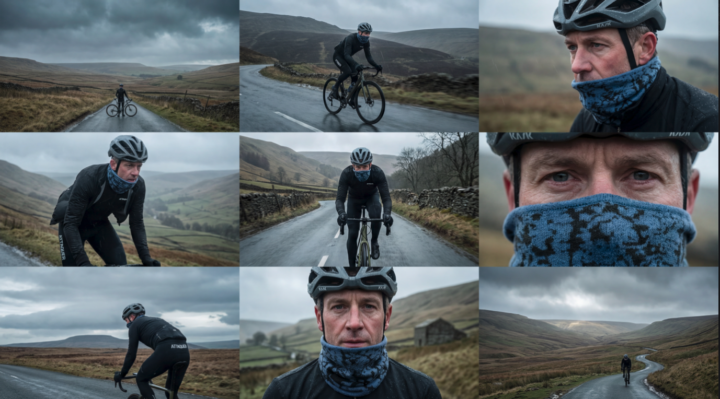
Extracting/Up-scaling single images for a 3x3 storyboard.
The aim here is to stress-test weavy to extract a single image from a storyboard whilst keeping all details exactly the same as they appear in the the smaller grid images. I have played around with using image upscales such as Topaz with limited success. The AI seems to hallucinate and fill in details such as decals on the bike and also the bike itself. After many conversations with LLMs- in case Claude it appears that the best solution is to independently create 9 single high res images. Weavy does not like trying to extract 1 single image from a grid in one sweep- it gets confused and the details are muddled at best. I'm putting this in the community to see if anyone else has come across this issue and their workflows to resolve this.
1 like • Mar 18
@Jamy Vodegel Do you have an exemple, in what case you are using this ?
0 likes • Mar 18
@Jamy Vodegel Thanks, very interesting ! Your work is impressive, the skin quality , photoshoot it's high level
1-7 of 7
Active 22h ago
Joined Mar 12, 2026
INTJ