Activity
Mon
Wed
Fri
Sun
Aug
Sep
Oct
Nov
Dec
Jan
Feb
Mar
Apr
May
Jun
What is this?
Less
More
Memberships
AI Video Bootcamp
24.3k members • $9/month
AI Video Generator
87 members • Free
The Pretty Girls Club
4 members • $1
The Threads Collective
110 members • Free
Ai Made Simple
1.2k members • Free
Pretty Powerful & Delulu
17 members • $2
Pretty Girls Prompt Too
1.1k members • Free
Poised Not Pressed Society
38 members • Free
The A.T.M. Method | Amazon
655 members • Free
8 contributions to AI Character Academy

🔥
1d •
Fixing a "Bad" Image with One Simple Prompt
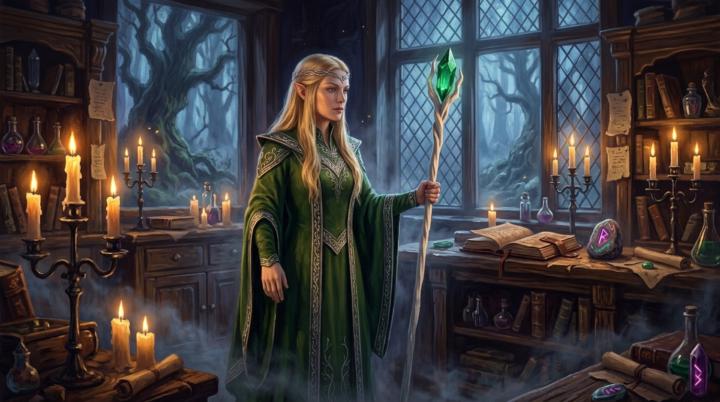
Have you ever had a generation that was "almost" there? You know, the one that could be nearly perfect if the lighting was better, the camera angle was SLIGHTLY different, or if the character was in a different pose? Here is a fast and easy fix especially for those images, and a real example of one I fixed just this morning. Note: this works on ALL types of images, not just illustrations. The first image, while rendered beautifully, just doesn't hit. In this case, Nano Banana 2 gave me the character in the stock turnaround pose. I love the room, the colors, and the painting style, but...not exactly award-winning material. I figured I'd try my agent prompt for cinematic shots, and while not every shot turned out great - I ran the prompt three times for a total of 12 new shots - I got about 7 usable ones while keeping the environment and the character consistent. Here is the prompt I ran (make sure Agent mode is enabled in Google Flow): Please give me 4 different camera angles of this shot and vary the framing from medium shots to extreme close-ups with macro texture details, and everything in between. Keep the character, clothing, and environment consistent in each image, vary the shots and the character's pose. That's it. Super-simple. The new images are much more suitable for project work.

🔥
3 likes • 21h
[attachment]
🔥
2d •
Welcome
Everyone let's give a warm welcome to @William Johnson ! Looking forward to being part of your character design journey!

🔥
5 likes • 2d
[attachment]
🔥
13d •
Welcome
Everyone give a warm welcome to our newest ACA member @Gavin Stevens ! Welcome to ACA Gavin, I hope you enjoy your time here!

🔥
4 likes • 13d
[attachment]
🔥
23d •
Welcome New Members!
Everyone let's welcome @Denice Mann @Sonja Bey & @Danica Petrovic to ACA! Delighted you're here and thank you for being part of our Community!

🔥
5 likes • 23d
[attachment]
🔥
25d •
How is everyone enjoying the courses/classroom?
I wanted to check in with you all and make sure you are getting the content and help you need. -Are you finding the tutorials and courses easy, difficult, or just right? -What would you change or eliminate? -What would you like to see added? I'm really grateful you're here. Let me know in the comments, or feel free to DM me, if you have any suggestions for pretty much anything here in the community - this group is for you! :)
🔥
4 likes • 25d
I will start later today
1-8 of 8
Active 3m ago
Joined Jun 7, 2026