Activity
Mon
Wed
Fri
Sun
Sep
Oct
Nov
Dec
Jan
Feb
Mar
Apr
May
Jun
Jul
What is this?
Less
More
Owned by Lisa
Heal to scale the Kingdom business God is calling you to build without sacrificing your peace, your family or yourself.
Memberships
Bye Bye Menopause Weight
203 members • Free
Skooligans
578 members • Free
Rooted to Rise in Faith Moms
73 members • Free
Skoolers
162k members • Free
Skooly: Tools for Skool
253 members • $9/month
Painting for Drawing Dropouts
105 members • $13/month
The Directory On Skool
968 members • Free
Defunk’d Design
13 members • $19/month
📸 Photography by Cristal
192 members • Free
1 contribution to Skool Extensions 🧩

🔥
Mar 27 •
Community Stream
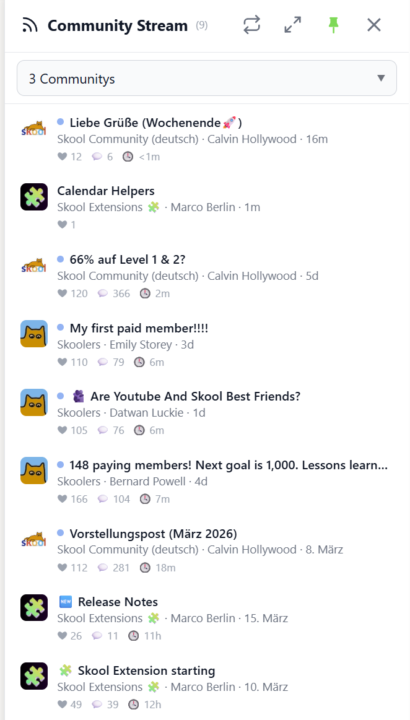
𝗖𝗼𝗺𝗺𝘂𝗻𝗶𝘁𝘆 𝗦𝘁𝗿𝗲𝗮𝗺 — 𝗔 𝗟𝗶𝘃𝗲 𝗙𝗲𝗲𝗱 𝗔𝗰𝗿𝗼𝘀𝘀 𝗔𝗹𝗹 𝗬𝗼𝘂𝗿 𝗖𝗼𝗺𝗺𝘂𝗻𝗶𝘁𝗶𝗲𝘀 Keeping up with multiple Skool communities means jumping between groups and scrolling through separate feeds. Community Stream brings it all together in one sidebar — a live feed of recent posts from your selected communities, right inside Skool. Click the stream icon in your toolbar to open the sidebar. Choose which communities to follow using the selector at the top — pick individual groups or select all at once. The stream shows the three most recent posts from each community, sorted by newest first. Every post displays the community icon, title, author, and a relative timestamp so you can see at a glance what's new and where. Unread posts are marked with a blue dot. Click any post to jump directly to it on Skool, and the dot disappears. The stream auto-refreshes every three minutes, but you can hit the sync button anytime for an instant update. A progress bar shows the refresh status as data loads from each community. Pin the sidebar to keep it open while you browse, or let it close automatically when you click elsewhere. For a bigger view, expand the stream into a full-screen popup. Your community selection and read status are saved across sessions, and cached posts load instantly when you reopen the sidebar. Community Stream can be toggled on or off in the Tools section of the Toolkit Settings. --- 𝗖𝗼𝗺𝗺𝘂𝗻𝗶𝘁𝘆 𝗦𝘁𝗿𝗲𝗮𝗺 — 𝗘𝗶𝗻 𝗟𝗶𝘃𝗲-𝗙𝗲𝗲𝗱 ü𝗯𝗲𝗿 𝗮𝗹𝗹𝗲 𝗱𝗲𝗶𝗻𝗲 𝗖𝗼𝗺𝗺𝘂𝗻𝗶𝘁𝗶𝗲𝘀 Mit mehreren Skool-Communities Schritt zu halten bedeutet, ständig zwischen Gruppen zu wechseln und separate Feeds durchzuscrollen. Der Community Stream bringt alles in einer Sidebar zusammen — ein Live-Feed der neuesten Posts aus deinen ausgewählten Communities, direkt in Skool. Klicke auf das Stream-Icon in deiner Toolbar, um die Sidebar zu öffnen. Wähle über den Selektor oben aus, welchen Communities du folgen möchtest — einzelne Gruppen auswählen oder alle auf einmal. Der Stream zeigt die drei neuesten Posts jeder Community, sortiert nach Aktualität. Jeder Post zeigt das Community-Icon, den Titel, den Autor und einen relativen Zeitstempel — so siehst du auf einen Blick, was neu ist und wo.

🔥
3 likes • Mar 28
Very cool!
1-1 of 1

🔥
@lisav
Walking with Christian business women as they grow in peace, leadership and faithful stewardship of the Kingdom visions God has given them.
Online now
Joined Mar 24, 2026
BC, Canada
Powered by