Activity
Mon
Wed
Fri
Sun
Jul
Aug
Sep
Oct
Nov
Dec
Jan
Feb
Mar
Apr
May
Jun
What is this?
Less
More
Owned by Lisa
Cash flow community for multi-passionate female entrepreneurs ready to organize money, grow profit, erase debt, and build wealth.🗝️🌬️💖💸
Memberships
Claude Community
9.8k members • Free
Thrive Together Womens Circle
151 members • Free
Expanding Capacity
179 members • Free
Women Helping Women Mastermind
11.1k members • Free
WeMeet for Women Entrepreneurs
2.6k members • Free
Linguists Society
129 members • $29/month
Money & Growth for Women
254 members • Free
Summiters
251 members • Free
PhatKat Fitness 😼🎩
161 members • Free
3 contributions to Skool Extensions 🧩

🔥
May 5 •
Community Translation
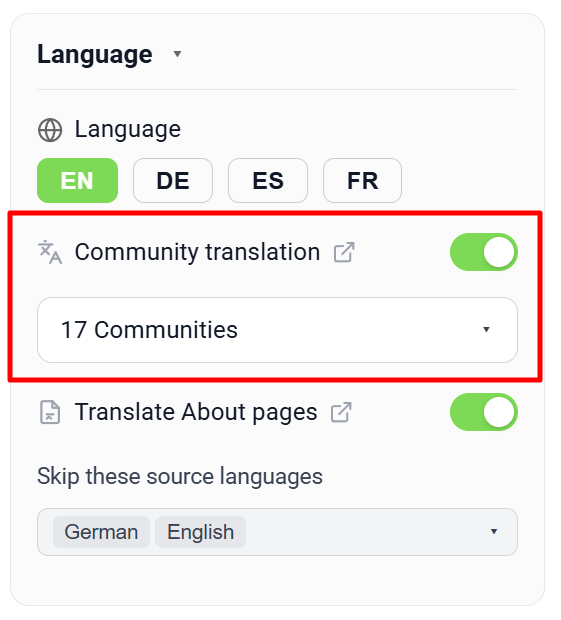
𝗖𝗼𝗺𝗺𝘂𝗻𝗶𝘁𝘆 𝗧𝗿𝗮𝗻𝘀𝗹𝗮𝘁𝗶𝗼𝗻 — 𝗥𝗲𝗮𝗱 𝗮𝗻𝗱 𝗪𝗿𝗶𝘁𝗲 𝗶𝗻 𝗬𝗼𝘂𝗿 𝗢𝘄𝗻 𝗟𝗮𝗻𝗴𝘂𝗮𝗴𝗲 𝗔𝗰𝗿𝗼𝘀𝘀 𝗦𝗸𝗼𝗼𝗹 Skool is a global platform, and the most interesting communities aren't always in your language. Until now, that meant either skipping posts you couldn't read or pasting them into a translation tab. Community Translation flips that on its head: pick the communities where you want to read in your own language, and posts, comments, replies, the live stream and the group chat are all translated automatically as you scroll. Once you switch the master toggle on in Settings → Language, you can pick any number of communities from your joined list. From that moment on, every post detail page, feed card and comment thread inside those communities renders in your interface language — German, Spanish, French or English. A translate icon next to each post lets you flip back to the original text in one click and back again without re-fetching, because every translation is cached locally and on a hybrid backend so that the next visitor (or your next visit) loads it instantly. The same toggle also powers a big "Translate" composer button placed right next to the Post / Reply / Comment submit buttons, so you can write in your own language and translate the entire draft to the community's language before publishing. The button respects mentions like @First Name — they are masked out before being sent to the translator and reinserted afterwards as real mention links with profile IDs intact, so links never break. Bold-Unicode formatting and line breaks survive the round-trip too. The same protection applies to the auto-translation of posts and comments — mentions stay clickable in the translated version. The community language is read once from Skool's discovery API and cached, so the toolkit knows exactly which language pair to translate (Spanish → German, English → French, etc.). Communities whose language matches yours are skipped silently. The whole feature is free for all users — no Premium gating.

🔥
7 likes • May 5
I tend to avoid these now I won't.
🔥
May 5 •
Translate About Pages & Discovery
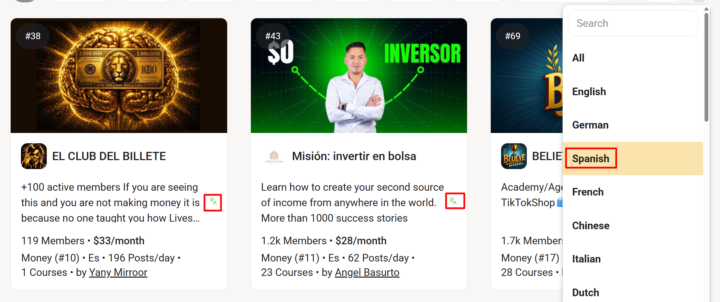
𝗧𝗿𝗮𝗻𝘀𝗹𝗮𝘁𝗲 𝗔𝗯𝗼𝘂𝘁 𝗣𝗮𝗴𝗲𝘀 & 𝗗𝗶𝘀𝗰𝗼𝘃𝗲𝗿𝘆 — 𝗕𝗿𝗼𝘄𝘀𝗲 𝗖𝗼𝗺𝗺𝘂𝗻𝗶𝘁𝗶𝗲𝘀 𝗬𝗼𝘂 𝗗𝗼𝗻'𝘁 𝗦𝗽𝗲𝗮𝗸 𝗬𝗲𝘁 Discovering new Skool communities used to mean scrolling past dozens of cards in languages you don't read. Translate About Pages fixes the discovery problem and the deeper "should I join?" decision in one go: every community's About page and every discovery card description gets translated to your interface language automatically — even before you've joined. The toggle is on by default for every fresh install. Browse the discovery page or open any community's About page, and the description renders in your language right away. Each translated section keeps a small toggle so you can flip back to the original text whenever you want — useful when you want to verify a specific phrase or read in the original tone. Translations are cached on the same hybrid backend as Community Translation, so the second time you (or anyone) sees the same About page or card, the translated text loads instantly with no API round-trip. To avoid the "translating English into English" anti-feature, the toggle ships with a smart language filter: your current UI language and English are automatically excluded by default — so a German user sees German pages untranslated and English pages untranslated, but Spanish, French, Italian and Vietnamese pages all flip to German. The exclusion list lives in Settings → Language and you can add or remove any ISO-2 language code at will (e.g. add "es" if you also speak Spanish and don't need it translated). On first install the exclusion list is initialized to your UI language plus English, so the most common case "just works" without configuration. Same engine, same mention protection, same caching as the rest of the translate stack — and free for all users. --- 𝗔𝗯𝗼𝘂𝘁-𝗦𝗲𝗶𝘁𝗲𝗻 & 𝗗𝗶𝘀𝗰𝗼𝘃𝗲𝗿𝘆 ü𝗯𝗲𝗿𝘀𝗲𝘁𝘇𝗲𝗻 — 𝗖𝗼𝗺𝗺𝘂𝗻𝗶𝘁𝗶𝗲𝘀 𝗲𝗻𝘁𝗱𝗲𝗰𝗸𝗲𝗻, 𝗱𝗶𝗲 𝗱𝘂 𝗻𝗼𝗰𝗵 𝗻𝗶𝗰𝗵𝘁 𝘀𝗽𝗿𝗶𝗰𝗵𝘀𝘁 Neue Skool-Communities entdecken hieß bisher: an Dutzenden Karten in Sprachen vorbeiscrollen, die du nicht lesen kannst. About-Seiten übersetzen löst das Discovery-Problem und die tiefere „Soll ich beitreten?"-Entscheidung in einem Schritt: Jede About-Seite einer Community und jede Beschreibung in der Discovery-Übersicht wird automatisch in deine Oberflächensprache übersetzt — schon bevor du beigetreten bist.
🔥
4 likes • May 5
Very cool feature.
🔥
Mar 10 •
🧩 Skool Extensions starting
skool-extensions.com I’m officially releasing my Skool Extensions! 🥳 Install the extension, give me your feedback and ideas, and spread the word! --- Hiermit veröffentliche ich offiziell meine Skool Chrome Extension 🥳 Installier dir die Extension, geb mir Feedback und Ideen und erzählt es weiter.

🔥
3 likes • Apr 29
Added. Looking forward to using it.
1-3 of 3

🔥
@lisa-drennon
Wealth Activator|Multi-Passionate Women Entrepreneurs|Cash Flow Strategies|Doesn't matter how much money you have; it's what you do with it.🗝️🌬️💖💰
Active 31m ago
Joined Apr 29, 2026
ENTJ
Melbourne Beach FL
Powered by