Activity
Mon
Wed
Fri
Sun
Jun
Jul
Aug
Sep
Oct
Nov
Dec
Jan
Feb
Mar
Apr
May
What is this?
Less
More
Memberships
Agentic Labs
766 members • $7/m
GET SHIT DONE
562 members • Free
5 contributions to GET SHIT DONE

Jan 26 •
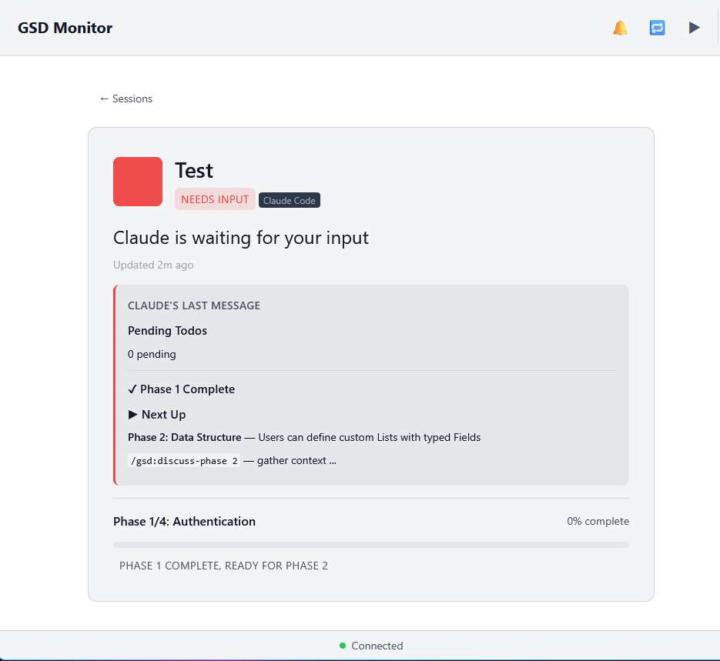
GSD-Monitor Update to Version 1.3
GSD Monitor (provides monitoring & alerts / notifications on your PC and beyond for Claude Code/BSD) is now at version 1.3. Changes include: - Better support for working with Claude Code (with or without GSD) - Now works with Claude Code plugins (VSCode, Jetbrains) - Shows you the actual prompt Claude/GSD is asking you to answer - Toggle reoccurring alarm mode (plays once a minute until you answer the Claude prompt) - Ability to manually clear old Claude Code sessions - Improved phone browser support Note if you are running version 1.1 or below you need to update your hook files with: python injector.py remove python injector.py inject https://github.com/GallionConsulting/gsd-monitor
Jan 25 •
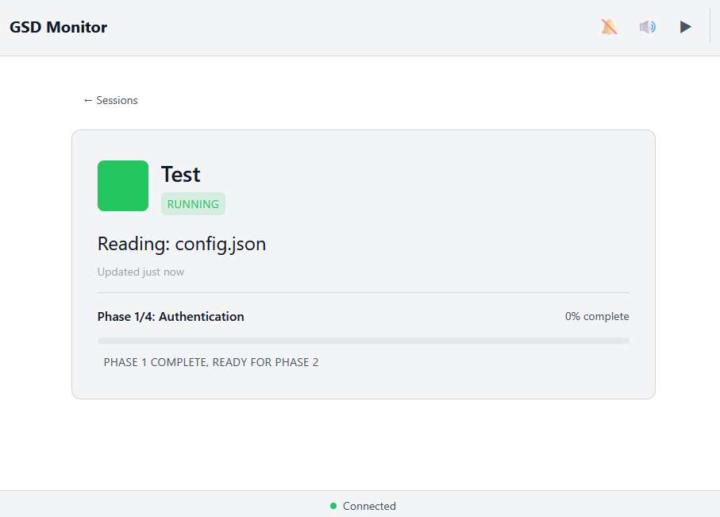
Free Project: GSD Monitor w/ Audio Alerts & Notifications
With the help of Claude and GSD, here is the GSD Web Monitor with alerts. This app helps you keep an eye on GSD in a simple web view and when it stops for your input (to answer a question or do the old '/clear' and next step) it will turn yellow and if you don't notice in 60 seconds, it will turn red & play an alert sound. Everything runs locally on your dev machine and, yes, you can just point your phone to the PC's IP (a QR code is even provided) and keep track of GSD's progress on your phone (local network only). Actually plugs into Claude Codes' hook system (just like GSD does) and it does not modify GSD itself in any way. This means it should be GSD update proof. BTW a bonus feature is this works with just Claude Code without GSD too. Free & open source repo is here: https://github.com/GallionConsulting/gsd-monitor

Jan 20 •
MacWhisper - The only tool you'll need for Speech-To-Text --> Thx Lex
@Lex Christopherson mentioned MacWhisper just when I was debating between Every's Monologue, and WhisperFlow. so I checked it out, did some Perplexity research, and apparently with recent updates enabling using (locally, no API stuff) Parakeet V3 by NVIDIA, the speech-to-text speed is amazing. It does so much more than just that, but that's for later. (transcribing, translating) It costs 64 Euro (currently 59 till end of Jan) took 10 minutes to setup. real private, nothing sent to the cloud. it's a steal!!! https://goodsnooze.gumroad.com/l/macwhisper (no affiliation, no nothing. just the link)
0 likes • Jan 20
You can also check out the free & open source Handy for Win, Mac and Linux (https://github.com/cjpais/handy). Defaults to Parakeet V3 but you an select other models like Whisper and Moonshine. Also totally local processing. Plus is also a CLI version if you want to have a lower level, controllable Python app. I've gotten excellent results with it.

Jan 17 •
Best practices for integrating Design System with GSD from scratch
Hello everyone, I'm wondering if there's a recommended approach or best practice for setting up a project from the ground up with a consistent design system that integrates well with GSD?
0 likes • Jan 19
This is more just general "working with AI" advice but I always like to add a phrase about using MCP servers. For example, if I am specifying the tech stack, say "Use Laravel Boost MCP Server" (if using Laravel) and I make sure it is loaded into Claude (claude mcp list) for this project. If you are vibe'n say something like "Use MCP servers for the tech stack if available and either install them or confirm I have installed them before starting coding". If you aren't familiar with MCP servers, they are basically a way for AI to get local project information without scanning files. It is kind of like a cheat sheet and an API to help AI deal with MySQL, Github, n8n, Docker, etc. Speeds things up and uses less token. GSD itself prefers to use "Context7" MCP server if available so that is a good one to add just for GSD.
Jan 18 •
GSD Workflow Cheat Sheet
GSD Newbie here and kept getting lost in "what command when" so here is a little cheat sheet that shows the common commands used in the various parts of the GSD work loop: Starting a New Project /gsd:new-project → Answer questions, get PROJECT & ROADMAP MDs /gsd:quick → Build a quick feature without full gsd process (v 1.8) Daily Work Loop (within a milestone) /gsd:progress → "Where am I? What's next?" /gsd:discuss-phase N → Capture decisions before planning (don't skip!) /gsd:plan-phase N → Create executable plans /gsd:execute-phase N → Build it /gsd:verify-work N → Test it with Claude's guidance Stopping & Starting /gsd:pause-work → Creates handoff file when stopping mid-phase /gsd:resume-work → Restores context when coming back /gsd:progress → Alternative to resume - shows status & routes you Capturing Ideas While Working /gsd:add-todo → Quick capture without breaking flow /gsd:check-todos → Review captured items Milestone Transitions /gsd:audit-milestone → "Did we actually deliver what we promised?" /gsd:plan-milestone-gaps → Creates phases for anything missing /gsd:complete-milestone → Archives, git tags, prepares for next /gsd:new-milestone → Starts new milestone with full context Adjusting Scope Mid-Flight /gsd:add-phase → Append to end of roadmap /gsd:insert-phase 2.1 → Squeeze in urgent work between phases /gsd:remove-phase N → Remove a future phase
1-5 of 5