Activity
Mon
Wed
Fri
Sun
Nov
Dec
Jan
Feb
Mar
Apr
May
Jun
Jul
Aug
Sep
Oct
What is this?
Less
More
Owned by Kristen
A self-paced crystal library with simple guides, rituals, and tools to help you feel clear, grounded, and connected. ✨
A creative studio for spiritual entrepreneurs. Digital assets, AI tools, courses, and templates for creators who are done starting from scratch 🌙
Event & Collab Growth Co
995
5.0
Free
24 contributions to Digital Clarity Training

🍀
May 7 •
May 7, 2026 | Prompt of the Day Generator
Click the attached file to open it up to start writing prompt that creates art like shown.


2 likes • May 7
#kc
🍀
Feb 18 •
The Skool Community Masterclass Is in the Classroom -- Here Is Everything That Is Waiting for You
If you were in the room Monday night, you already know this one went deep. If you missed it, you did not miss a recap. You missed a full live build. From a blank Skool account to a named, positioned, structured community, done on screen in real time. That replay is now in the classroom, and it is worth every minute. But the replay is not the only thing in there. Here is everything sitting inside the DCT Schoolhouse Vault right now waiting on you: - 3 AI Knowledge-Based Guides: These are not meant to be read front to back. Upload them directly into Claude or ChatGPT and let the AI use them as your knowledge base while you build. - The Community Blueprint Architect GPT: This is the tool we used live during the session. It validated a real community idea, stress-tested it, and built out a full Minimum Viable Test plan in real time. If you have a community you have been sitting on, run it through this first. It will tell you what is missing before you build a single thing. - Canva Templates: Includes the About Page templates and the VSL Slide Deck with 85 slides you can download as an MP4 and upload directly to your Skool About page. No camera required. - Step-by-Step Guide to Building a Skool Community - And the full replay. DCT VIP members, everything is inside the classroom now. Go here to access it: https://www.skool.com/digitaldownloadsuccess/classroom/bd851a3c?md=38514a88f999401786751e1c054edf38 If you have been overthinking your Skool community, this is your sign to stop planning and start testing. The tools are built. The framework is there. All you have to do is show up and run it.
2 likes • Feb 18
#kc
🍀
Feb 18 •
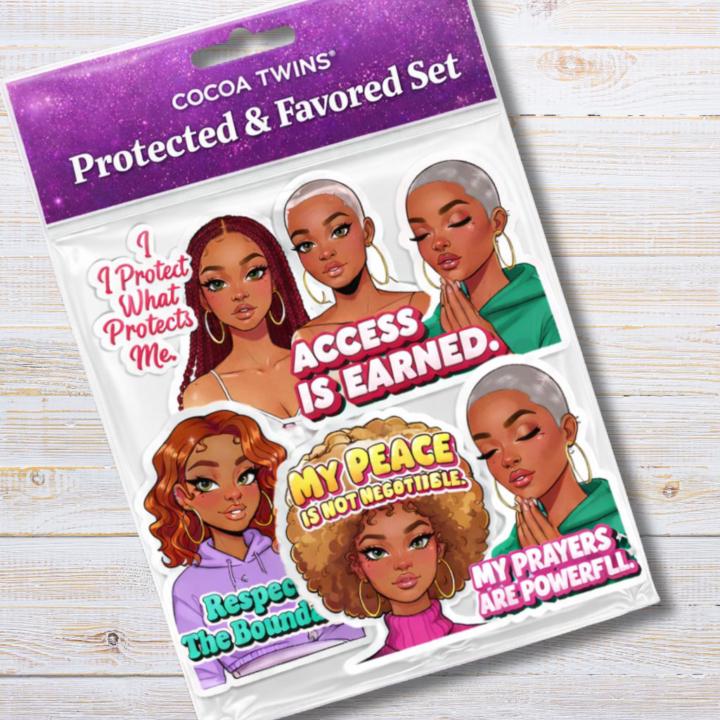
Sticker Set Mockup Prompt
STICKER PACK PACKAGING MEGA PROMPT (9.5/10 Version) Using the uploaded sticker designs, create a photorealistic retail packaging mockup of a cohesive sticker pack product. ARTWORK INTEGRITY RULE Use the sticker artwork exactly as uploaded. Do not alter illustration style, colors, text, proportions, outlines, borders, or design details. Do not redesign, enhance, simplify, or reinterpret the stickers. Place them into the packaging exactly as they are. Keep sticker borders crisp and clean. Do not blur, distort, soften, or resize disproportionately. PACKAGING FORMAT (LOCKED) Clear glossy resealable poly bag Visible zipper seam Subtle plastic crinkle texture Realistic plastic glare Die-cut hang tab header card at the top Soft studio lighting Natural soft shadow beneath package LAYOUT RULES All stickers must be fully visible No cropping over faces or key text No overlapping that hides important details Maintain proportional scaling so no sticker dominates unless intentionally designed as the focal piece Balanced spacing with clean visual hierarchy If 7–8 stickers are provided, arrange in two clean rows with minimal overlap and full visibility Centered composition Slight 15 degree product tilt for realism Approximately 10 percent white margin around the package BRANDING INPUTS (EDIT EACH TIME) Product Name: [INSERT PRODUCT NAME] Business Name: [INSERT BUSINESS NAME EXACTLY AS IT SHOULD APPEAR] Main Title Text Color: [INSERT COLOR] Optional Header Background Style: Choose one: solid color / soft gradient / glitter sparkle / minimalist clean HEADER CARD TYPOGRAPHY HIERARCHY Top line: Business Name Second line (largest): Product Name Use the selected title color for the product name. Keep layout clean and uncluttered. Keep all header text within a safe print margin no closer than 8 percent from any edge. BACKGROUND (LOCKED) Pure white ecommerce background only. No props. No lifestyle scenes. No additional decorative objects. OUTPUT CONTROL
2 likes • Feb 18
#kc
🍀
Jan 3 •
Canva Template Freebies
https://www.skool.com/digitaldownloadsuccess/-/search?q=Canva%20Template Thank you to everyone who's contributed a template to the community.
0 likes • Feb 8
#kc
🍀
Feb 4 •
Build Your Skool Community With AI | February 11, 2026 | 10-11am Eastern
A Free Masterclass for Digital Download Creators You created the product. You priced it. You posted about it. And it's not selling. Here's why: People don't buy products because they're good. They buy because they believe you can solve their problem. You're explaining what your product does when you should be diagnosing why they haven't solved the problem yet. You're teaching people how to think about the solution when you should be showing them what they can't see about their current approach. A Skool community positions your digital products inside a system where peer-to-peer selling happens without you pitching. Where testimonies do the converting. Where people stop scrolling and start investing. But most creators build communities the same way they built their products. They focus on content when they should focus on conversion. This masterclass shows you how to use AI to build a community that positions your digital products as the obvious next step. What You'll Learn - Why your digital products aren't converting and what to shift immediately. - How to use AI to position your community so buyers come pre-sold. - How to turn your community into a conversion system that sells without you convincing anyone. When and Where - February 11, 2026 from 10-11am Eastern Virtual How to Join Join The AI-Driven Business Summit: https://www.skool.com/ai-driven-business-summit/about?ref=35546171cd0a4ecda72d07a1bd4fefba Grab the calendar link once you're in: https://www.skool.com/ai-driven-business-summit/calendar?eid=bb20024b3fe4411980c2356534c86915 This is free. One hour. And it will change how you position your digital products. Stop explaining what your product does. Start diagnosing why they haven't solved the problem yet.

3 likes • Feb 4
#kc
1-10 of 24

@kristen5838
Crystals, mindset tools, & more to keep you clear, confident & creating 🌙
Because your ideas & energy deserve to grow in a way that feels like you 🌿
Online now
Joined Nov 22, 2025
US
Powered by