Activity
Mon
Wed
Fri
Sun
Aug
Sep
Oct
Nov
Dec
Jan
Feb
Mar
Apr
May
Jun
Jul
What is this?
Less
More
Memberships
AI Automation Mastery
30.1k members • Free
Ai Titus
915 members • Free
AI Income Lab
2.9k members • $89/month
AI Freedom Agency
10.8k members • $1/month
KeepAutomating - AI Automation
96 members • Free
AI Marketing by Kia
21.3k members • $1/month
AI Automation Agency Hub
328.7k members • Free
Automation-Tribe-Free
4.5k members • Free
AI Automation Society
424.1k members • Free
245 contributions to Automation-Tribe-Free

Feb 12 •
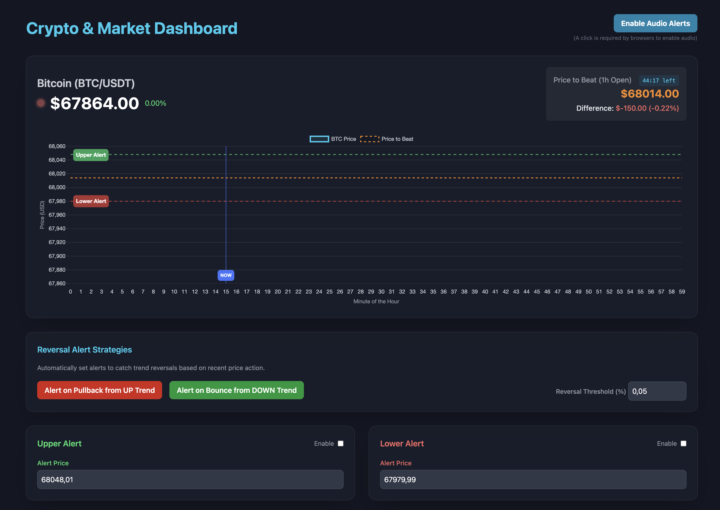
New Release: Polymarket Bitcoin Helper Dashboard
I’ve just released my Polymarket Bitcoin 1H Helper Dashboard, the tool I’ve been using to better time entries and react to price movements in the Bitcoin hourly market. For members of this free community: The helper dashboard is available inside my paid community classroom, here: https://www.skool.com/automation-tribe Inside the paid community, you’ll find the full tool and workflow in the Micro-SaaS Projects category. Also, I’m curious about your experience: • Are you using any similar trading tools or dashboards? • Are you currently making money trading crypto or prediction markets? • What tools or automations are helping you most? Feel free to share your experience or setups below. I’d love to see what everyone is building and using.

3 likes • Feb 12
Good to see you sharing that Bitcoin helper. Interesting how you're using it.

Feb 11 •
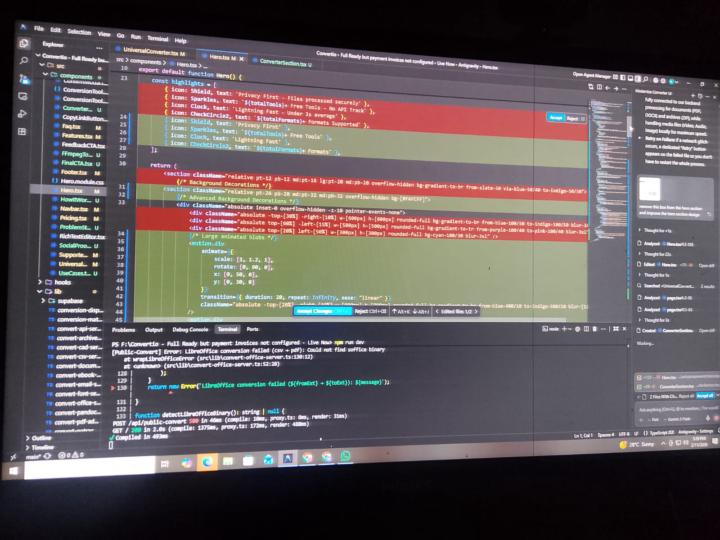
I switched from Cursor AI to Antigravity.Google last month. Here's what happened.
For months, I've been vibe coding SAAS apps for clients using Cursor AI. Solid tool, got the job done. Then I discovered Antigravity. The websites it builds? Impressive. The apps it generates? Even better. I've already vibe coded 2 complete web apps using both Cursor and Antigravity. I'll be sharing them officially soon—stay tuned. The free plan is generous enough to build real projects. The quality of code and the speed of development? Game changer. If you're still grinding with Cursor, give Antigravity a shot. The vibe coding quality speaks for itself. Got a project idea collecting dust? This might be the nudge you need to build it. #WebDevelopment #AI #Coding #SAASDevelopment #BuildInPublic #Learninpublic
0 likes • Feb 12
Sounds like a solid shift. Always good to find tools that really speed things up.

Feb 12 •
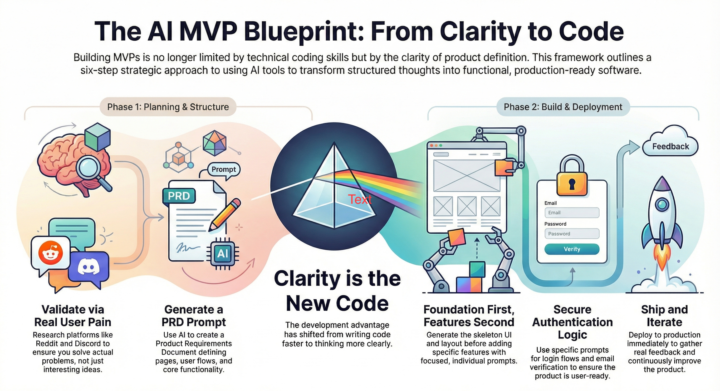
A practical framework for building MVPs with Lovable
After building multiple MVPs with Lovable, I realized something important: Building MVPs is no longer limited by coding skills. It’s limited by how clearly you define the product. AI can build almost anything. But only if you give it the right structure. Here’s the exact framework I follow: 1. Start with real problems I don’t start with ideas. I start with problems. I explore Reddit, Discord, and YouTube comments to see what people are struggling with. This helps ensure I’m building something useful and relevant, not just something interesting to me. When the problem is clear, everything else becomes easier. 2. Create a clear blueprint using a PRD prompt Before building, I use Lovable to generate a PRD (Product Requirements Document). This helps define: - Pages and routes - User flow - Core features - Product structure This step is critical. It acts like a roadmap and removes confusion during development. Without structure, AI produces inconsistent results. With structure, it produces production-ready output. 3. Build the skeleton first Next, I generate the basic UI structure: - Layout - Navigation - Pages I don’t worry about features yet. The goal is to create a clean foundation that can be extended easily. 4. Add features incrementally I add one feature at a time using focused prompts. This keeps the system stable and easier to debug. It also helps Lovable produce more accurate results. Trying to build everything at once usually creates messy output. Incremental building works much better. 5. Add authentication Once the core product works, I add authentication using Supabase. This includes: - Login and registration - Password reset - Email verification - Protected routes This makes the product ready for real users. 6. Deploy and iterate Finally, I deploy the product. You can deploy directly from Lovable or connect GitHub and deploy via Vercel or Netlify. Once live, I improve the product based on real usage and feedback.
1 like • Feb 12
Yeah, nailing the problems first and that PRD blueprint really steers things.

Feb 8 •
Freedom Blueprint: The Easiest Way to Make Money Online
Freedom Blueprint is a beginner-friendly affiliate marketing training program that teaches how to make money online using simple and automated systems. Sold on JVZoo, the course shows step-by-step how to promote other people’s digital products and earn affiliate commissions when someone buys through your link. It includes done-for-you tools, easy lessons, and a simple system so beginners can start an online income without needing advanced technical skills. This Secret System Could Allow You To Cash In $1,797.65 Every Single Day. ❓What Is Freedom Blueprint? It is a beginner-friendly training program. It shows how to build an online business using affiliate marketing. You don’t need website building or ads. Most tools are done-for-you. The goal is to earn commissions online. It’s a step-by-step guide that shows: ✔️How to pick winning products to promote (especially on JVZoo). ✔️ How to get traffic (visitors) to your offers. ✔️How to automate sales so you earn while sleeping. 🧭How Does It Work? Freedom Blueprint teaches a simple and easy process. Step 1: Choose a product to promote ✔️You first learn how affiliate marketing works and how to pick good products that people want to buy. Step 2: Get visitors (traffic) ✔️The training shows beginner-friendly ways to bring people to your offer, such as simple online posts or videos. Step 3: Use automation tools ✔️The system gives you done-for-you tools so parts of the sales process can run automatically after you set everything up. 👨Who Is Perfect for the Freedom Blueprint? 🔷Students – Want extra money with little time. 🔷 Moms/Dads – Need a flexible side income. 🔷Beginners – No experience required. 🔷 JVZoo Sellers – Want to boost affiliate sales. Not for: People who want money overnight without work. >>> GET MORE INFO HERE <<<

1 like • Feb 9
Yeah, a clear path for automating online income, especially for beginners.
Feb 9 •
Migrating n8n workflows to the cloud? Here's a PDF conversion headache I just solved.
The Problem: My client's workflow relied on local n8n with ffmpeg for HTML-to-PDF conversion. Moving to cloud n8n meant finding an alternative—but most services charge premium prices for enterprise plans, even though we only needed <5 conversions daily. The Solution: After researching alternatives, I discovered https://www.convertfleet.com/ . It's not widely known, but it works reliably and fits our low-volume use case without the enterprise pricing overhead. Try it out: If you're dealing with similar n8n migration challenges, give ConvertFleet a test run. I'd love to hear what solutions you've found for HTML-to-PDF conversion in cloud environments. What's your go-to tool for this?

0 likes • Feb 9
Yeah, cloud PDF conversions can be rough. Good to know ConvertFleet works well.
1-10 of 245
@kevin-troy-lumandas-6639
Freelance software engineer building smart automations with n8n. I code fast, adapt fast, and love creating efficient workflows.
Active 88d ago
Joined May 17, 2025