Activity
Mon
Wed
Fri
Sun
Mar
Apr
May
Jun
Jul
Aug
Sep
Oct
Nov
Dec
Jan
Feb
What is this?
Less
More
Memberships
AI Automation Mastery
25.9k members • Free
Ai Titus
885 members • Free
AI Automation Station
2.2k members • Free
OS Architect
11k members • Free
KeepAutomating - AI Automation
97 members • Free
AI Automations by Kia
21.7k members • $1/month
AI Automation Agency Hub
290.5k members • Free
Automation-Tribe-Free
4.1k members • Free
AI Automation Society
249.6k members • Free
238 contributions to Automation-Tribe-Free

2d •
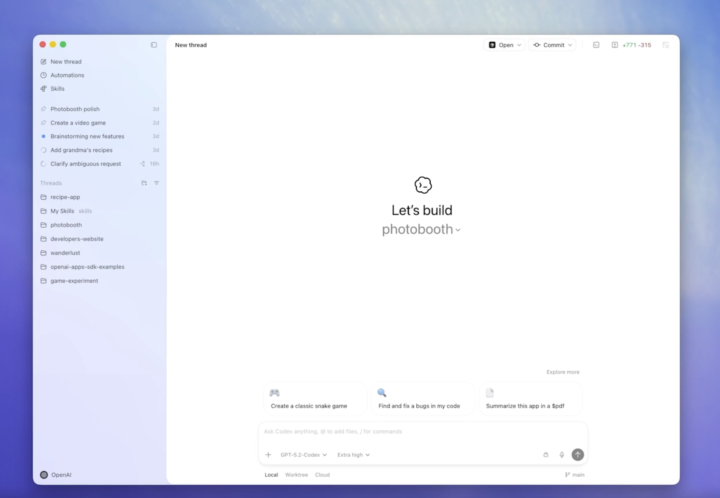
🚀 OpenAI just launched the Codex app for macOS
Sharing exciting news from OpenAI: the new Codex app lets developers manage multiple AI coding agents in parallel, automate tasks, and collaborate with agents across entire projects. For a limited time, Codex is also available to Free and Go users, with increased limits on paid plans. If your community builds software or experiments with AI workflows, this is worth checking out. 👉 Available now on macOS. https://openai.com/index/introducing-the-codex-app/

🔥
1 like • 1d
This looks like a solid move for automating AI agent tasks on macOS.

6d •
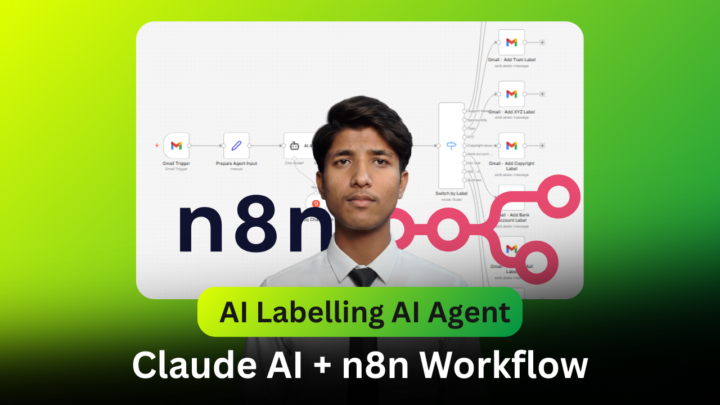
Build Your N8N Workflows with 4 to 5 Prompts + Debugging Prompts with Claude AI
As an AI expert, I integrate AI systems into my clients' businesses. When a new client is onboarded successfully, I create an initial n8n workflow using Claude AI. I simply outline my requirements, and Claude AI delivers a working prototype. From there, I refine the workflow to meet the client's needs, ensuring they get the maximum ROI on their investment. In this demo, I showcased how Claude AI enhances the n8n workflow creation process compared to the standard n8n AI, which doesn't deliver optimal results. You can check out my previous demo in my profile's past posts. Haven't tried Claude AI yet? Give it a go and build your first n8n workflow. Activate it and watch it work in real-life applications! 💡 Interested in collaborating on n8n or SaaS projects? DM me! Let’s automate the future together.
🔥
0 likes • 5d
Pretty neat how you're speeding up n8n builds with Claude AI.

6d •
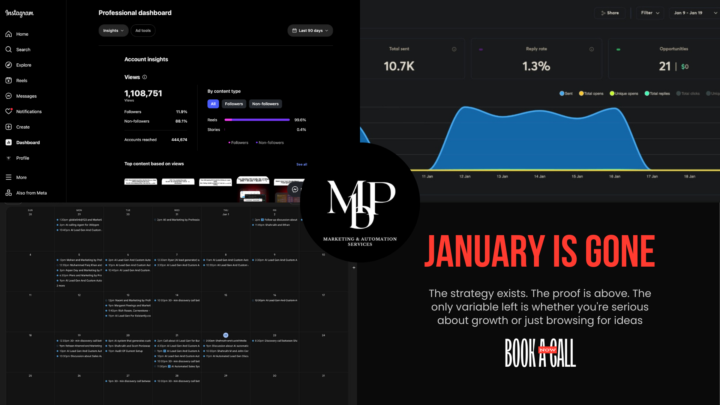
January is gone. My calendar is full. 21 qualified opportunities. 3 deals closed. $17,490 in revenue.
I generated 21 qualified sales opportunities in 10 days. 3 already closed. $17,490 in new revenue. And I didn't write a single email manually. Most B2B companies are still doing prospect research by hand. Clicking through websites. Taking notes. Crafting "personalized" emails that take 10 minutes each. Then they wonder why their reply rates are under 2%. I built a different system. It researches prospects automatically. Scrapes their entire website (not just the homepage). Analyzes what they actually do. And generates icebreakers that sound like a human spent 20 minutes studying their business. Because that's exactly what the AI does. Here's how it works: - Step 1: Feed it a prospect's website URL. The system crawls every page. Service pages. Case studies. Blog posts. Team bios. Everything. - Step 2: Converts all that HTML into clean, structured text. This is what most people skip. Raw HTML is useless to AI. Clean data is everything. - Step 3: AI analyzes their business model, challenges, and opportunities. Then generates multiple personalized icebreaker options. You pick the best one. Send. The entire process takes 10 seconds per prospect. The results speak for themselves. (See the screenshots) But here's the thing most people miss: Personalization isn't about using someone's first name or company name. It's about showing you understand their business. When you reference their specific service offering, their recent case study, or a challenge their industry is facing right now, people respond. Not because it's clever. Because it's relevant. My background: I co-founded Marketing By Prof, an AI automation agency that just crossed 21K Instagram followers. We get 400K+ organic views per month sharing exactly how we build these systems. Over 10,000 people download our free templates monthly. I'm not sharing theory. This is what I use every single day to fill my pipeline. I'm giving away the exact workflow. No email capture. No hoops. Just duplicate it and plug in your prospects.
🔥
1 like • 5d
Automated deep personalization like that's where the real value is.
7d •
Turn Screenshots Into Reels With This Micro-SaaS
I’ve just released a new micro-SaaS that turns screenshots into smooth zoom-and-pan videos — the same system I use to create my own Reels, Shorts, and quick demos. A lot of people have been asking how I generate these videos, so instead of explaining it repeatedly, I decided to share the actual system. It was vibe-coded, runs locally on your computer, and is designed specifically for short-form content. 👉 The tool is available inside the Skool community here: https://www.skool.com/automation-tribe 🎥 You can see examples of videos generated with this system here: https://www.youtube.com/shorts/qiYzSA1fonk https://www.youtube.com/shorts/IQY3myWq728 The project is already available in the Classroom, and the full walkthrough video will be available tomorrow, where I’ll show exactly how I create a video step by step. If you’re into content creation, tutorials, or product demos, this one is worth checking out 👀 Stay tuned. Tomorrow i will launch also a short video.
🔥
1 like • 6d
Pretty slick system for those zoom-and-pan effects.

8d •
You're Using Claude Code Wrong (And Losing Hours Because of It)
Look, I've been using Claude Code for a few months now and I just realized most people are doing it backwards. Everyone's just throwing vague prompts at it like "build me a login system" and then spending forever going back and forth fixing stuff. There's a better way. Write the damn spec first. I'm serious. Before you even open Claude Code, spend 20 minutes writing out what you actually need. Requirements, edge cases, how the API should work, what errors to handle. Just a markdown file. Nothing fancy. Then (and this is the part nobody talks about) you point Claude Code directly at that spec file. "Implement the auth service in auth-spec.md." That's it. What happens next is honestly kind of wild. It reads the whole thing, sometimes asks you questions if something's unclear, then just builds it. Multiple files, proper error handling, tests that actually make sense. Because it knows exactly what you want. No more asking - actually can you change this fifteen times. No more - I forgot to mention we need to handle OAuth too. The spec is right there. And here's the thing that sold me: your specs don't disappear into some Google Doc graveyard. They live with your code. When you need to refactor three months later, the spec is still there telling you what the hell you were thinking. Try it once. Write a proper spec, save it as a .md file in your project, and tell Claude Code to build from it. You'll get why everyone who does this won't shut up about it.
🔥
0 likes • 7d
Writing the spec first really is the move. Big time saver.
1-10 of 238
🔥
@kevin-troy-lumandas-6639
Freelance software engineer building smart automations with n8n. I code fast, adapt fast, and love creating efficient workflows.
Active 12m ago
Joined May 17, 2025
Powered by