Activity
Mon
Wed
Fri
Sun
Jul
Aug
Sep
Oct
Nov
Dec
Jan
Feb
Mar
Apr
May
What is this?
Less
More
Owned by Kevin
Master OpenClaw, n8n, & GoHighLevel. Build adaptive AI agents & elite workflows for scalable revenue. Join the elite community of Automation Legends🚀
Memberships
Clief Notes
35.5k members • Free
AI Money Lab
79.1k members • Free
OpenClaw Users
918 members • Free
Lifestyle Founders Group™
12.1k members • Free
AI Automation Base
748 members • Free
3 contributions to Automation Legends

Apr 25 •
🚀 STOP Guessing. START Automating.
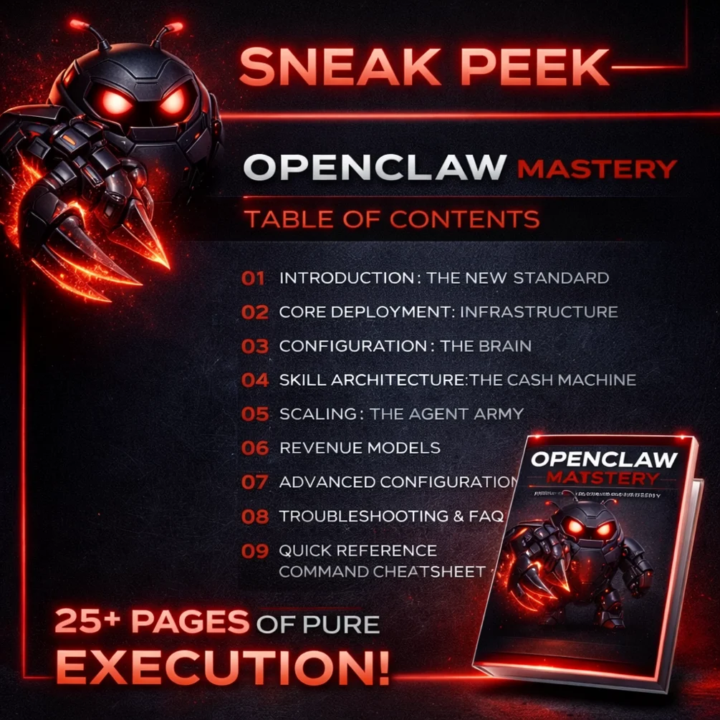
Want to see exactly how the pros are deploying autonomous agents? I’m giving away the OpenClaw Mastery Blueprint for FREE. 🦞 This isn't just a basic overview—it’s the tactical manual for building and scaling an "AI Agent Army" using the OpenClaw framework. Whether you're a backend dev or an entrepreneur looking for a competitive edge, this blueprint shows you the path. Inside, you'll learn: ✅ How to deploy agents that actually work. ✅ The "Digital Firewall" strategy for client data. ✅ How to monetize agentic workflows for real revenue. Stop watching from the sidelines and start building. 👉 Grab your FREE copy here: https://edgeagency.gumroad.com/l/trfnh #OpenClaw #AIAgents #AutomationLegends #n8n #TechStack #FreeResource
0
0
Apr 25 •
Welcome to Automation Legends! 🚀
This is the headquarters for builders mastering OpenClaw, n8n, and Agentic Workflows. We’re here to move past basic bots and engineer high-level, autonomous systems that drive real revenue. Where to start: 1. Introduce Yourself: What are you building? 2. The Classroom: Grab the 10-minute OpenClaw VPS setup guide. 3. ClawHub: Explore new skills for your agents. Let’s automate everything. 🦞⚒️ CHECK US OUT ON FACEBOOK: https://www.facebook.com/share/g/18SKCixR6u/
0
0
Apr 25 •
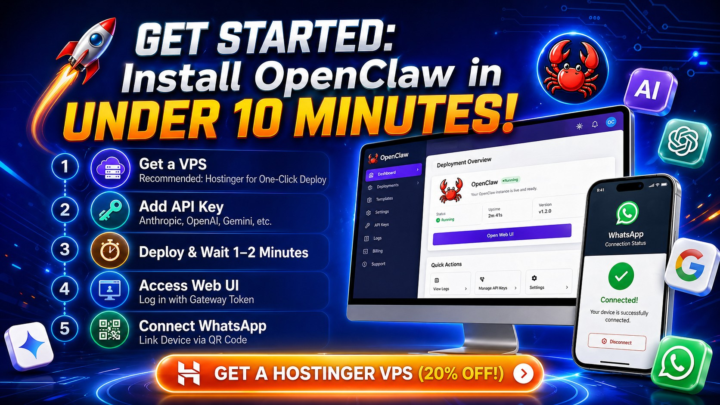
Get Your 🦞OpenClaw Agent Up & Running in Under 10 Minutes!
Ready to deploy your own AI agent but don't want to mess around with complex code or terminal commands? I’ve got you covered.🤖 The fastest and safest way to get OpenClaw live is using a VPS with a one-click setup. I personally use Hostinger because they have a dedicated OpenClaw template in their Docker Manager—it literally does the heavy lifting for you. The Quick Start Guide:🔗 https://www.hostinger.com/cart?product=vps%3Avps_kvm_2&period=12&referral_type=cart_link&REFERRALCODE=edgeagency&referral_id=019dc619-d213-7241-9cb9-9479925d0239 Grab a VPS: Use the link below to get 20% OFF your hosting. The KVM 2 plan is the "sweet spot" for performance. Deploy: Select the OpenClaw template in the hPanel Marketplace. Connect: Add your API key (Anthropic, OpenAI, or Gemini), grab your Gateway Token, and you're in! Go Mobile: Scan the QR code in the Channels tab to link it to WhatsApp and start chatting with your agent immediately. Once you're set up, you can give your agent a custom personality in the file and start installing new skills from ClawHub. Get started here (20% Discount Applied): Got questions? Drop them in the comments or head over to the Help category in the group! #OpenClaw #AIAgents #Hostinger #Automation #AICommunity #OpenSourceAI
0
0
1-3 of 3

@kevin-doherty-8915
Agency builder turning attention into revenue with simple offers, clean funnels, and Skool communities for creators and service businesses.
Active 9d ago
Joined Apr 25, 2026