Activity
Mon
Wed
Fri
Sun
Dec
Jan
Feb
Mar
Apr
May
Jun
Jul
Aug
Sep
Oct
Nov
What is this?
Less
More
Clief Notes
56.1k
5.0
Free
AI Hustle Generation
243
Free
13 contributions to AI Hustle Generation



Dec '25 •
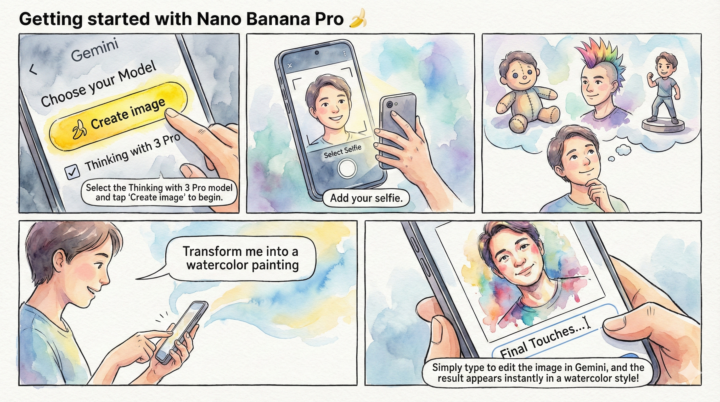
Unpeel Your Creativity: A Quick Start Guide
Panel 1: The Setup Step 1: Choose Your Tool. Open Gemini and ensure the "Thinking with 3 Pro" checkbox is selected. Tap the yellow Create image button to begin the process. Panel 2: The Input Step 2: Capture the Canvas. Upload a clear selfie from your camera roll or snap a fresh one. This image will serve as the foundation for your new creation. Panel 3: The Vision Step 3: Dream It Up. What version of you do you want to see? A plushie? A figurine? A punk rocker? Let your imagination explore the possibilities before you type. Panel 4: The Prompt Step 4: Style It. Give Gemini a clear direction. Simply type your desire, such as "Transform me into a watercolor painting," to set the artistic style. Panel 5: The Result Step 5: Refine & Reveal. Use natural language to tweak the result if needed. Watch as your ordinary selfie is instantly transformed into a work of art!
7
0
Nov '25 •
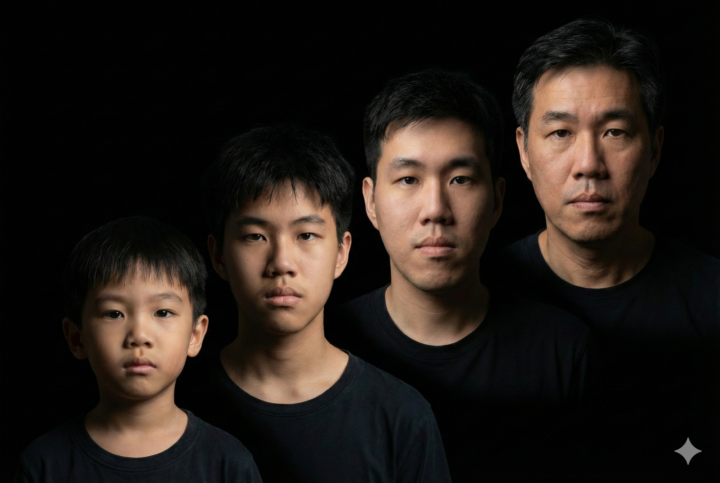
Past and future
the younger 2 are almost but not quite accurate. the older 2 are eerily accurate
1 like • Dec '25
@Alix Choo using nano banana with a well crafted prompt
1-10 of 13

Active 194d ago
Joined Nov 15, 2025