Activity
Mon
Wed
Fri
Sun
Jun
Jul
Aug
Sep
Oct
Nov
Dec
Jan
Feb
Mar
Apr
May
What is this?
Less
More
Owned by Josh
Learn cloud security using AI by building real cloud labs, security programs, and portfolio artifacts—not just studying for certifications.
Memberships
Clief Notes
28.5k members • Free
AI Automation Agency Hub
315.8k members • Free
AI Cyber Value Creators
8.8k members • Free
OpenClaw Users
901 members • Free
Cloud Tech Techniques
12.2k members • Free
Skoolers
190.3k members • Free
16 contributions to AI Cloud Security Lab

10d •
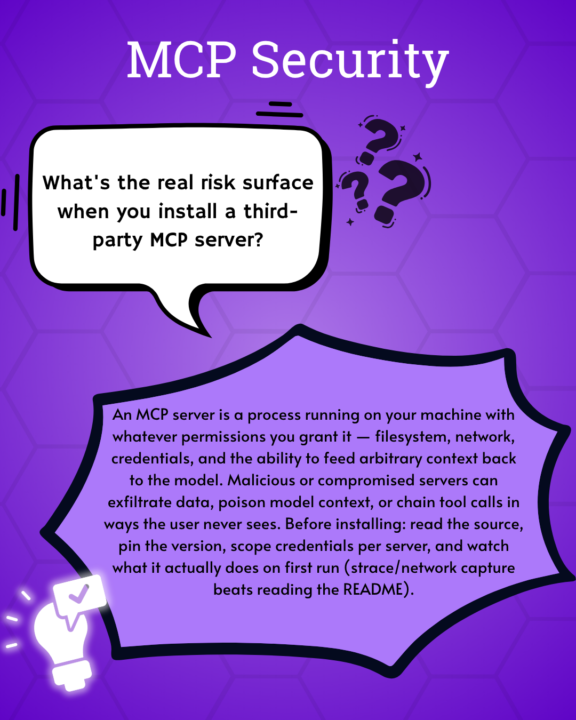
What is the real risk of using an MCP server?
Check out this cool graphic @Stephanie Macahis made!
11d •
The Mythos breach has no AI in it. Here's what to do this week.
If you've been on LinkedIn this week, you've seen the Mythos news. Anthropic is investigating unauthorized access to Claude Mythos Preview — the model they capped at about forty partners because they considered it too dangerous to release. Investigation is still ongoing. I want to bring it here because there's a lesson in this one for us specifically — and an action you can take this week. Here's the chain (no AI in it, except at the destination): 1. Attackers poisoned a Trivy GitHub Action — a security scanner — inside LiteLLM's CI/CD pipeline. They stole credentials and pushed backdoored litellm packages to PyPI. Live for about 40 minutes. LiteLLM has 95M+ downloads. 2. Mercor (an AI training startup) was one of thousands hit. Lapsus$ claims 4TB stolen via Mercor's Tailscale VPN. 3. The dump included Anthropic's internal model naming conventions. A Discord group — with an Anthropic contractor in it — used them to guess the Mythos deployment endpoint. They got in on launch day. No zero-day. No novel exploit. No model jailbreak. Just a poisoned dependency, a CI tool nobody was watching, an over-scoped contractor, and a 4TB dump that shouldn't have held those naming conventions in the first place. Verizon's 2025 DBIR put third-party breach involvement at 30% — doubled YoY. Panorays says 85% of CISOs can't see their third-party threats. Only 22% formally vet AI tools. We are getting excited about an AI that can find zero-days while most companies can't see what their vendors are doing on a Tuesday. The biggest risk in 2026 isn't AI capability. It's production security practices that have been broken so long we stopped flinching. This week — pick at least one. Drop your result in comments. 1. Find LiteLLM in your stack. Open Claude Code in your repo and paste this: "Search every package manifest, lockfile, requirements file, Dockerfile, and CI workflow in this repo for litellm. Report the version pinned (or unpinned), where it's used, which environment variables and secrets it has access to, and whether the version falls in the compromised range (1.82.7 / 1.82.8). Then list the credentials you'd need to rotate if this dependency was poisoned."
0
0
12d •
🛡️ Course 3 is LIVE — Wazuh + AI Threat Hunt
Quick one. Course 3 is live. Six lessons. Real AWS infrastructure. By the end, you'll have deployed a production-grade SIEM (Wazuh), plugged an AI layer into it (the Wazuh MCP server — 48 tools you talk to in plain English), and used both to investigate threats, hunt for persistent backdoors, and write a custom detection rule that produces audit-ready SOC 2 evidence. This is the lab where AI stops being a chat sidebar and starts being how you do the work. You'll ask your SIEM questions in plain English ("what happened on this server between 2 and 4pm?"), get structured answers back, verify them against the source, and act on them. You'll be paired with a senior SOC analyst persona who narrates the investigation as you go and adjusts depth to your experience level. Real AWS bills. ~$0.11/hr while running. Destroy when you're done. Nothing fake, nothing simulated, nothing you couldn't put on a resume. Courses 1 and 2 just got refreshed too. We rebuilt the on-ramp. Course 1 now puts Claude Code in your hands within the first 30 minutes, with a calibration step that tunes the AI to your real experience level — career switcher to senior practitioner, everyone welcome. Course 2 pairs you with a junior analyst character through every lesson so the AI-augmented workflow becomes muscle memory, not novelty. By the time you reach the SIEM lab, you spend 100% of your time on the actual security work, not on tool onboarding. If you've already done Courses 1 and 2 — head back. The new beats add about 20 minutes across both courses and they reshape everything that comes next. If you're just starting — begin with Course 1, and don't skip the calibration step in Lesson 4. It changes how every Claude response lands.
2
0
13d •
New: Wazuh + AI SOC lab (first public beta)
Most security training is watching someone else do the work. This isn't that. Pull down the new lab and in a couple of hours you'll have: - Stood up a production-shape Wazuh SIEM on AWS — 20 minutes, one script - Run a controlled attack and investigated the chain manually in the dashboard - Plugged an AI layer on top and re-run the same investigation in plain English - Hunted for the three persistence backdoors the CloudVault attacker left in Course 2 - Written a custom detection rule that fires live on your own terminal - Closed out a fresh incident with an evidence package for the SOC 2 audit That's a week of work for most real teams. It's a resume line most SOC analysts I talk to can't claim. It's the "I actually built that" answer nobody else has in interviews. "Start Here" and "AI Quick Wins" were the setup. This is the payoff — a real engagement where you stand up the SIEM, work the case, hunt what's left behind, close it out. If you haven't done the first two yet, run them first; ~30 minutes, and this one lands harder on the other side. You're working the case alongside an AI-powered senior SOC peer (Mateo) — he stays in character, teaches while you work, and gets out of your way when you've got it. Costs about a coffee in AWS compute. First public beta. If something breaks, feels off, or just confuses you — tell me: - #Build Questions here in Skool (fastest) - DM me - GitHub issues: github.com/botz-pillar/ai-csl-wazuh-lab/issues Repo: https://github.com/botz-pillar/ai-csl-wazuh-lab Go build. Tell me what you find. — Josh
0 likes • 13d
@Gary Collins @Frank DiPietrantonio @Pedro Castaneda
0 likes • 13d
@Sumair Faizi @David Castor @Collins Aboagye
16d •
Walk into your next security team meeting with something real 👇
Vercel got breached this week. The initial access wasn't even at Vercel — it was at one of their vendors (Context.ai). An employee there got hit with Lumma Stealer malware, attackers grabbed their Google Workspace OAuth tokens, and pivoted straight into Vercel's internals. Two months of dwell time. Customer environment variables exposed. ShinyHunters now asking $2M for the data. No exploit. No zero-day. Just an OAuth grant nobody was watching. Read the story here. Here's the thing: your company almost certainly has the same exposure right now. Every AI tool your coworkers have connected to Workspace or M365 is a non-human identity with a scope attached — an account you can't train, fire, or put behind MFA. Most security teams have never taken a hard look at that inventory. Not because they don't care — because nobody's been asking the question yet. That's the opening. This is an opportunity to bring this story to your security lead, and say: "I saw what happened to Vercel. I want to make sure we're not exposed the same way. Can I run a quick review?" That's how you get pulled into AI security work at your current job — by spotting the thing before someone asks you to. The drill (30 min, no budget, high visibility): 1. Open Google Workspace or M365 admin → Security → third-party / connected apps 2. Export or screenshot the list, sorted by how broad each app's access is 3. Flag the three with the widest scopes and note: who approved it, when was it last used, does anyone still need it 4. Write it up as a one-page brief. Reference the Vercel → Context.ai → OAuth pivot story so leadership understands why you looked. That one page is the deliverable. Send it to your security lead, your manager, or drop it in your team Slack. Doesn't matter if the findings are boring — the act of looking is the value. You just demonstrated threat awareness, business context, and initiative in a single artifact.
0
0
1-10 of 16

@joshua-botz-4433
I help IT and security pros learn by building real security solutions, cloud labs, and portfolio artifacts they can actually use.
Active 19h ago
Joined Mar 15, 2026
INTJ
Powered by