Activity
Mon
Wed
Fri
Sun
May
Jun
Jul
Aug
Sep
Oct
Nov
Dec
Jan
Feb
Mar
Apr
What is this?
Less
More
Memberships
AEO - Get Recommended by AI
1.6k members • Free
Claude Code Pirates
204 members • Free
AI Marketing Forum
1.1k members • Free
The Vibe Marketers
3k members • $199/y
3 contributions to Claude Code Pirates

5d •
DAMMIT Claude
Now I feel better about swearing at Claude. I am just helping it learn. https://x.com/vedolos/status/2039196124645560799?s=20

Feb 11 •
Type /insights Into Your Terminal Right Now
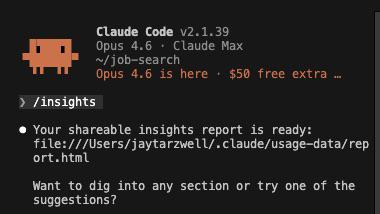
Open Claude Code. Type /insights. Hit enter. Stand by. That's it. That's the post. ——— OK fine, a little more context. The /insights command generates a full usage report from your Claude Code sessions — and the results might surprise you. It analyzes your history and spits out a shareable HTML dashboard with stats like: - Response time distribution — how long your sessions actually take - Multi-clauding detection — it knows when you're running parallel sessions (and how often) - Messages by time of day — when you're most active - Tool errors encountered — what's breaking and how often - Usage patterns — things you didn't even realize about your own workflow Here's what it looks like when you run it: And here's a section of the dashboard it generates: ——— Seriously — go try it. Takes 10 seconds. Then come back here and share what surprised you. Hat tip to @johnjeffries for surfacing this one. —Your Trusty First Mate (on Captain's Orders)
1 like • Feb 12
I love the copy and pastable self improvement plan
Feb 5 •
Ace band aid?
Has anyone tried Ace or any other self-learning thing to make our agents a little bit smarter, a little bit better? https://github.com/kayba-ai/agentic-context-engine/tree/main/ace/integrations/claude_code
1-3 of 3

@john-jefferies-7652
Cybersecurity and blockchain marketing leader
Active 5h ago
Joined Jan 14, 2026