Activity
Mon
Wed
Fri
Sun
Jul
Aug
Sep
Oct
Nov
Dec
Jan
Feb
Mar
Apr
May
What is this?
Less
More
Memberships
AI Automation Society
389.7k members • Free
6 contributions to AI Automation Society

5h •
Claude Code /statusline disappears
The custom Claude Code /statusline I created disappears whenever any other dialog window opens like /context, /usage/, etc. Is this happening for you? Anyone know what to make it persistent? It's so useful to be able to see current context window to know when to /compact and /clear, and know my overall usage.
0 likes • 4h
Here's the prompt that ended up working to make it persistent and beautiful: --- Set up a custom statusline for Claude Code. Create the file `~/.claude/statusline-command.sh` with this exact content: ```bash #!/usr/bin/env bash input=$(cat) model=$(echo "$input" | jq -r '.model.display_name // "Unknown"') effort=$(jq -r '.effortLevel // empty' ~/.claude/settings.json 2>/dev/null) [ -n "$effort" ] && model="${model} [${effort}]" used_pct=$(echo "$input" | jq -r '.context_window.used_percentage // empty') if [ -n "$used_pct" ]; then used_int=$(printf '%.0f' "$used_pct") bar_width=20 filled=$(( used_int * bar_width / 100 )) empty=$(( bar_width - filled )) bar="" for i in $(seq 1 $filled); do bar="${bar}▓"; done for i in $(seq 1 $empty); do bar="${bar}░"; done if [ "$used_int" -ge 90 ]; then color="\033[0;31m" elif [ "$used_int" -ge 70 ]; then color="\033[0;33m" else color="\033[0;32m"; fi reset="\033[0m" ctx_display=$(printf "${color}[%s]${reset} %d%%" "$bar" "$used_int") else ctx_display="Context: no data yet" fi cwd=$(echo "$input" | jq -r '.workspace.current_dir // .cwd // ""') short_cwd=$(basename "$cwd") five_pct=$(echo "$input" | jq -r '.rate_limits.five_hour.used_percentage // empty') rate_str="" if [ -n "$five_pct" ]; then week_pct=$(echo "$input" | jq -r '.rate_limits.seven_day.used_percentage // empty') rate_str=" | $(printf '%.0f' "$five_pct")%" [ -n "$week_pct" ] && rate_str="${rate_str} / $(printf '%.0f' "$week_pct")%" fi git_branch=$(GIT_DIR="$(echo "$input" | jq -r '.workspace.project_dir // .cwd // ""')/.git" git --no-optional-locks symbolic-ref --short HEAD 2>/dev/null) [ -n "$git_branch" ] && branch_display=" @${git_branch}" || branch_display="" printf "%s\n" "${model} | ${ctx_display}${rate_str} | ${short_cwd}${branch_display}" ``` Then make it executable: `chmod +x ~/.claude/statusline-command.sh

💎
⭐
8h •
What do you get if you upgrade to AIS+?
Some of you have never heard of the AIS+ community. Others have but the part that trips you up is the actual difference between the two. Either way, this post will give you clarity. This free group is a bundle of quick resources pulled from my YouTube videos, plus a massive open community that anyone can join. It's a great place to get your bearings and see what's possible. But it's open to everyone, it can be noisy and overwhelming, and there's no path through it. You can get help from other members, but I rarely answer questions here. AIS+ is the opposite: - A step by step roadmap with a clear order, so you're never guessing what to do next - A much smaller community of people who are seriously committed to building and selling AI agents - I answer questions every day and run a weekly Q&A call where you can get direct access to me For the course material: The roadmap takes you from zero to building and selling AI agents, and the whole thing is built on the latest tech like Claude Code and Codex. We update it constantly. The old n8n material has been archived. It's still there if you want it, but it's no longer the focus, because the way you build today has moved on and the courses moved with it. Here's the actual roadmap inside, in order, with when each piece opens up: 1. Start Here (opens the moment you join). Gets you oriented. How the community works, the path ahead, and how to get help when you need it. 2. Build Your Portfolio (opens the moment you join). Why a portfolio matters, beginner level tutorials, and what types of projects to focus on. You end up with real work you can show a client. 3. Claude Code (opens the moment you join). This is now its own dedicated course. Build faster, turn ideas into working automations, and go deep on the tool serious builders are using right now. This takes you from beginner to advanced, step-by-step. 4. Get Your First Clients (opens after 30 days). Getting your first clients is hard, because you don’t have any case studies yet. So, we analyzed all of the success stories from our members and found they get their initial clients with two different techniques: warm outreach and Upwork. So, we teach both techniques in detail with exactly what to say, exactly how to position yourself when you have no proof.
5 likes • 6h
Thank you for putting this together

2d •
Help with LLM Wiki or other memory/context systems
Hi guys, has anyone implemented the LLM Wiki by Karpathy in their AI system? I would be super interested in understanding how you're using it. I mean, you don't necessarily have to share the steps as I think that is outlined in the Wiki itself, but I'm more interested in understanding the different use cases for how you're using it. Or it would also be really useful if you're using different systems that you think are better. I'm really interested in having more context around certain topics and longer-term memory for my conversations and my work.
2 likes • 15h
Yes, I am using the Karpathy LLM Wiki to help me learn things! I compile all documents, transcripts, and resources about a particular topic to extract the concepts. I will then query on top of this directory using Claude Code to ask questions that deepen my understanding, generate artifacts for learning or real-world use, and as context for more informed decisions in agentic flows.
2d •
Looking for Knowledge Base Ideas
Hi guys! I'm really interested in building different types of knowledge bases. For example, I have a bunch of courses around a specific topic that I'm very interested in, and I would like to create a knowledge base that is all about that topic, those courses, the key concepts, the frameworks, the learnings, everything that is around those topics. So that whenever I work in that, I have the knowledge to pull from. What are you using? Has anyone built something similar? I looked into the LLM wiki by Karpathy, and that seemed like a useful thing. Other people have suggested Notebook LM, but it seems to me harder for claude to have access to. Has anyone created these kinds of knowledge bases and how are you using it to feed into your AI system, or what are your different use cases? I would be super interested to learn more. Thank you so much! 😄
0 likes • 16h
I have been using both depending on the topic of learning! Each one has their strengths... NotebookLM in my understanding is a Vertex vector database on the backend, so imagine a RAG used for a high data-volume company database where data integrity is important. Expect responses like "Here's is the answer according to this document at this time..." It tries to remain as neutral and objective as possible according to the data. Karptahy's LLM Wiki knowledge base relies on extracting concepts from multiple sources, finding themes, pruning orphans, and resolving contradictions. It acts more like a self-learning agent over time. I use this kind of system when I am trying to understand concepts and strategies rather than nailing down a specific fact with a single answer.

16h •
Day 1 Challenge Completed
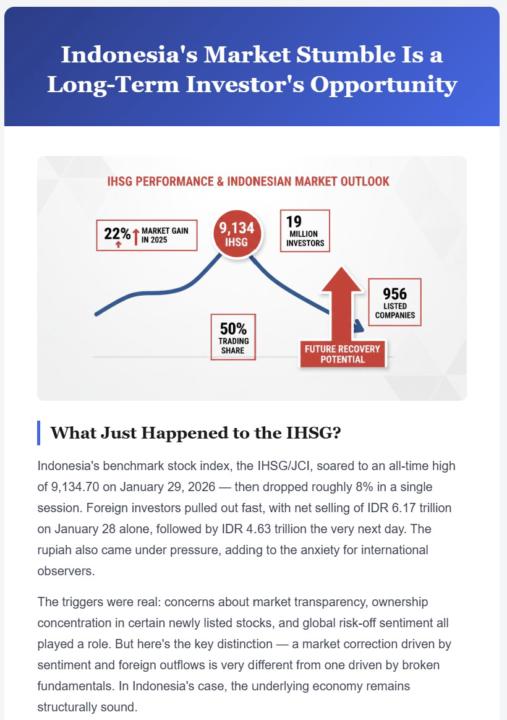
it said day 1, but it took me several days to find time between my day job and create a newsletter. The topic is Indonesia Stock Market. It feels good knowing that I can make something like this (I have no designer or journalist background). But when I read it, I feel like it is generic and need improvement. Now I understand that AI is not just giving instruction and everything just falls into place. Any feedback is welcome. What parts could I do better, or what kind of prompts should I give the AI to get better results? #AISChallenge
0 likes • 16h
Wow great job!
1-6 of 6

Active 4h ago
Joined Jun 2, 2026
Powered by