Activity
Mon
Wed
Fri
Sun
Aug
Sep
Oct
Nov
Dec
Jan
Feb
Mar
Apr
May
Jun
Jul
What is this?
Less
More
Memberships
DP
Digital Product Creators Club
767 members • Free
Asset Academy™
307 members • $96/month
Auto Builder Kit
2k members • $97
AGNZY
299 members • Free
7-Figure CashFlow Biz™
823 members • Free
Local AI Visibility Central
418 members • $49/month
3 contributions to Digital Product Creators Club

May 14 •
TB Book Writer: Final Product Downloads
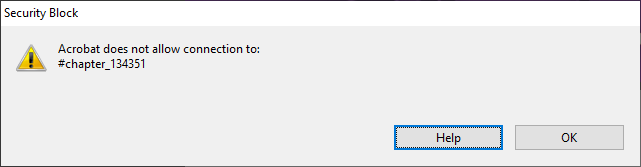
I have some questions/feedback regarding the final output files in TB Book Writer. I just used it for the first time, and I'm seriously impressed! To my issues: 1. When I download the PDF output from the writer, I can see that it provides all the appropriate bookmarks and whatnot (I'm using Adobe Acrobat to view). There are even what appear to be blue underlined internal links within the text. Clicking on those blue links doesn't appear to do anything. It doesn't whisk you away to elsewhere in the document like sometimes they do in other publications. Is this by design? 2. The PDF's TOC is also a series of internal links within the document, intended to bring you to the opening page of each section as listed. When I click on any link in the TOC, I get an error message, as seen in the capture below. Is this a TextBuilder issue or an Acrobat issue? Do others' readers properly handle these internal links? Any suggestions as to other readers if Acrobat is just a cruddy reader for PDF? I believe they pioneered it way back in the day, but that doesn't mean they're the best. 3. When I download the DOCX file output, there is one blank page at the very beginning followed by a few pages that just have a whole lot of dots on them, as shown in the second photo (maybe dot leader artifacts from a table of contents section that didn't get rendered right?). I am using Microsoft Word 365 (the picture is taken in Reading View). I'm sure that's not how it's supposed to look. Thanks!!
1 like • May 17
Hi, @Zigmars Berzins. I don't know why, but I "regenerated" the PDF of my book, and it appears that all three of the issues I cited above are still affecting my outputs. Is there something more I need to do on my end to essentially allow the generation engine to wipe the previous issues clean from the source? Maybe that's it. If I'm missing something, please let me know. Thank you, kind sir.
1 like • May 28
Hi, again, @Zigmars Berzins. Upon regenerating my PDF and downloading all three file formats, it would currently appear that Item #2, above (errors in the TOC), is resolved. The other two points, however, remain. There are still blue underlined links in the body text of the PDF that don't go anywhere, and in the DOCX, the first page is still blank and the TOC just appears to be a bunch of dot leader placdeholders. I may be wrong, but I believe you mentioned somewhere that the cover image(s) would not appear in the DOCX, as it's supposed to essentially be text output, but the dot leader placeholders still aren't coming together in a cohesive TOC. Thank you sir! Jayson

May 18 •
Introducing WorldGraph: Your Novel's Internal Memory
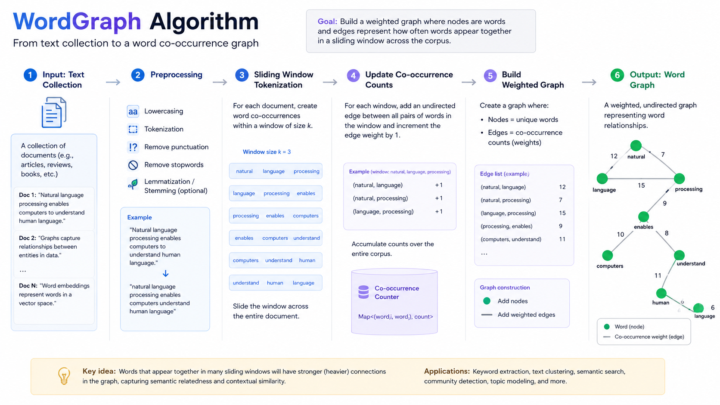
The continuity problem every AI writer faces If you've used AI to draft long fiction, you've probably seen it happen: - Chapter 1: "David, my husband, who passed away six years ago…" - Chapter 2: "David waved from across the street, fixing his truck." - Chapter 3: "Walter, my husband, refinished this clock the summer before he died." Three different versions of the same character in three chapters. AI models are remarkable at writing prose, but they have a well-known weakness: as a novel grows longer, the model forgets what it established earlier. Dates shift. Ages change. Dead characters quietly come back. The central premise itself sometimes morphs into a slightly different story. This isn't just an aesthetic problem. A novel that contradicts itself is a novel readers stop trusting on page one. We've spent the last several months building a solution. Today we're shipping WorldGraph — a behind-the-scenes memory system that watches your novel as it's written and locks in the facts that matter. What WorldGraph does WorldGraph runs alongside your fiction generation in three quiet stages. 1. Bootstrap (once per book) Before your first chapter is written, WorldGraph reads your Story Bible and extracts every named character, location, object, and concept into a structured entity database. It also synthesizes a short Plot Anchor — a 2-3 sentence crystallization of your novel's central mystery or conflict. This anchor is locked in for the entire book. 2. Lock generation (per chapter) Every chapter generation includes a real-time injection of canonical facts — the dates, ages, relationships, and specifics already established in prior chapters. The AI sees these facts at both the top and bottom of its instructions, so it can't quietly drift away from them. 3. State sync (after each chapter) After your chapter is written, WorldGraph scans the prose, extracts any new facts (a character's age, a location's name, an event's date), and either auto-applies them to the canonical record or flags contradictions for your review.
2 likes • May 18
I thought the "Deus ex machina" thing was cute, myself. 😂
May 13 •
TB Book Writer: Design Editor
Am I to understand that some of the available book covers are not designed to be able to accommodate a subtitle? I'm using the first one in the list (the purple one with the wavy lines), and when I tap on "Subtitle," nothing appears. I'd have expected to see a text box similar to when I tap "Paragraph," but that isn't what happens. The editor makes it appear like I should be able to add one, but I'm just confirming that this isn't the case here. Am I correct?
0 likes • May 14
@Zigmars Berzins Thank you good sir, and much appreciation for what you do.
1-3 of 3

Active 1d ago
Joined Mar 24, 2026
Fairfield, Ohio