Activity
Mon
Wed
Fri
Sun
Aug
Sep
Oct
Nov
Dec
Jan
Feb
Mar
Apr
May
Jun
What is this?
Less
More
Memberships
Clief Notes
40.7k members • Free
3 contributions to Clief Notes

3h •
Building my own private ChatGPT/Claude
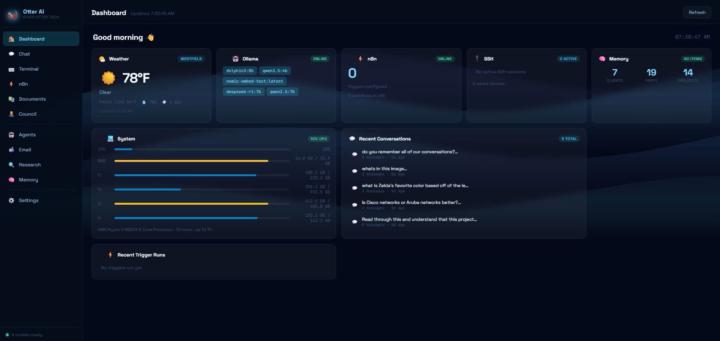
🦦 Otter AI Project, Building My Own Local AI Dashboard! Over the past month or so I've been building something I'm really proud of which I call Otter AI, a fully self-hosted AI command center that I built from scratch for my own personal use. The idea? A private, local alternative to ChatGPT or Claude that runs entirely on my own machine. No subscriptions, no data leaving my network, no cloud dependency. Just a powerful AI dashboard built exactly the way I want it. ✅ What's built so far: • Multi-turn AI chat with streaming, voice input, and file/image uploads • An integrated suite of terminals connected to your device such as PowerShell, CMD, and SSH with Cisco switch and Ubiquiti Dream Machine Pro support as well as other devices. • Gmail integration with AI email summaries and draft replies • Multi-persona AI debate panel with the ability to create new personas (yes, I made Moobly the Greedy Goblin and Aldric the Arcane Sysadmin to argue about how to solve my IT problems) • Deep research mode that autonomously searches the web and writes cited reports • RAG document indexing, the AI can read and reference any files I give it and past conversations. I uploaded all of my conversations with ChatGPT and Claude into it to get it up to speed. • n8n workflow automation integration • Full settings panel with 16 color themes, custom branding, and voice input • Weather widget, draggable and customizable dashboard, and a ton more 🔜 What's coming next: • Electron packaging, turning it into a real .exe desktop app • Client Manager panel for MSP work • Script library for PowerShell/bash • Image generation support • Multi-user profiles so friends can run their own instance The goal is to eventually package this up and include a how to document to setup some other dependencies so anyone can run their own private AI dashboard, no technical knowledge required. Built with Node.js, Ollama, SearXNG, and a lot of late nights ☕
0 likes • 3h
@Jerami Rinaldi it’s designed to be run off of a higher end desktop or server. I’m running off of a laptop just fine for now with a pretty low end llm though. The beauty of this tool is you can choose from several different llms. Right now I’m mostly using Qwen3.5:4b personally but you would be able to connect any llm your device could run. The more powerful the machine the better llm you could host. I’ll copy paste the equipment requirements draft I’m working on here for you. # Otter AI — System Requirements --- ## Minimum Requirements *It will run, but expect slow responses.* | Component | Minimum | |-----------|---------| | RAM | 16 GB | | CPU | Intel Core i5/i7 (8th gen+) or AMD Ryzen 5+ | | Storage | 20 GB free (SSD recommended) | | GPU | Not required — CPU inference works | | OS | Windows 10/11, macOS 12+, Ubuntu 20.04+ | At minimum spec, expect 3–5 tokens/second on a 7B model. Deep Research runs may take 20+ minutes. --- ## Recommended Requirements *Good experience — similar to Jason's current setup.* | Component | Recommended | |-----------|-------------| | RAM | 32 GB | | CPU | Intel Core i7/i9 or AMD Ryzen 7/9 (2020 or newer) | | Storage | 50 GB free SSD | | GPU | NVIDIA RTX 2060 or better (6 GB+ VRAM) | | OS | Windows 10/11, macOS 12+, Ubuntu 20.04+ | Runs 7B models fast on GPU. 14B models work at acceptable speed. Good for daily MSP and productivity use. --- ## Ideal Requirements *Best experience — fast responses, large models.* | Component | Ideal | |-----------|-------| | RAM | 32–64 GB | | CPU | Intel Core i9 or AMD Ryzen 9 | | Storage | 100 GB+ NVMe SSD | | GPU | NVIDIA RTX 3090/4090 or AMD RX 7900 XTX (24 GB VRAM) | | OS | Windows 10/11, macOS 13+, Ubuntu 22.04+ | Runs 14B–34B models fully on GPU. Fast responses, higher quality outputs, longer context windows. --- ## Dedicated AI Server Option *Best value for running Otter AI 24/7 without impacting your main PC.* A mini PC like the **Beelink SER8** (~$550) running as a dedicated AI server is highly recommended.

18d •
Friends! Welcome my brother and maybe help with some local LLM tips 🙏
My brother @Jason Roy is now a member of the community! Please give him a warm welcome. He is looking for some help setting up systems with local LLMs as this is currently all he has access to at work. This is one area I have only dabbled with so if anyone can help him out please give a shout!
2 likes • 18d
@M Cook a lot of information there wow! Thank you so much
1 like • 18d
@David Vogel about to make this my desktop wallpaper ty!! 😂
18d •
Sunday Coffee ☕️ #3
Come chat about your goals for the week! If you are new here, this is a chat room for general talk about the past week and the week ahead. Share what you’re working on and network with others! If you‘ve been here before, you know the drill. Leave a comment below: - What you’re working on - Something you hope to ship - Blockers you’re running into at the moment - Where you’re looking for help currently - Anything else you’d like to share Have fun and enjoy your week everyone! This week’s poll, how do you like your coffee? I love it and brewing my cup on a Sunday morning is a ritual for me which is where the namesake of this series comes from. I am a bit of a snob and brew it myself but how do you make or get yours?
Poll
10 members have voted
1 like • 18d
Currently working on a tool that goes through our completed support tickets, looks at how we actually solved each issue, and then either writes up a new KB article or updates an existing one based on that. Goal is basically to stop losing institutional knowledge every time someone closes a ticket and moves on. Would love to have a rough end-to-end version working by end of week, even if it’s a clunky ticket goes in, KB suggestion comes out after someone reviews and approves it. Biggest headache right now is the tech stack. Everything has to run on a local LLM since we can’t have this touching the open internet, so I’m still figuring out what setup actually performs best without internet access. If anyone’s done local LLM stuff for document analysis or KB generation and found something that works well offline (or a setup that totally flopped), I’d really appreciate hearing about it. Coffee-wise I don’t drink it but I’m a Dunkin Donuts refresher person, hope that still counts lol
1-3 of 3

Active 2h ago
Joined Jun 6, 2026
Powered by