Activity
Mon
Wed
Fri
Sun
Nov
Dec
Jan
Feb
Mar
Apr
May
Jun
Jul
Aug
Sep
Oct
What is this?
Less
More
The Seller's Circle
37
Free
1 contribution to Oleg's AI Lab

Oct '25 •
How I Automated a Client’s Call Workflow
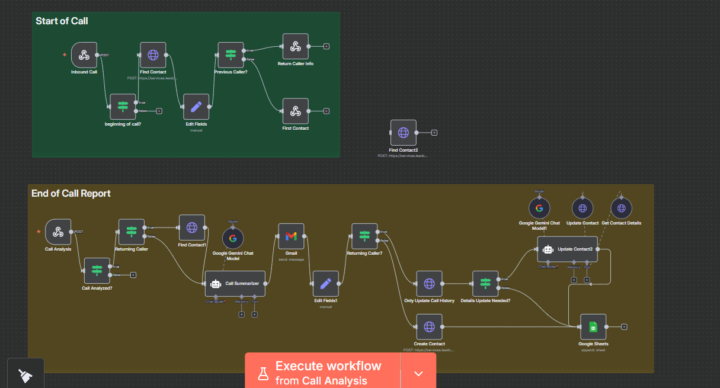
Ever felt like your team spends more time logging calls than actually handling them? That’s exactly the pain my client was facing. Each call meant jumping between spreadsheets, emails, and CRMs—time-consuming and messy. The goal was simple: create a smooth system that tracks calls, updates contact info, and summarizes conversations automatically. Using n8n, I built a two-stage automation—one that handles call intake and another that compiles detailed reports once the call ends. I integrated tools like Google Sheets, Gmail, and Gemini Chat Model, connecting every step with smart logic to detect returning callers and update only what’s needed. One major challenge was ensuring data sync across tools without duplication—but after refining conditions and testing triggers, it now runs flawlessly. The result? The client cut manual admin time by over 70%, with every call summarized, logged, and tracked instantly. They now have more time to focus on what matters—serving customers, not chasing data. If you’ve got repetitive workflows eating up your day, I’d love to help you reclaim that time. Let’s build something that actually works for you.

🔥
2 likes • Oct '25
@Marvellous Adegoke this is cool! Did you use a template for it?
🔥
1 like • Oct '25
@Marvellous Adegoke nice!
1-1 of 1
Active 3h ago
Joined Oct 16, 2025
Puyallup, WA
Powered by