Activity
Mon
Wed
Fri
Sun
Aug
Sep
Oct
Nov
Dec
Jan
Feb
Mar
Apr
May
Jun
Jul
What is this?
Less
More
Memberships
VA Claims Made Easy
2.8k members • Free
Claude Code Kickstart
514 members • Free
AI Automation Society Plus
3.8k members • $99/month
The AI MBA
2k members • Free
AI Automation Society
423.9k members • Free
12 contributions to AI Automation Society

💎
⭐
29d •
400,000 members.
When I started the AI Automation Society, I had no idea it would grow into this. Under two years later and we just crossed 400k. The largest AI automation community in the world. Yes, the space is exploding. But this community grew because you guys keep showing up, asking questions, dropping answers, sharing builds, and helping the person one step behind you. Huge thank you to the team that keeps this thing running, and to every single one of you who's posted, commented, or just been here. I feel lucky to get to do this. So excited to share with you guys what we've been quietly cooking up over here at AIS...👀 - Nate


2 likes • 29d
Congratulations on reaching this milestone. It was certainly well-deserved Especially with all the great content and the passion that you have to share your knowledge.👏
May 29 •
7-Day Challenge - Day 4: Deploying an Automation (a little long post)
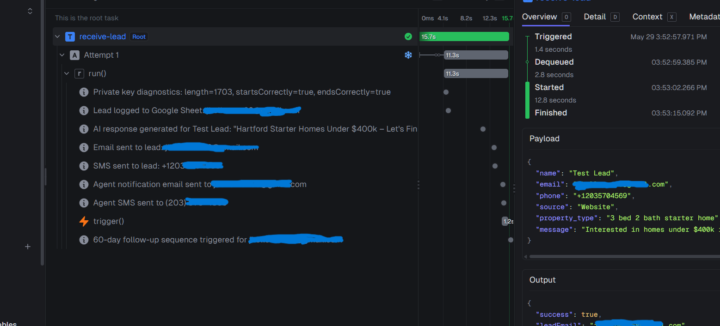
Day 4 is done, and I built something I'm actually proud of! But honestly, this challenge nearly broke me before I truly got started. This was because I spent the last four days trying to get everything set up on an external drive and kept hitting walls. None of the required dependencies would fire no matter what I tried. Turns out the whole thing needed to live on my local drive. Once that clicked, everything opened up. From there, I worked with Claude Code to build out what I'm calling the "First Responder", an AI-powered lead response system built specifically for real estate agents. Aside from Trigger Dev, VS Code and Claude Code, the tech stack that I used to complete this project was: - Twilio (SMS text) - Gmail / Nodemailer (email) - Google Sheets (lead logging) Here's what it does: The moment a lead comes in, within 60 seconds, it sends a personalized AI-written email and text (Twilio) to the lead, notifies the agent, logs everything to a Google Sheet, and kicks off a follow-up sequence. I use the Twilio 7-day free trial, so I couldn't confirm the text messages being sent to my phone; however I will upgrade after the trial ends and confirm that the texts are coming through. I built this in roughly two hours. Compare that to the previous days I lost just on setting up the project up. But here's what really got me. I wasn't just clicking through steps and saying I completed the challenge. I was watching commits get written, pushed to GitHub, GitHub Actions trigger a Trigger.dev deploy, runs succeed and fail in real time. I actually understand how this works now and it's a great feeling!😁 The dental leads finder and the Nate B. Jones video monitor that Nate demonstrated were great exercises, but they made me want to go further and build something that could actually be a working and profitable product. "First Responder" is it. Honest assessment: After verified testing and getting consistent results, I believe that this will be an MVP I could walk into a real estate office with and feel confident in landing an actual client.
0 likes • May 30
@James Sharp I certainly will. You know us James's have to stick together.🙂
0 likes • May 30
@Jay Go We're all in this together👍

May 24 •
Day 3 AIS Challenge
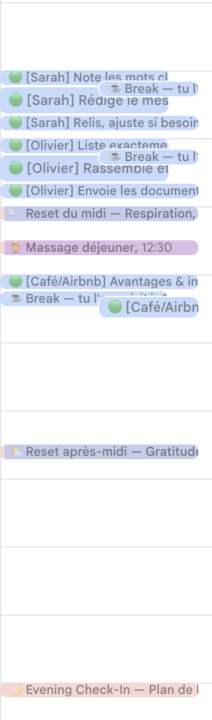
Today I decided to create a tool taht would help me with getting things done having ADHD. The skill helps me divided the big task into little tasks, and put them in my calendar. But I went a bit further, I wanted like a coach interaction with message, so I created a bot on telegram that sends me a message when i have to do a task and also sends me a checkbox every day to check if I've done my tasks. Everytime I tell Claude to help me with a task and run the ADHD skill he helps me with it. Not optimal yet but really enjoyable build this kind of stuff, goal is to build a proper personnal assistant later on!
1 like • May 25
I think it's awesome that you can use AI to help you with a personal challenge of your own. Great job!
May 21 •
7-Day Challenge - Day 3: Learning Skills
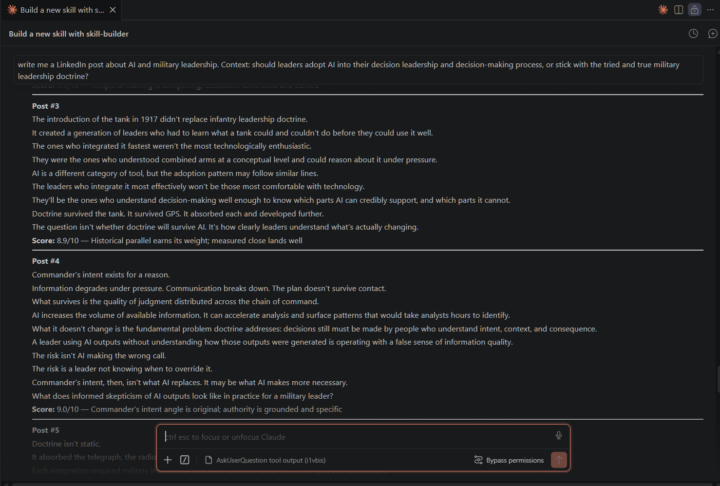
Today I completed the third challenge of learning and working with skills. I had a blast with this one, and the concepts were definitely reinforced. I referred to the list in the module to build the following: Name - linkedin-post Description - Generates 10 LinkedIn posts on any given topic, written in the user's established voice and style. Each post is scored across five criteria, and a ranked summary table follows all posts. Trigger - "Write me a LinkedIn post on/about [Topic] / [Context] The one change I made was updating the formatting and the instructions to conform with the LinkedIn best practices for posting written content. Even though it was the first on the list in the module and it seemed pretty simple, the ideas just kept flowing on how I could expand things further. I am going to build upon this further by adding a LinkedIn image generator skill to generate a single image and a carousel images for the posts produced so that the post can get more engagement with visual content.
1 like • May 24
@Tone Glomstein sure. I created a custom GPT that generates prompts and outputs them markdown formatting. I used it to build a custom LinkedIn Post Writer to write post in my own voice on LinkedIn. In the backend instructions I told it to: "come up with 10 different LinkedIn posts and rate each one of them on a scale of 1 to 10 for its potential to go viral. If a post has very high odds of going viral, I want you to give it a rating of 10. If it's very low, you can give it a rating of 1. I also want you to give me a one-line reason for why you think each particular post you came up with will go viral. I want rationalization for every single post that you come up with. It would be great if you could order the posts in a way that the most viral ones are on the top according to you and give me this output in the table so that it's easy to read." Here's the link to my custom GPT for prompting: https://chatgpt.com/g/g-697e309d30c08191ba42687be42ef743-magic-prompt-builder Just follow the samples in the GPT and see what works for you. I use it for everything that requires me to generate a prompt. I hope it helps you and the community.
1 like • May 24
@Tone Glomstein I generally don't trust the AI with its initial output. That's why I go through a bunch of iterations to get the output that I want. On this forum and in many other courses that I've taken when it comes to AI, it is emphasized that the validation and iterative process is crucial for producing quality incredible results. When I first generated the instructions for my backend, I went through several iterations and eventually removed the virality criteria. I just wanted it to score which post reflected the general idea of the topic more for engagement as opposed to just going viral. I'm sure if you're worried about trustworthiness, you could invoke in the instructions to the AI to cite the source(s) of where it's getting the information from and verify it yourself. Ironically, Nate touched on this in his AI slop post.😀 Great question though!
May 20 •
7-Day Challenge - Day 2: Using an MCP Server
Today I completed the second workflow under the challenge. As with day one, it wasn't that difficult. The biggest obstacle I had to overcome was working out the kinks of setting up the Firecrawl MCP server and deconflicting where and what files the server was pointed to. I'm running Claude Code through VS Code which was causing a conflict between the folder I created for projects on my computer and the folder that was created by Claude Desktop. I ultimately worked things out and was able to get through the tutorial. I really like the use cases and now that I got things up and running I can do away with Scrapebox.
1 like • May 21
@Justin Weschenfelder The best advice I've received since taking this AI journey is to use AI to learn AI. You did exactly just that. Kudos to you!👏
1-10 of 12

@james-holloman-2712
Repurposed Senior Military Leader | Lifelong Learner of all Things
Active 9h ago
Joined Dec 8, 2025
Stratford, CT
Powered by