Activity
Mon
Wed
Fri
Sun
Sep
Oct
Nov
Dec
Jan
Feb
Mar
Apr
May
Jun
Jul
Aug
What is this?
Less
More
Memberships
20 contributions to Midjourney Experience Academy

Jan 16 •
Columbus
I created something I am quite proud of today — a cinematic video of the Nina, the Pinta and the Santa Maria — all in Midjourney. Usually I start in Midjourney and take it into photoshop and fix it there. Then it's over to Higgsfield to use Nano, Kling or the new cinematic video tab. But today, this came together all in Midjourney. Whooda thunk it? The final image prompt: "Wide cinematic low angle shot of the Nina, the Pinta and the Santa Maria at sea with very rough water and large breaking waves, The sails are fully open with a red Spanish cross centered on them, The sky is blue with clouds and dramatic morning light, Rule of thirds, shot with a ARRI Alexa Mini, Epic Cinema." --chaos 10 --ar 7:3 --profile dpi2j1v --stylize 150 I do give @Marshall Atkinson a lot of the credit as I used a bunch of things I learned over the last few months especially not being stingy with the iterations. Also, used the edit tool in MJ instead of Photoshop (with Nano). While the ships looked great, I wanted them smaller but every time MJ could stick another ship in the space I just wanted open ocean. It took a bit of futzing, but I finally got my starting and ending images to create a video from. Next, I went right over to Higgsfield and proceeded to got weird results. I know what I did wrong: I created a smaller version of the original image and when I asked Kling and Nano to make a video, it just scaled the image up which made the whole video look really unnatural. I had to stop at this point as work intruded. Cut to later this evening and I had to fill up with gas. I pulled out my iPhone and decided to generate a video from my image with MJ while I was waiting. I'll be damned if it didn't turn out pretty good AND better than my go-to's for video generation. It's a little fast but I can slow it down in Premiere. Next steps: Take the last frame and add a bunch of Spanish sailors driving golf balls off the side of the ship, A close up of Christopher Columbus with a driver and a telescope, and some other shots. Then stitch them all together to make a commercial I couldn't possibly make 30 years ago when I foolishly pitched it to my boss.

0 likes • Jan 16
@Marshall Atkinson thanks, Marshall!
1 like • Jan 16
@Penny Davis Thanks! 😊
Dec '25 •
Xenomorph IOS App Icon
I had a discussion with Marshall today and we discussed my fascination with the Xenomorph from the Alien universe. Half of everything I prompt is "Xenomorph". So he tasked me with creating an IOS icon for a Xenomorph app. He knew my weakest skill in Midjourney was flat logo graphics, so what better way to learn than to just dive in and do it. I have attached some images from my process. THE FINAL The first image is my final. NOT MIDJOURNEY The second image is what I took into Photoshop (to hack together the pieces and parts) and Illustrator to recreate the new art I refined. This is my comfort level. Could I have prompted this thing closer? Possibly. But this follows my process to iterate and then refine and make more perfect. When I saw this image, I knew it was the direction I wanted to take it. It felt the most "icon" like and was flat and could be viewed easily next to all the other apps on your phone. I just needed it to look more like a Xenomorph and less lke Godzilla. MOOD BOARD I usually start with references so I went over to Cosmos (https://www.cosmos.so/) and searched for logos, logos with animals, monsters, and aliens. I then created a moodboard in Midjourney and tried a bunch of different propmpts. I even used the individual images as references to see what that did. MY ORGANIZE TAB I went through all my previous Xenomorphs to see if any looked like they could work and I re-rolled the ones that I wanted to have another look at. ITERATIONS I really went to town on iterations. Whoo boy! I did not realize how many until I took the screenshots for this write-up. I would go through them and re-roll or vary strong. I did some searches for SREFs for flat graphics and simple shapes as well as just prompting. THE NEXT BEST I included these as the next closest but not really thinking they totally feel appropriate for app icons. So, there is definitely some room for improvement on being more efficient with my prompting and to not shy away from trying out logo ideation in Midjourney moving forward.

2 likes • Dec '25
Just playing around with SREFs today and this just popped out. Figures. 😄
Dec '25 •
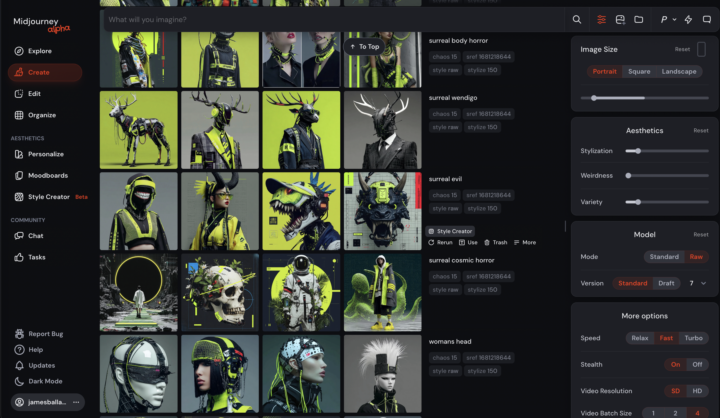
New MJ Interface
Just ranking images and trying out styles and then the interface literally changed in mid prompt. Seems like you can use your image as a prompt for the style creator, the settings now take up the right side of the window. It still only goes up to V7, though. Time to play!

Dec '25 •
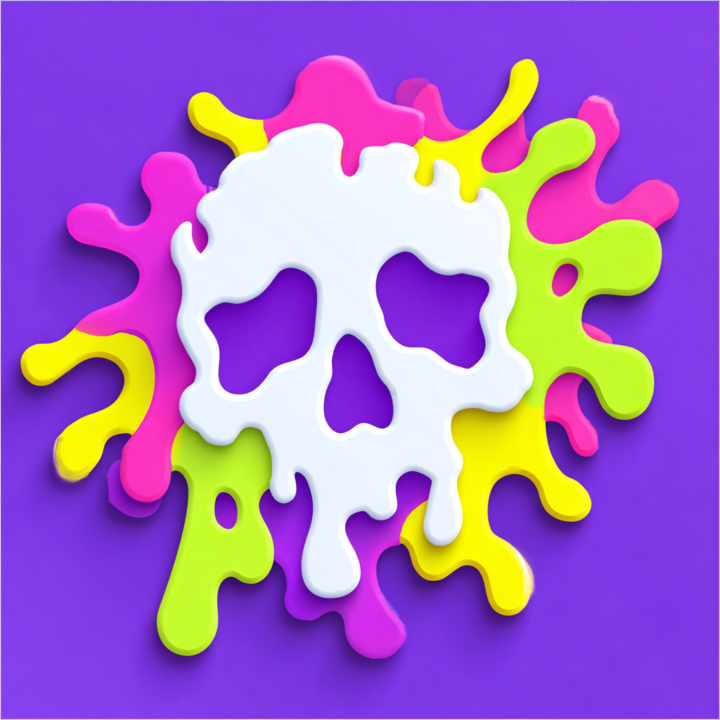
Fun SREF Code
Playing with the Style Creator tool, and found this SREF Code. Prompts: Skull --chaos 15 --sref 4673561034 --stylize 150
1 like • Dec '25
Nineties Nickelodeon vibes!
Nov '25 •
Midjourney Profiles - Let's Follow Each Other!
After you create your profile, please share it in the comments here and we can follow each other. Here's mine: https://alpha.midjourney.com/@marshallatkinson
1 like • Nov '25
Maybe I'm dense but I don't see anywhere where I can search for specific users in MJ. All I can find is a random user button. Hmmmm...
1 like • Dec '25
@Marlon Paul Bruin Sighhhh... I would rather MJ spends more time on kickass updates for version 8, but if it's a simple coding tweak, let's go ahead fix this. Please? Pretty Please?
1-10 of 20
@james-ballard-8443
Designer. Creator. Storyteller. Husband. Father. Dishwasher.
Active 53m ago
Joined Aug 31, 2025
Fort Worth, TX
Powered by