Activity
Mon
Wed
Fri
Sun
Apr
May
Jun
Jul
Aug
Sep
Oct
Nov
Dec
Jan
Feb
Mar
What is this?
Less
More
Memberships
4 contributions to Corporate Automation Library

0 likes • 3d
Thanks for sharing this guide. I’m currently learning how to build workflows and AI agents, so this looks very useful. I’m curious how people here use Claude skills in real projects.

4d •
Kling 3.0 Puppeteering Automation 101
Everyone's showing you how to make one AI puppet video. I'm showing you how to make 100 while you sleep. Yes, the celebrity stuff looks like AI slop. That's the point — it stops the scroll. But that's not the real application. Here's what corporations are actually using puppeteering for: → Training videos with a consistent presenter — no studio, no scheduling → Product demos in 10 languages without hiring voice actors → Personalised sales videos at scale → Marketing content that never needs a camera crew The problem? Everyone's still doing it manually. One generation at a time. Click. Wait. Download. Repeat. We skip all of that. Using the API directly — you queue multiple generations simultaneously. While one renders, the next is already running. What takes 3 hours manually takes 20 minutes automated. Build the dashboard once. Run it forever. That's the difference between learning a tool and building a system. 🟣 Comment PUPPET & I'll send you the free guide
1 like • 3d
PUPPET
12d •
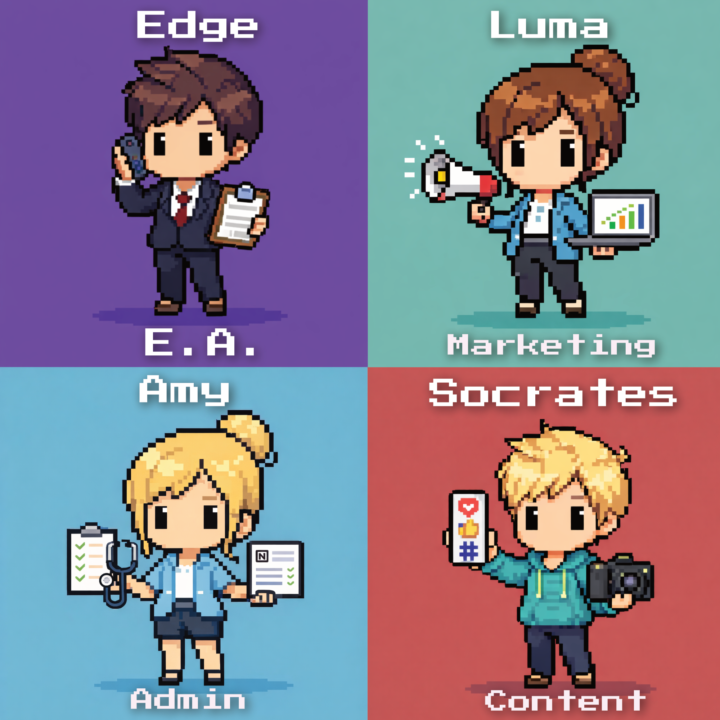
OpenClaw 🦞 agents run parts of my company.
And no its..Not not only dashboards. Not the most optimal prompts. Actual AI employees with roles. I built them using OpenClaw 🦞 so they can work together like a small team. Here’s part of my AI workforce: → Edge — my executive assistant. Handles scheduling, coordination, and ops. → Socrates — my social media strategist creating posts and content. → Luma — running marketing for one of my clients. → Amy — personal assistant helping with health, goals, and life admin. Each agent has a job. Each agent runs automations. Each agent keeps improving over time. This is how I think about AI now: Don’t use AI as a tool. Build AI employees. 🟣 Comment EMPLOYEE and I’ll send you the guide to build your first OpenClaw 🦞 AI employee.
0 likes • 11d
EMPLOYEE
13d •
Kling Motion Control Puppetting demo.
I recorded this in a normal room. Then I turned it into a different “me” in a totally different style, and it still keeps my real eye blinks, facial moves, and clean lip sync. This is the stack: Nano Banana = change the source image (clay, noir, anime, viking, whatever) Kling 2.6 = puppeteer that image with my driving video What it fixes for us: People want to post more video, but the setup takes forever, and most AI avatar stuff looks stiff or the face doesn’t match the scene, so it feels fake fast. With this, you can ship faster and still look alive on camera. Try this for the challenge: - Pick 1 style - Make a 10–20 sec clip - Post it in the group (you’ll level up on the leaderboard) Also drop your thoughts: does this feel like a cheat code, or does it still feel like “you”? 🟣 Comment “SWITCH” and I’ll send the full guide + tech stack + the exact prompts I used.

0 likes • 13d
SWITCH
1-4 of 4
