Activity
Mon
Wed
Fri
Sun
Jun
Jul
Aug
Sep
Oct
Nov
Dec
Jan
Feb
Mar
Apr
What is this?
Less
More
Memberships
AI Twin Society™
1k members • $9/month
AI Prompt Heaven Community
85 members • $15/month
The AI Creator Lab
148 members • $17/month
Design To Dollar Club
92 members • $9/month
101 contributions to AI Prompt Heaven Community

12h •
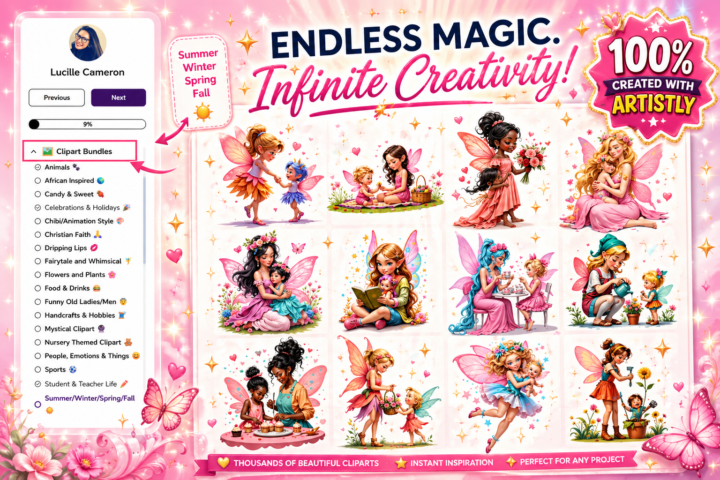
🩷🍭New Vault Drop | I am trying a new Template for Us
Let me know what you guys think of this look?! 🧚 Please go to Vault > Clipart > Summer, Winter, Autumn, Spring

1 like • 11h
Thank you! Love the style!
4d •
Bulk rename tool
Hey, can you create a bulk rename tool that works on Windows? Every time I make a pack, I have to rename the pack and the files one by one. It would be great to have a tool that renames the pack and the files. Maybe something you can create. Don't know if it is possible.
0 likes • 15h
@Kerry Hargreaves I used to work on a Mac but now on Windows again
2 likes • 15h
@Kerry Hargreaves Yes — AirDrop is mainly for Apple-to-Apple, so it won’t work directly to a Windows laptop. For your iPad Pro + Procreate → Windows workflow, these are the best options: Best method: Export from Procreate to cloud storage In Procreate: 1. Open your artwork. 2. Tap the wrench icon. 3. Tap Share. 4. Choose your file type: PNG = best for clipart with transparent background JPEG = smaller finished image PSD = keeps layers for Photoshop/editing .procreate = keeps the original editable Procreate file 5. Save it to Files, iCloud Drive, Google Drive, Dropbox, or OneDrive. 6. Open the same cloud folder on your Windows laptop and download it. Procreate officially supports exporting as .procreate, PSD, PDF, JPEG, PNG, TIFF, and more. My recommendation for you Use Google Drive or OneDrive if you want the easiest Windows workflow. Use iCloud Drive for Windows if you already use Apple storage. Apple has an iCloud for Windows app that lets you access iCloud files on your PC. Fast “AirDrop-like” option: LocalSend Install LocalSend on both your iPad and Windows laptop. It works like an AirDrop alternative across iOS and Windows, using the same local Wi-Fi network. It does not need cloud storage or an account. Workflow: 1. Install LocalSend on iPad. 2. Install LocalSend on Windows. 3. Export your Procreate file. 4. Share it to LocalSend. 5. Accept it on your laptop. USB cable option You can also connect the iPad to your Windows laptop with a USB/USB-C cable and use Apple’s Apple Devices app for Windows to transfer files. Apple’s support page says you can connect your iPhone or iPad, open Apple Devices, click Files, and transfer compatible app files. For clipart bundles For your Etsy clipart workflow, I would export: - PNG for transparent clipart files - JPEG for preview images - PSD only if you need layers - .procreate as your backup/master file Avoid sending through Messenger, WhatsApp, or email when quality matters, because files can get compressed.
17h •
Newbie Here
Hi Everyone, at last I got in the community, I think I was definitely doing something wrong😂, Lucille helped me ( thanks Lucille). I'm new here from the Uk, as a child I lived in Zimbabwe (when Zim was called Rhodesia) showing my age now! I'm loving the prompt heaven and sparkbot and I'm hoping to get more sales in my shop.
2 likes • 16h
Welcom to the community, great to have you here!
2d •
🍭🌸ClipArtSpark BOT Thread | Show me what You have been busy with!
This is my ENTREPRENEUR FEMININE SPRING BUNDLE created in a couple of minutes. Tool Used: ChatGPT 2.0

6 likes • 2d
Whimsical Sea Life Clipart
2 likes • 17h
@Lucille Cameron Yes in ChatGPT 2.0.
1d •
ChatGPT acting weird
Quick question for you all, and I would love your honest opinion 👀💕 So you know how ChatGPT has been a bit funny lately and keeps generating images even when you didn't ask it to. Did you have this problem too? I hope they fix it soon, it's annoying.
0
0
1-10 of 101

Active 3h ago
Joined Feb 25, 2026
Bulgarije