Activity
Mon
Wed
Fri
Sun
Oct
Nov
Dec
Jan
Feb
Mar
Apr
May
Jun
Jul
Aug
Sep
What is this?
Less
More
Synthesizer
47k
5.0
Free
Mentalidad millonaria
223
Free
The Next Level
2.4k
Free
Automation-Tribe-Free
4.6k
Free
Cold Email Accelerator
1.1k
Free
Claude Code Club
8.2k
4.9
$9/m
Luke's AI Group
2.4k
Free
AI Automation Agency Hub
334.8k
Free
14 contributions to Learn Automation and AI
Aug '25 •
Accountability ✅
One of the best ways to stay consistent is having others to keep you accountable. It's something this community does for me already but I still have room for improvement. If you want to join me, I'd like to try out Accountability Posts. Super simple: 1. State your goal (daily, weekly, or monthly — up to you). 2. Post updates regularly (what you did, what you learned, or even what you struggled with). 3. Encourage others — a quick 👍 or comment goes a long way. I’ll be posting my own updates here too. I have a running goal of at least one YouTube upload per week so that's still pending. If you're interested in joining, drop your first goal below ⬇️


1 like • Sep '25
Hey everyone! Quick update on my goal: I've hit 30 videos already, which means I'm 30% of the way to my goal of 100! I'm also working on building a complete automation system for my content creation. The first part was the n8n YouTube upload template that I found right here in this community ( Thanks @Jay Peters ) which has been a huge help. My next step will be to integrate a new AI image API ( nano 🍌) to automatically generate thumbnails from my video stills. Check out the channel and let me know what you think! https://youtube.com/@alejandr0river4444?si=PIt-PofBGXAbh1u7
0 likes • Mar 10
@Lana S 🔥
Jan 13 •
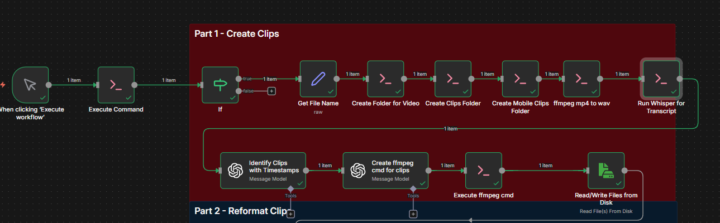
Technical Breakdown: Optimizing n8n + Whisper + Docker for Clipping on Limited Hardware 🛠️🤖
Hey community! I wanted to share my "post-mortem" after implementing the local Long-form to Short-form clipping workflow. If you aren't running a NASA-level workstation, this breakdown is for you. 💻 The Testing Stack (Low-Spec Challenge) - OS: Windows 11 - CPU: Intel Core i5 10th Gen - GPU: NVIDIA MX (Legacy architecture / Limited CUDA support) - RAM: 8 GB (The real bottleneck) ⚠️ Main Technical Friction Points 1. VRAM & RAM Exhaustion: With only 8GB, the system chokes quickly. The legacy GPU couldn't handle heavy models, forcing the execution to fall back to the CPU. 2. n8n Node Versioning: The Read Binary Files (v2) node presented several compatibility conflicts. I had to manually adjust the buffer logic to prevent the workflow from crashing. 3. Docker & Local Networking: It’s not "plug & play." To get n8n communicating correctly with your video processing containers, you need a solid grasp of Docker volumes and networking. 💡 Key Takeaways & Optimizations - Model Selection (Whisper): My machine couldn't handle the large model. The Fix: I downgraded to the tiny/base model. - FFMPEG is King: I learned more about codecs and video manipulation this week than in the last year. You will have to get your hands dirty with custom FFMPEG commands to adjust resolutions and bitrates. - Beyond Copy-Paste: The template is just a foundation. The segmentation logic requires manual tweaking depending on how the AI detects "silences" or "points of interest." - AI-Assisted Debugging: Don't just use AI for code; use it to find lightweight library alternatives when you hit a MemoryError. 🛠️ Recommendations for the Community 1. Resource Monitoring: Keep your Task Manager open. If Docker hits 95% RAM usage, n8n will likely disconnect. 2. Think Critically: Question every node. Do you really need to process the full video, or can you extract the audio first to save resources? Conclusion: This was a massive learning experience regarding containers and media processing. Don't let hardware limitations stop you—just get creative with optimization.
Oct '25 •
Video: Scheduled Sora 2 Videos
Use n8n, Google Sheets, Google Drive and the HTTP Request node to automate regularly scheduled Sora 2 video generations. Using a Schedule node, trigger the automation to fire daily, even multiple times per day, grab a prompt from Google Sheet and send it off to OpenAI to generate the video. Once it's complete, upload the video to Google Drive and mark that prompt as complete in the Sheet, ready to create the next one the next day. This does require access to Sora 2 which I believe is still requires an invite, but the video AI endpoint could easily be swapped out for Veo 3 or another AI video API service. Let me know if you have question or suggestions for improvements!
1 like • Oct '25
thought love the new Thumbnail styles, It was fire 🔥
Jul '25 •
Video: Automatic Shorts from YouTube Videos | Live Build | Part 3
This is Part 3 in Automating YouTube video to Shorts using self-hosted n8n, Whisper, FFmpeg, and ChatGPT-4o. Finish up the series I'll walk through combining all the clips from Part 2 into one full short, and wrap up that short with some automatic subtitles.
1 like • Oct '25
TIME TO BUILD!!!
Oct '25 •
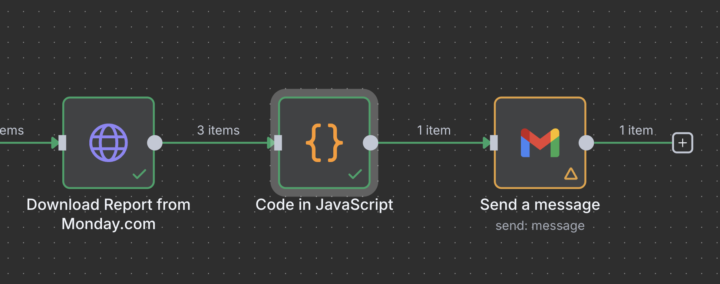
Multiple Binaries! Downloading Files in n8n
I've struggled with this many times now but this one seemed to work. n8n does not play well with multiple downloaded files at the same time, it tends to only want to you one, and only use it right after it's been downloaded. But I finally ran into a script that seemed to work for using multiple downloaded files at the same time. I needed to attach multiple documents to an email, and this code node managed to set it up before the Gmail node and after the download: let binaries = {}, binary_keys = []; for (const [index, inputItem] of Object.entries($input.all())) { binaries[`data_${index}`] = inputItem.binary.data; binary_keys.push(`data_${index}`); } return [{ json: { binary_keys: binary_keys.join(',') }, binary: binaries }]; Running that in a code node after the download allows for a drag and drop of the files that need to be attached in an email. Let me know if you need an example workflow for it!
1 like • Oct '25
[attachment]
1-10 of 14

@isaac-barron-7407
Automatización con IA y Soluciones de Negocio
Active 18d ago
Joined Aug 7, 2025
México city
Powered by