Activity
Mon
Wed
Fri
Sun
Aug
Sep
Oct
Nov
Dec
Jan
Feb
Mar
Apr
May
Jun
Jul
What is this?
Less
More
Memberships
AI Automation Society
423.9k members • Free
AI Automation Agency Hub
328.7k members • Free
AI With Anushka
1.6k members • $23/month
AI Automation Skool
2.4k members • Free
AI Automation Club
844 members • Free
The AI Advantage
126.5k members • Free
AI Automation (A-Z)
164.6k members • $7/month
Chase AI Community
72k members • Free
52 contributions to AI Automation Agency Hub

just now •
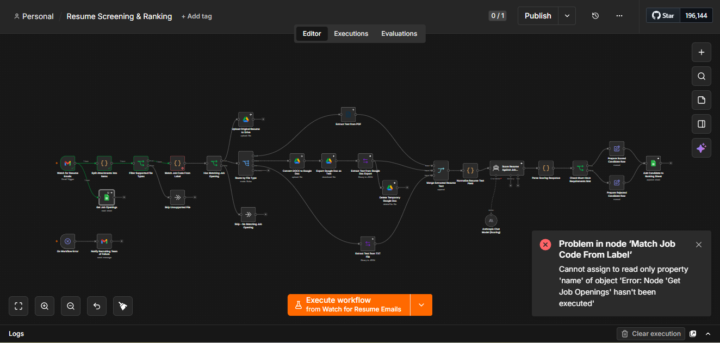
Guys Building Something Incredible "A Resume Screening & Ranking Workflow"
Currently testing it,debugging Errors i will update you properly about it. Wait for tomorrow
0
0
10h •
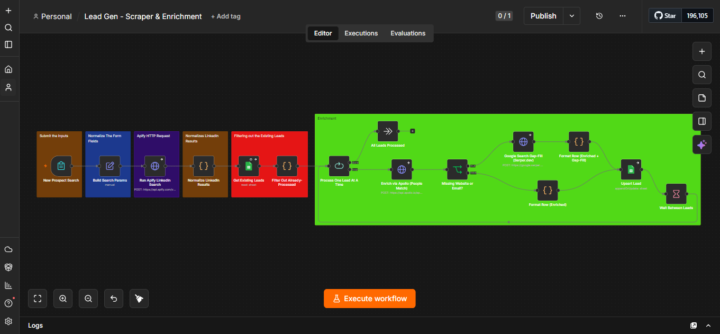
I made My LeadGen & Enrichment workflow More Cost effective for my clients. Here's how👇
So While i was testing my workflow, i found that the dedupe filter is in the Google sheet node where only new leads will be upserted. But the problem was that, let say i have set the lead count limit as 100 per run, so for the first time in the Apify node, It will go and fetch the first 100 people of the Job title, industry etc what you have asked for. But let's say when you run for the second time Then the Apify node will fetch, some of the previous lead also which were fetched in the first run Now in the final output(i.e Google sheet) you will not get the duplicate leads but what it was doing was, the leads which was refetched by Apify was travelling all the way through the enrichment process again which was unnecessarily increasing the enrichment cost (which was already done). So how did i fixed it? Simply just before the Enrichment process i have added Two Nodes In the red box you can see:- ~Get Existing Leads(Google sheet Node) - It will get all the leads existing in the Google sheet. ~Filter Out Already Processed (Code node) - It will match the existing Leads by their LinkedIn URLs and Filter out the matching ones, And only allow the Non Matching Leads for the Enrichment process ahead. So now we have to layers of filters one in the red box and other in the last google sheet node. And this reduced the unnecessary cost and made my workflow Cost effective and more production ready. Did you like my approach? let me know in the comments👇
1 like • 8h
Yeap buddy @Chetan Mishra. Thank you
0 likes • 4h
@Chetan Mishra ✌️
7d •
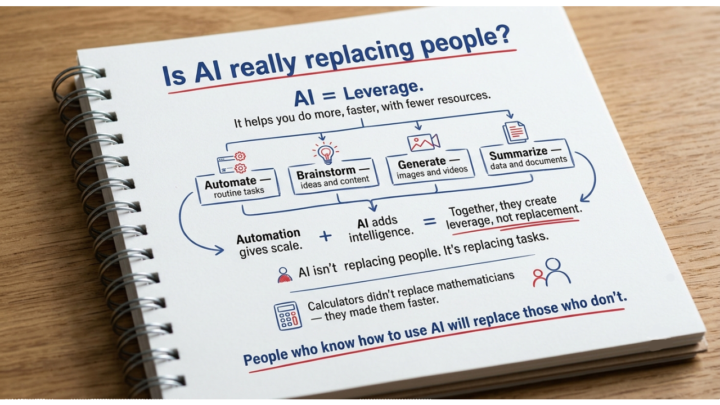
Is AI really replacing people?
What's really happening 👇 The core idea of AI is Leverage, It gives you Leverage- to do more faster, with fewer resources:- ~Automate : Routine tasks ~Brainstrom : Ideas & content ~Generate : Image & videos ~Summarize : Data & Documents Automation gives scale AI adds intelligence together they create leverage not replacement. ~Ai isn't replacing people. It's actually replacing takss. ~Just like calculators didn't replace mathematicians they made them faster. ~People who know how to use AI will replace those who don't. Do you agree? different opinions are most welcomed 👇 Harsh Singh
0 likes • 4d
@Rohan Ramnani hello
0 likes • 2d
@Rohan Ramnani hello
3d •
From today No Manual Lead finding and researching it.
It will blow your mind... You Just have to : ~ Define the target (i.e.You submit job title, industry, location, and company size through a simple form.) Now Just wait, It will : 1.) Search LinkedIn:- Matching profiles are pulled directly from LinkedIn based on your criteria. 2.) Verify & enrich:-Each person is matched against a business database for a work email, phone, and company site. 3.) Fill the gaps:-If anything's still missing, a web search finds the company's official site. 4.) Deliver & dedupe:-The finished row lands in your Google Sheet -updating any existing match instead of duplicating it. For E.g- I will search for Wedding Planner(Job title) , Events (Industry) , Hyderabad (Location), 1-10 (Company size). But I will obviously blur their info due to privacy concerns. NOTE- Right now, i have capped it to 5 lead per run but we can easily scale upto 100,120 leads per run. Please watch the entire video To see the actual result it has generated. Any thoughts ? Please drop it in comments👇
1
0

4d •
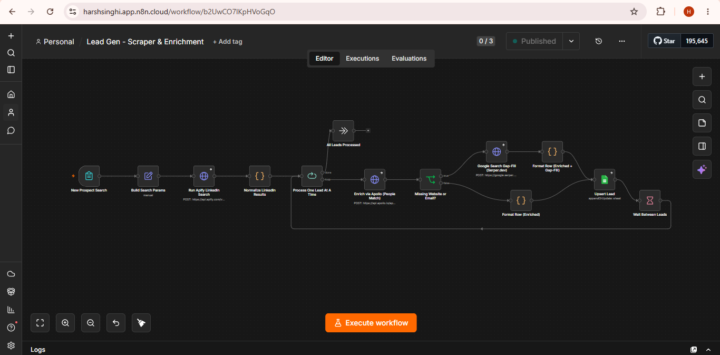
Bye Bye to Manual lead finding and researching it.
Now Imagine An automated pipeline that turns a short prospect description into a verified, ready-to-contact lead list - no manual research required. I Built this "LinkedIn Lead Scraper & Enrichment Workflow" With the help of Claude code. What it does? ~You describe the kind of person you want to reach — job title, industry, location, and company size. ~The system searches LinkedIn for matching people. ~verifies and enriches each one with a work email, phone, and company website. ~fills in any gaps with a web search. ~Delivers the finished list straight into a shared Google Sheet. ~Every contact is deduplicated automatically, so re-running a search never creates repeat rows ,it just keeps existing contacts up to date. The Pipeline:- (Five automated stages run in sequence for every search) 1).Define the target:-You submit job title, industry, location, and company size through a simple form. 2).Search LinkedIn:-Matching profiles are pulled directly from LinkedIn based on your criteria. 3).Verify & enrich:-Each person is matched against a business database for a work email, phone, and company site. 4).Fill the gaps:-If anything's still missing, a web search finds the company's official site. 5).Deliver & dedupe:-The finished row lands in your Google Sheet — updating any existing match instead of duplicating it. Dropping a proper demo video of this workflow tomorrow.. I would like to hear from you guys, feedbacks are always welcomed 👇 Harsh Singh
1
0
1-10 of 52

@harsh-singh-4383
I help Businesses Implementing Ai in the right way & Save their Time, Cut Costs , and Grow
Online now
Joined Jan 10, 2026
Powered by