Activity
Mon
Wed
Fri
Sun
Aug
Sep
Oct
Nov
Dec
Jan
Feb
Mar
Apr
May
Jun
Jul
What is this?
Less
More
Memberships
Corporate Automation Hub(Free)
760 members • Free
AI Automation Society
427.7k members • Free
AI Automation Agency Hub
329.5k members • Free
10 contributions to AI Automation Society

21h •
I built an AI invoice chaser as four n8n workflows, and the most important one has no AI in it
Most invoice automations I see in here are parsers: read the PDF, pull the fields, drop it in a sheet. I built a chaser instead, the follow-up side: who to chase, when, and how hard. The split: 1. Ingest: (Gmail + Airtable + Claude Haiku 4.5). The owner forwards an invoice, Haiku reads the PDF and the fields land in Airtable. Bad scans or missing fields get flagged for review instead of guessed at, and duplicates attach to the existing record rather than making a second one. 1. Decide and draft (a daily cron): This is the important one, and it has no LLM in the decision. A deterministic state machine looks at each overdue invoice (client tier, days overdue, history, how many chases already went out) and returns exactly one action: chase, wait, or escalate. Only after that does an LLM draft the wording, tone-matched to the situation. The model writes the email. It never decides whether to send. 3. Send (one-click approval): The owner approves in Airtable, n8n sends via Gmail with the invoice PDF attached. On every send it also grabs that email's Message-ID and stores it, which matters for the next part. 4. Understand replies (Gmail trigger): When the client writes back, this workflow works out which invoice the reply belongs to and what it means (payment, promise to pay, dispute, question, or unrelated), updates the status, and drafts a response for approval. One note on that first step: parsing an emailed PDF is just one way in. The same pipeline could pull invoices straight from a Xero or QuickBooks API instead of reading a PDF. I started with email because it works for anyone, whatever they invoice with. The part that took the most fiddling was step 4: matching a reply back to the right invoice. I do it by email header, not by AI. When workflow 3 sends a chase,it stores that email's RFC Message-ID. When a reply comes in, workflow 4 matches its In-Reply-To and References headers against the stored ID. Two things I learned the hard way: - Gmail's send response does not hand you the real Message-ID. You have to make a second call to fetch the sent message and read the header off it.

0 likes • 13h
Hey @Jay Feldman Thanks for the heads-up, that's the right fix as of now it's one field, overwritten on every send, so a reply to an older chase falls back to matching the invoice number in the subject. A child table, one row per sent chase, would let the header match search the whole history instead of just the latest. Updated my todo list!
0 likes • 13h
@Goutam Soni Thanks for the message! Good news, that cap already exists: escalation only fires after chase_count hits a threshold (different for new/regular/long-term clients) AND the invoice is 30+ days overdue AND the last chase went unanswered through a full cooldown. It can never escalate cold, even a huge overdue invoice gets chased first, never straight to escalation, that felt unfair to build any other way. Good to hear it matches how you'd have built it. And you're right on References too, that's already the fallback behind In-Reply-To in the header match.

0 likes • 2d
I've used it on more complex tasks, or whenever Sonnet or Opus hit an issue they couldn't fix within two iterations. In those cases it would automatically invoke Fable, and I've seen Fable one-shot the solution. That might partly be because the first LLM had already ruled out two failed approaches. I like Fable, but it's too expensive to run.
May 18 •
Did I build the right thing, or just overengineer a family business problem?
Looking for honest feedback from people who’ve built real systems in n8n. At what point do you decide a business is specific enough to justify a custom build, and at what point do you stop reinventing the wheel and use off-the-shelf software with automation around the edges? Three months ago, this started as one small task for my dad’s business: a daily email showing which supplier and customer payments were due that week, as my first n8n automation real project... He runs a small Italian tour operator for marathon and half-marathon trips, with around 10 to 12 events a year and 900+ quote requests. Three months later, it had turned into a full back-office system on self-hosted n8n + Airtable, and it’s now handling real bookings. Right now, it’s 27 workflows covering quote intake, pricing, quote emails, booking forms, PDF contracts, payment follow-up, booking modifications, error handling, and recovery flows. I didn’t seriously evaluate off-the-shelf booking software before building, mainly for three reasons: 1) The pricing and booking rules felt weird enough that I assumed SaaS might only work through configuration and paid customization, or a pile of workarounds 2) Dad is absolutely non-technical, so I wanted the tool to match how he actually works day to day 3) Honestly, I wanted to know if I could build it That third reason is the one that makes me question the first two. The system fits him well and has cleaned up several messy manual processes. Now everything is in one Airtable interface, arranged in a way that makes sense to him. Does this sound like a fair custom n8n use case, or the kind of problem where the smarter move would have been using an existing quote-to-booking products and only automating around it? I’m especially interested in answers from people who’ve lived through the maintenance side of similar builds, because “I knew I could build it” is exactly the reason I don’t fully trust my own judgment here. I’m still new enough to this stuff that I can’t fully tell where genuine fit ends and build excitement starts.
1 like • May 18
@Erica Walls Thanks, this feels like a fair read. The maintenance cost point is probably the right lens now that it’s live. And not properly evaluating off-the-shelf first is exactly the part I’d be most critical of in hindsight, especially for possible future client work. Regarding the accounting side, we already have Fatture in Cloud in place, so that part will be integrated rather than rebuilt at a later stage.
1 like • May 18
Hey @Hasibul Islam thanks, for your message! A lot of the maintenance points you mentioned are exactly the things I’ve been trying to put in early: global error handling, Airtable logging, and documentation around workflows and schema. The one area where I’d genuinely value your take is consolidation. I deliberately went with smaller single-purpose workflows rather than bigger master chains, because so far they’ve felt easier to debug, retry, and reason about. Shared logic only sits in a few reusable pieces, like pricing and error handling. If you’ve seen that approach become a problem at a certain scale, I’d be interested to know where that usually starts to happen.

May 14 •
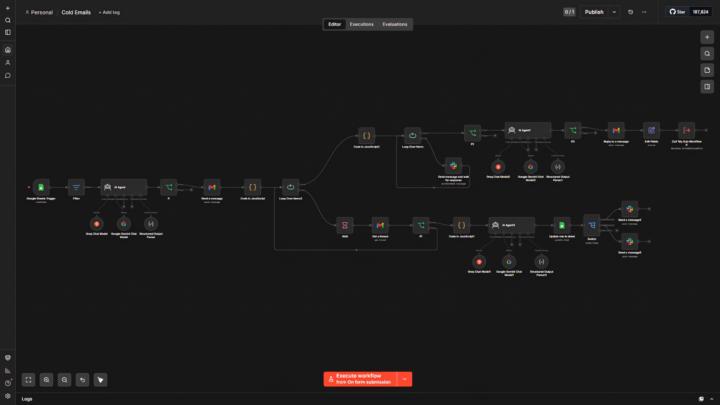
Built a full cold email automation system for myself — here's how it works
Just shipped this after weeks of building and testing. It pulls leads from a Google Sheet, generates AI-personalized cold emails for each agent (name, city, company — all dynamic), and sends them automatically via Gmail. If no reply, it follows up on Day 4 with a different angle. Still no reply, it sends a final breakup email on Day 11 with a Calendly link. The thing that makes it special is human in the loop. It asks permission from me before sending follow-up emails. So I always know what is going on in the pipeline. Every reply gets cleaned, classified by AI (Interested / Ambiguous / Not Interested), and routed to separate Slack channels to notify me instantly. Everything logs back to Google Sheets automatically. Built entirely on n8n — no paid email tools, no Zapier, no shortcuts. Happy to answer questions about it. Also let me know if there is any suggestions about it.
1 like • May 16
Very cool system. I like that it’s not just AI personalization, but actual control over the process. Did you run into any Gmail limits or delivery issues while testing it?
1 like • May 16
@Shihab Sakif Thanks for the heads up. I didn't know about the limit between the personal and the workspace. I recently created a Google Workspace as well. Hopefully, I will soon be able to drive traffic to my website and find clients as you did with some cold email automation systems. The next few weeks will be lots of building and testing!!

May 13 •
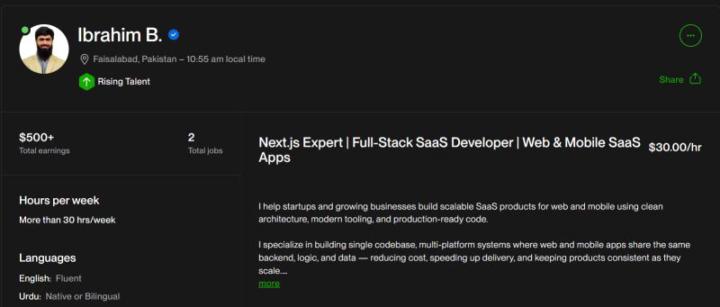
Achievement
Alhamdulillah! I’ve earned the Rising Talent badge on Upwork! Grateful for the amazing clients who trusted me in my journey.
1 like • May 16
Congrats man!!! Hope to receive the same email one day 🚀
1-10 of 10

@giacomo-benedetti-5293
AI automation enthusiast helping businesses turn bottlenecks into systems that run themselves. When I’m not building, I run. Badly, but consistently.
Active 7h ago
Joined Oct 12, 2025
Newcastle upon Tyne
Powered by