Activity
Mon
Wed
Fri
Sun
Aug
Sep
Oct
Nov
Dec
Jan
Feb
Mar
Apr
May
Jun
Jul
What is this?
Less
More
Owned by John David
Sing Better Faster in a Safe Space. Time to Shine. What growth will you have by the end of today?
Purpose-driven people turning what they LOVE into something others Actually want to buy WITHOUT the fear of failure using My Cash In Passion Method.
Memberships
The RoboNuggets Network (free)
57.9k members • Free
Community Launch
15k members • Free
Ai Filmmaking
6.8k members • $7/month
Transformational Sales Cert
643 members • $97/month
Imperium Academy™
69.1k members • Free
🏛️ Coaching Academy
4k members • Free
Content Scalers
851 members • Free
Growers
2.3k members • Free
Business by Faizal Siddiqui
1.1k members • Free
2 contributions to AI Tools + Apps 4 Businesses

Jul '25 •
🚀 and GO! 🚀
I just hit play on my latest Facebook ad campaign, 7 distinctive ads, I’m interested to see which ones are the best performing, 5 day campaigns, will keep you posted!!
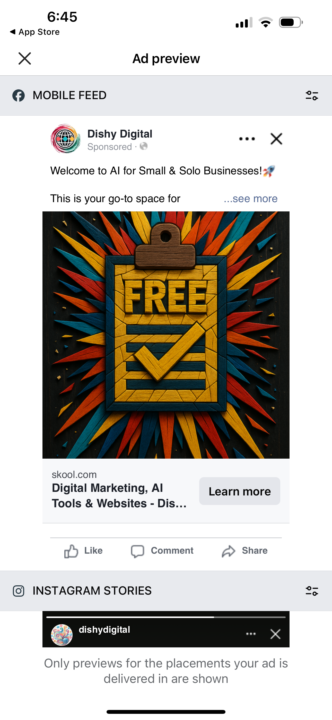

1 like • Jul '25
Exciting stuff!!! Good luck, @Trish Beven
Jun '25 •
🚨📰 Midjourney V7 now available 🤩 👏
Great news—Midjourney has launched its first native video-generation feature in version 7 (currently rolling out), allowing you to animate stills directly within the platform. Here’s a detailed breakdown of what it offers and how you can leverage it for your video content: ⸻ 🎬 What Midjourney v7 Video Can Do • Animate images: After generating or uploading an image, you can click “Animate”, which creates a short video clip—usually 5 seconds, extendable by 4‑second increments, up to 21 seconds total ⚒️ Automatic and manual modes: • Automatic: Applies pre-defined motion patterns (camera or subject movement) with a single click. • Manual: Lets you describe the motion in natural language (“pan right,” “zoom out slowly,” etc.) 🎥 Motion intensity settings: • Low motion: Subtle movement (e.g., only the subject moves). • High motion: Dynamic movement (camera & subject), but can sometimes produce quirky artifacts ⚙️ Capabilities: • Video length: 5–21 seconds • Resolution: Up to 480p • Cost: ~8× the cost of a standard image . • Access: Web and Discord; requires a paid subscription (starts around US $10/mo for basic usage) ⸻ 📊 Strengths & Limitations 📈 Strengths: • Fast and intuitive: Animate in one click or with simple prompts. • Great for simple, single-subject videos—storytelling, promos, social posts. • Unique “high motion” and “low motion” modes let you control style. 📉 Limitations: • Short clips only (max 21 sec). • 480p quality, so not ideal for high-res final outputs . • Expensive for long-form use (Pro tier better suited) • May struggle with complex scenes, multiple subjects, realistic expressions. ⸻ 💡 How You Can Use This: 1. Storyboard Creation Create initial storyboards by animating key Midjourney images. Perfect for visual planning. 2. Social Clips Make 5–21 second motion clips for Reels or Insta Stories that are eye-catching and quick to produce. 3. Brand Enhancers Animate logo reveals, product showcases, or behind-the-scenes visuals with simple camera movement.
1 like • Jul '25
I'm so excited for future AI video creation getting even better like this!
1-2 of 2
@findawayormakeone
Driven? Me too! Have a passion? 🙋 I DO! I've spent 2 decades helping thousands realize their passion. Now I'm expanding to help them cash in on them.
Active 49m ago
Joined Jul 6, 2025
ENTP
DC