Activity
Mon
Wed
Fri
Sun
Jul
Aug
Sep
Oct
Nov
Dec
Jan
Feb
Mar
Apr
May
What is this?
Less
More
Memberships
AI Automation Club
170 members • Free
AI Automation First Client
1.7k members • Free
Ai Titus
908 members • Free
AI Automation Society
381.8k members • Free
DIGITAL EMPIRE
113 members • $39
AI Automation Agency Hub
319.5k members • Free
AI Automation (A-Z)
154.8k members • Free
AI Automation Mastery
29.4k members • Free
AI Automation Agency Ninjas
20.8k members • Free
6 contributions to AI Automation Club

2h •
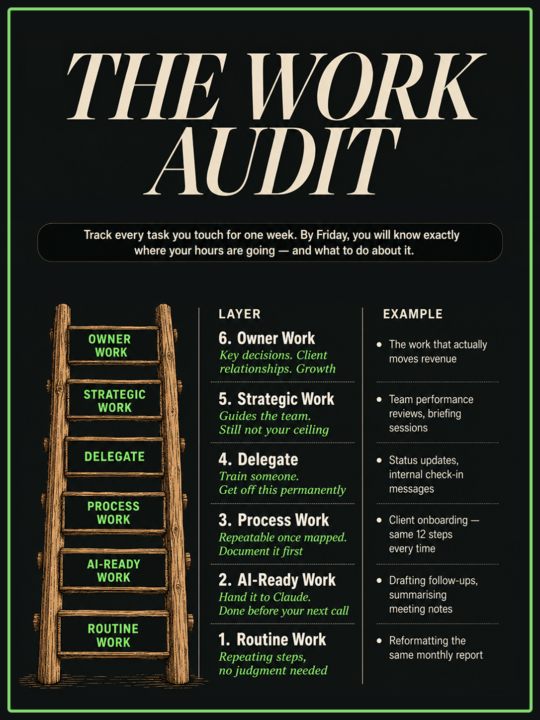
Here's how to fix your calendar in 1 week.
The business is at seven figures. The founder is still doing $20/hour work. Running a seven-figure digital business and still working nights? That is a calendar problem. And you can diagnose it in one week. Here is the exercise. At the end of each workday, write down every task you touched and how long it took. Just the name and the time. Nothing else. By Friday, a founder at that revenue level typically has a list that looks something like this: - Writing new client briefs: 4 hours - Monthly performance reports: 3.5 hours - Client check-in messages and status updates: 5 hours - Internal team handoff notes: 2 hours - Content for the agency's own channels: 3 hours Seventeen hours. In one week. On work that sits outside the actual service you sell. Sort that list into two groups. Work that requires your specific judgment and client relationships. Work that follows roughly the same steps every time. Everything in the second group is recoverable time. Some of it you delegate. Some of it becomes a process. A big chunk of it, you hand to an AI tool today and the hours come back this week. Claude, Grok, whatever is already in your stack. These tools exist precisely for this category of work. I used to build every piece of social content by hand. Writing, designing, formatting. Hours every week. Now AI handles it, trained on my examples and my preferences. It runs at about 90% accuracy. The remaining 10% takes less than 10% of the time the whole thing used to cost. One category cleared. Find yours. The audit takes one week. What you build with the hours after that is the actual business.
2
0
2d •
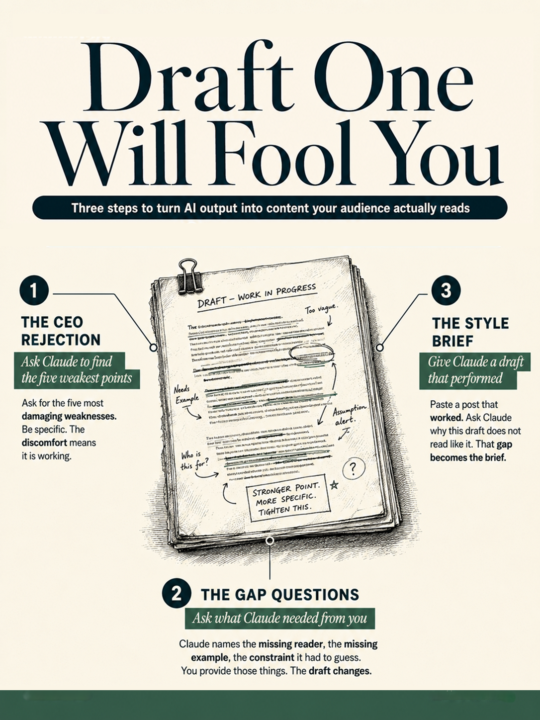
How to write better with AI.
Your AI draft looks polished. That is the problem. Most founders read their AI draft and think it looks good. That is exactly where the post fails. You are the wrong person to judge your own content. You know what you meant. The reader only sees what is on the page. That gap is where weak content slips through. Here is the workflow that removes you from the equation: After the first draft comes back, ask Claude: "Evaluate the draft as a CEO who is trying to reject it. Find the five most damaging weaknesses. Be specific and blunt. Do not soften the critique." The critique will be uncomfortable. Good. That discomfort is the process working. Take that critique. Let Claude rewrite using it. Then ask: "What would you have needed from me to make this draft significantly better?" Claude names exactly what it was missing. The specific reader. The real example. The constraint it had to guess at. You provide those things. The third draft looks noticeably different from the first. This is where most people stop. The optional step is the most powerful one. Give Claude a content draft that actually performed well in production. Paste it in. Tell Claude exactly: "Why does your current draft not read like that one? Copy the style of this example." Treat it like you're the mentor holding up a finished piece and asking why Claude's work does not match it yet. That gap becomes the brief. Claude closes it. The first AI draft is the raw material. The three-step process is how you turn it into something worth posting. Most people stop at draft one. The ones who do not are the ones whose content actually sounds like them.
4d •
4 Simple Fixes for your Claude Sessions
Imagine hiring someone and briefing them from scratch every time they showed up. Before I built these four files, every Claude session started the same way. 500-word prompt. Re-explain who I am. Re-explain what I'm building. Re-explain what I hate. Get a first draft that's close but slightly off. Fix it. Move on. Repeat next week. After: 2–3 lines per prompt. Claude asks me what it needs. I answer. The draft comes back right. One setup session made that switch. File 1: about-me.md Who you are. How you write. How you think. The working identity Claude reads before it does anything. Open Cowork. Use Opus 4.7 with Adaptive Thinking. Prompt: "Build my about-me.md. Interview me with 20 questions via AskUserQuestion." File 2: anti-ai-writing-style.md Every word you ban. Every structure you reject. The tone that sends you back to a blank page. 80% of this file is what you do not want. Claude needs to know your floor before it can find your ceiling. I'll share my own version at the end of this post. File 3: my-company.md Yearly targets with real numbers. Quarterly focus. The decisions already made, so Claude stops suggesting them. Prompt: "Build my my-company.md. 6–8 questions on goals and decisions. Under 1,000 tokens." File 4: global-instructions.md Settings → Cowork → Global Instructions. Paste this exactly: "Before every task, read every file in ABOUT ME/. Never touch OUTPUTS/ or TEMPLATES/ unless I point you to a file. Save deliverables in OUTPUTS/. If unclear, use AskUserQuestion." These files work across Claude Cowork, Claude.ai, Claude Code, ChatGPT, Gemini, Codex. Any LLM you use. Build them once. Carry them everywhere. Four files. One session. Claude already knows you after that. Want my anti-ai-writing-style.md? Comment "ANTI" and DM with me. I'll send it directly.
1 like • 3d
@Muskan Ahlawat
1 like • 3d
@Shiv pratap Singh yeah we all learn at some point.
3d •
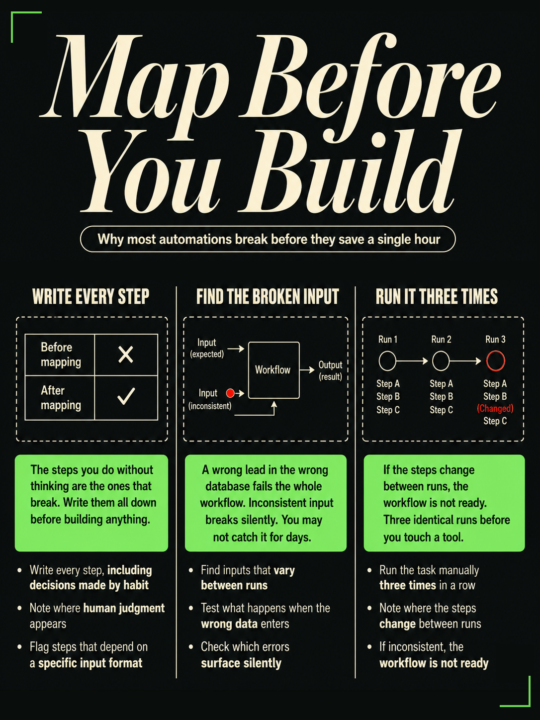
Most automations fail in the first week. Here's why.
Every founder automates the same task twice. Once to build it. Once to fix what the first build missed. The automation looked fine. Notion connected to Slack. The trigger fired every time a row was updated. Summaries went out automatically. By day four, half the summaries were wrong. The rows were being updated three times. When a task was created, when it was assigned, when the status changed. Nobody had mapped that before building. Three days to build. Two weeks to debug. If you are just starting to bring AI and automation into your business, this is the mistake that costs the most time. You automate before you understand what you are actually automating. Before you touch any tool, run this first: 1. Write every step by hand. Every single one. Include the decisions you make without thinking. Those are the ones that break. 2. Find where the input is inconsistent. A wrong lead dropped into the wrong database, one that your workflow was built for a specific lead type, breaks the whole sequence silently. You may not catch it for days. 3. Find the step you skip when you are in a hurry. That shortcut is invisible to the automation. When you skip it manually, the output looks right and is wrong. 4. Run the task manually three times before building anything. If the steps change between runs, the workflow is not ready. A broken workflow automated is still a broken workflow. Map the task first. That step saves more time than the tool does.

🔥
7d •
The final version of my website
Hey everyone 👏🏻 The final version of my website is here , How it is ? And do you need any kind of help to build this type of all about you website for yourself??

3 likes • 6d
really like the tech theme and style. Turned out great
1 like • 6d
@Muskan Ahlawat Cool. Let's see what that looks like
1-6 of 6

Active 2h ago
Joined May 19, 2026
INTP