Activity
Mon
Wed
Fri
Sun
Jun
Jul
Aug
Sep
Oct
Nov
Dec
Jan
Feb
Mar
Apr
May
What is this?
Less
More
Memberships
Clief Notes
27.9k members • Free
10 contributions to Clief Notes

👑
⭐
16d •
☄️New Module: Claude Design and Local Models
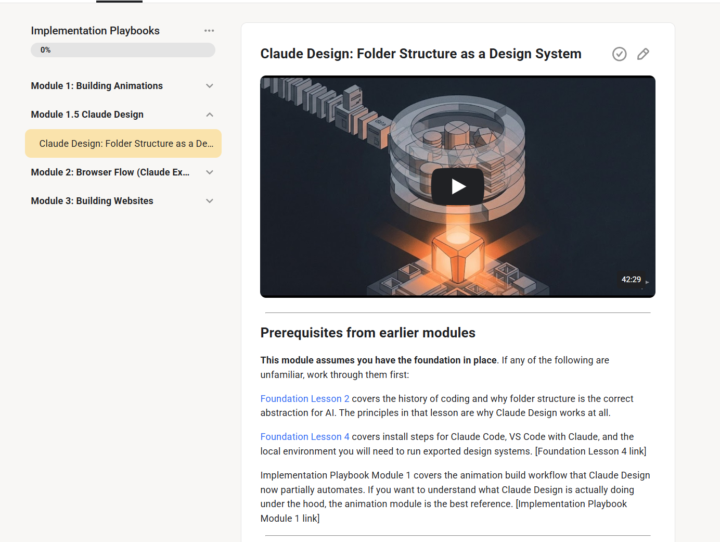
New module just dropped in Implementation Playbooks. Claude Design: Folder Structure as a Design System Anthropic released Claude Design. It builds brand design systems, slide decks, prototypes, and animated content from your existing assets. Underneath the interface it is Claude Code, skills, and a folder structure. If that sounds familiar, it should. It is a refined version of what we have been building in this community. This module covers three things: 1. How Claude Design actually works, what it does well, and where it burns tokens fast. 2. How to export the design system it builds and run it locally in Claude Code or VS Code. 3. *Lightly Touches* on how to swap in open source models like Qwen 3 Coder Next, Code Gemma, Devstral, or DeepSeek Coder V2 when you hit usage limits or want to cut costs. Claude Design is not a replacement for the workflow you have been learning. It is proof the workflow is correct. The people who built Claude Design are solving the same problem with the same tools as you are here. The difference is you now have a head start, because you already understand folder structure, skills, and routing. If you are new here, start with Foundation Lesson 2 for the history, Lesson 4 for the install, and Implementation Playbook Module 1 for the animation builds that predate all of this. Watch the video. Build your own system this week. Post your folder structure in the community. Claude Design: Folder Structure as a Design System - Implementation Playbooks · Clief Notes
1 like • 15d
@Vic S I also have an M4 Pro with 48GB. I am interested on the models that you are running.
1 like • 14d
@Vic S I will give it a try to that model. I've never heard of aggressive models.I had a MLX server with qwen3.5 and it was quite faster than LM studio. I just wiped out my macbook to start clean again. I hope to build something that I can finally use. It's hard to get out of the setup phase when everything else goes so fast.

15d •
How to learn quickly with YouTube and Claude
Hey All wanted to share something I was able to use today that helped me get something done in 20min rather than the usually 2-3 hours. I like to use Youtube a lot to learn new techniques and ideas to use in my work, but that takes a lot of time. I wanted to learn a specific granular synthesis patch to recreate a sound. Under normal conditions: watch the video, rewatch the confusing parts, look up GRM's modulation system separately, rebuild the patch by trial and error. Realistically 2–3 hours before I'm actually working. With this workflow: clipped the video, had Claude reconstruct the signal flow and give me step-by-step instructions, followed them, asked for timestamps twice when I needed to see something visual. I was building the patch within seconds. Here's the breakdown of the workflow pasted from my session summary from claude: --- ## The Problem YouTube tutorials are great but they also take a lot of time to watch and digest. A 45-minute walkthrough covers maybe 20 minutes of usable information, buried in real-time narration, visual demos, and the host's live troubleshooting. To actually *do* what you watched, you still have to reverse-engineer the steps or follow along. But if I'm hunting YouTube for a tutorial for something I need to do right now that's a time sink. --- ## The Workflow Works for any tutorial, any domain. **Step 1: Clip it.** - Use Obsidian Web Clipper to save the YouTube video as a markdown file. The clipper pulls the transcript and metadata into a structured note directly to an Obsidian vault you can work with directly in a chat. - If you store the Obsidian Vault inside your Claude workspace in a directory you can access it with Claude. **Step 2: Have Claude teach it to you.** - Ask Claude to read the transcript, summarize the technique and walk you through it step by step. - you can immediately start working or learning. **Step 3: Execute with Claude on standby.** - If you need calrifcation ask Claude for the timestamp to a specific step. It can point you back to the exact moment in the source video without you having to scrub through the whole thing. It will even give you a direct link to that point in the video.
1 like • 15d
This works for so much stuff on the internet. Thank you!

18d •
Got a government contact? Lifetime VIP for the connection that works
I handle pipeline and partnerships at Eduba, and I'm asking the room for help on this one. We've got a shot at federal funding to run an AI capability-building pilot inside a public sector agency. Same playbook we've used with Pacific Life, Colgate, and KPMG UK, now pointed at the government workforce. The piece we're missing is the partner. State, county, or federal. An agency with legacy pain, a workforce ready to actually use AI the right way, and a leader willing to try something real. This is grant-funded. No procurement cycle, no sales pitch. The agency gets trained, equipped, and supported. We get to prove the model in public with the people who need it most. Timeline is tight. We need a partner locked in over the next few weeks. If you know someone in a state CIO office, a county agency, a federal program, or anywhere a civil servant is losing sleep over their tech stack, DM me. I'll personally work with you to figure out the best way in, whether that's a three-way intro, a short brief I can send you to forward, or a call with all of us on the line. And if the intro you make is the one that lands the partnership, you get lifetime VIP in the community on us. No cost, ever.
2 likes • 18d
Wow. That’s why out of my league, for now.
👑
⭐
21d •
🧪 Take this 2-minute survey.
A friend of ours @Joseph Fioramonti built a tool called Constellations (If you have a watch or attended the first ever afternoon tea session. You'll know who I'm talking about). It measures something most people and most companies get wrong: the gap between what you think you respond to and what you actually respond to. Take it here 👇(also I am NOT getting paid for this and this is not some sponsored thing. Joe does really cool work) https://gen.constellations.app/constellations/survey/d269cab5-coca-cola/skool 📋 How it works: You'll see a grid of Coca-Cola images across two pages. Drag the green (+) dots to the images that make you want a Coke right now. Drag the red (-) dots to the ones that don't. Hit submit. That's it. 🧠 Why this matters: Every day we interact with systems that run on words. Search engines, AI tools, prompts, interfaces. The words we use are becoming instructions. They're becoming code. But here's the problem. If someone asks you "what kind of marketing works on you?" you'll give an answer. And that answer will be mostly wrong. Because desire and language live in different places. You feel a response to an image before you can explain it. You scroll past something or stop on something before your brain catches up with a reason. Constellations measures that gap. The space between what you say you want and what you actually respond to. This is the same problem companies spend millions trying to solve. It's the same problem you'll run into when you build anything that depends on understanding what people actually care about. And it's the kind of thinking that separates people who build things that work from people who build things that look right on paper. Take the survey. @Joseph Fioramonti will compile the results And provide a report shortly! He is an expert in branding and psychology and can come up with some really amazing reports.
3 likes • 21d
I will never see coke ads like a normal person anymore
22d •
12 Weeks. Real Projects. $250K in Prizes. Let's Talk.
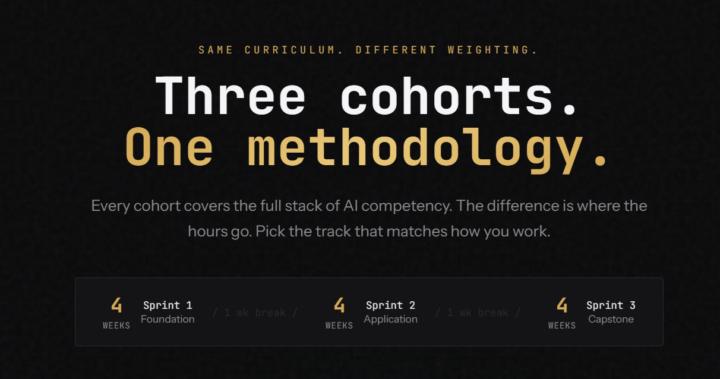
For those who missed the first post or just joined: The Lyceum is a 12-week program we're building. Live instruction from Jake and the Eduba team. Small cohorts. Real projects. You build something from week one, not watch tutorials. At the end, a competition with real prizes. Eduba's first certification, backed by the same methodology we've used to train Fortune 500 teams. Now here's what we've locked in since then. The Structure Three 4-week sprints with a 1-week break between each. Not 12 straight weeks of grind. You build, you breathe, you come back sharper. - Sprint 1: Foundation — Core methodology. Everyone starts here. - Sprint 2: Application — You're building. Real project, real progress. - Sprint 3: Capstone — Finish what you started. Demo day prep. The breaks aren't fluff. They're built in so you can catch up, refine, or just live your life without falling behind. The Cohorts Same curriculum across all three. The difference is where your hours go. Technical — Developers, engineers, technical founders. You're building a tool or production system. 30% of your time goes to Claude Code and integrations. Another 30% to production systems and capstone. This is the builder track. Business — Ops, managers, founders, consultants. You're automating a process or designing a system spec. Heavy emphasis on workflow design (30%) and decision frameworks (25%). You direct the work without writing the code. Creator — Marketers, educators, solo operators. You're building a content production system. One person replaces the team. 25% on content pipelines, 20% on workflow design. This is how you scale yourself. Pick the track that matches how you work. The methodology transfers no matter which one you choose. A 4th Cohort? We're considering adding a team cohort if there's enough interest. This would be for companies that want to enroll multiple employees, or for people in the community who want to form their own team and build together. If that sounds like you, let us know in the comments.
Poll
486 members have voted
2 likes • 22d
lets goooo
1-10 of 10