Activity
Mon
Wed
Fri
Sun
Dec
Jan
Feb
Mar
Apr
May
Jun
Jul
Aug
Sep
Oct
Nov
What is this?
Less
More
Chase AI Community
81.5k
Free
Shipping Skool
253
Free
Samin's Free AI Resource Hub
24.8k
Free
The RoboNuggets AI Network
106.3k
Free
Brand Builders Academy
871
Free
Brand In A Box
941
Free
3 contributions to Shipping Skool

Apr 21 •
opus 4.7 back on openclaw through Claude CLI
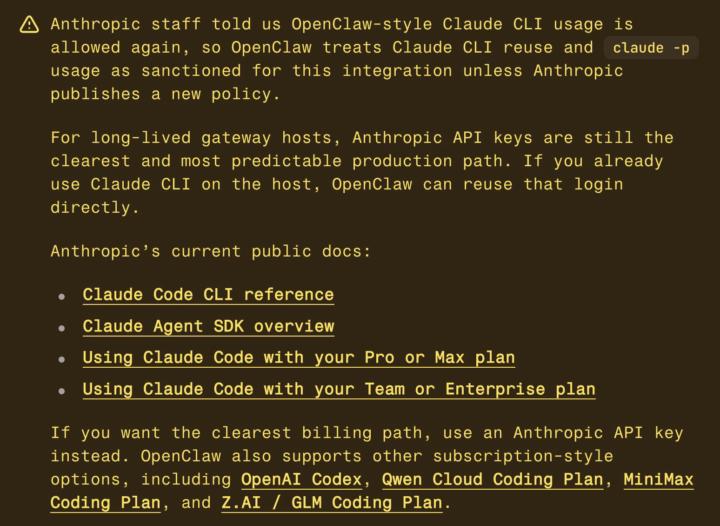
the openclaw api bill just went back to zero for me lol, was paying $1500 this month remember three weeks ago when anthropic said no more subscriptions for third party tools. everybody wrote their hot take. i moved my pipeline to the openai api to cut losses. turns out that story was half right. what anthropic actually banned was openclaw harnesses pulling your oauth token out of claude code and calling the anthropic api directly while pretending to be claude code. fair. that was legitimately bad behavior. but there is a second pattern they did not ban. shelling out to the claude cli itself with dash p. claude code runs the request. claude code handles auth. claude code does the caching. openclaw is just calling the binary. anthropic staff confirmed to the openclaw team that one is still sanctioned. openclaw treats it as official green light unless they publish a new policy. i flipped my main session to it this afternoon. one line in openclaw.json. set provider to claude-cli and mode to oauth. my opus 4.7 sessions are now running through my max subscription instead of the api. no per token bill on the main session. catch: your subscription cap is still real. pro has one, max has one. i hit my 5 hour cap two days ago when the rza cron tried to write a script through it. blew right through my usage window in the middle of the day. the fix was simple. only the main session touches claude oauth. every cron, every coding task, every background job goes to gpt 5.4 on the openai api. that keeps the claude cap for thinking and planning, not bulk content generation. if you dont have claude max, the same pattern works elsewhere. glm coding plan starts at 10 a month, qwen around 28, minimax at 10 for the starter tier. run a local cli, subscription handles the billing, no per token bleed. if your using claude code in your .openclaw workspace folder just tell claude to wire it up for you full video on this drops in 1 hour on yt.

0 likes • Apr 22
I literally spent all day long trying to make it work as you explained on youtube and it just doesn't. You can use it but it just not keeps the context, send it 3 messages and it will already have it's context reset so it's no use
Apr 16 •
how im saving thousands using claude code with openclaw 💰
one thing nobody talks about enough or at least i have not seen it much... is how to actually save tokens when you are running openclaw every day i have been doing this for a while now and the setup that works best for me is keeping claude code completely separate from my main openclaw session here is exactly how i have it set up right now, you should copy if you want to save money imo i have two claude code terminals open at the same time terminal one is pointed at my openclaw workspace folder. that is where all my agent files live. SOUL.md, USER.md, MEMORY.md, all my cron job prompts, skill files, everything. when i need to edit an agent prompt, update a memory file, fix a skill, or change how a cron job works, i do it in claude code, not in my main chat with atlas terminal two is pointed at my mission control folder. that is my next.js dashboard that tracks all my revenue, content drafts, clips, everything. when i need to add a new feature, fix a bug, or update the ui, claude code handles it directly in that folder the reason this saves so many tokens is simple and easy to understand your main openclaw session has a context window. every message you send, every response you get, every tool call that runs, all of it adds up. when you ask atlas to write code or fix a bug inside the main chat, that whole conversation lives in the context window. it compresses eventually but it burns tokens before it does, and it clutters your agent memory with code noise that has nothing to do with running your business claude code works completely differently using your claude subscription. it reads only the files it needs for the specific task you give it. it does the work. it closes. no session history. no context overhead. no lcm compression eating your budget. just the task, done think of it this way. your main openclaw session is your chief of staff. you talk to it about strategy, content, community, what to work on next. that conversation should stay clean and focused
0 likes • Apr 17
And is there anyway that we can configure this behavior by default in openclaw? So if you ask you main to for example change something in your cron that it will automatically delegate it to claude code?
Apr 5 •
Banned for using Claude through CLI with OpenClaw
Hello, I tried using claude on my openclaw through CLI and got banned pretty much instantly. Beware guys if you care about your accounts!
1-3 of 3
