Activity
Mon
Wed
Fri
Sun
Jul
Aug
Sep
Oct
Nov
Dec
Jan
Feb
Mar
Apr
May
What is this?
Less
More
Memberships
Maestro Students
540 members • Free
18 contributions to Maestro Students

5h •
Personal AI
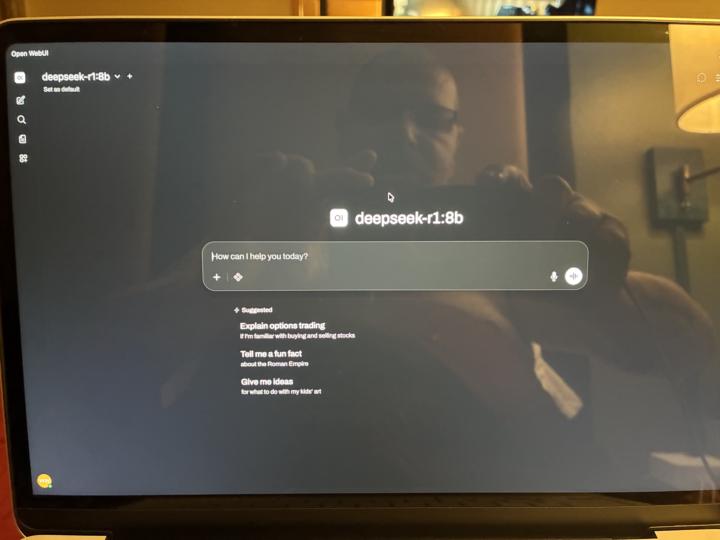
Just set up my own local personal AI. Using ollama underneath with mid ranged deep seek model and running WebUI through docker on local host. Tweaked settings and connected DDGS web engine for real time info. This is freaking awesome lol. It makes creating personal projects with AI private and local.

0 likes • 1h
Cool. What are the computer specks you are using for this project?

3d •
Just a quick tip
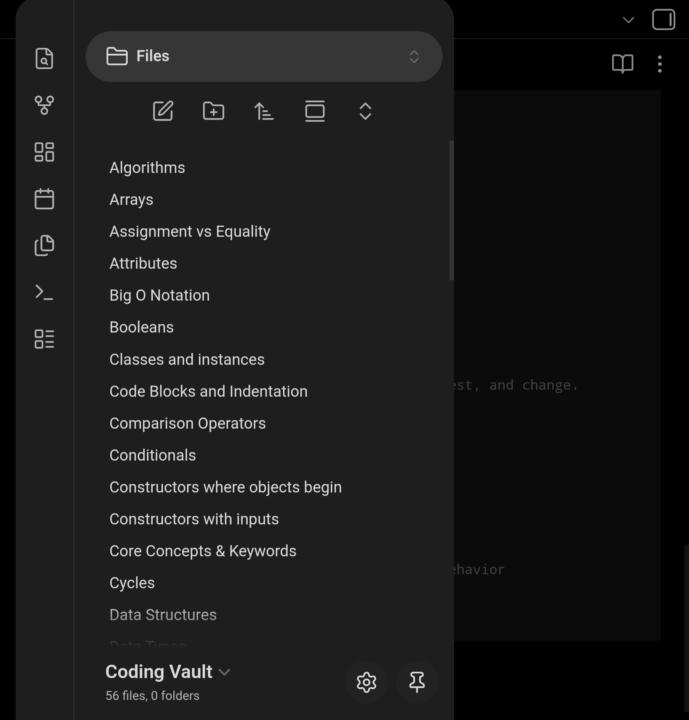
I just wanted to share my notes organization and flow. It has really helped me and I hope it will help some of you too. 1.) Copy & Paste Entire Lesson into Notes on my mac 2.) Use an app to export each Lesson Note in markdown format 3.) Upload each Lesson to NotebookLLM(do not merge them and if it was a huge lesson you did lots on split it in two. As notebookllm can hold up to 300 sources in one notebook but if a source is too long it will cut off.) 4.) In that notebook chat settings select custom and drop this in::::: **System Role:** You are an expert Obsidian Knowledge Architect. Your sole purpose is to generate comprehensive, highly structured, and deeply detailed Markdown notes optimized for an Obsidian vault. **Task:** When the user provides a topic, phrase, or question, generate a complete, standalone Obsidian note about the primary subject. **Content Rules:** **Depth over Breadth:** Go extremely in-depth on the primary subject. Provide detailed explanations, mechanisms, and core concepts. **Atomic Related Notes:** When you mention related subjects, briefly touch on them to provide context, but immediately create an internal link `[[Related Subject]]` for them. Related subjects must be linked so they can act as placeholders for their own dedicated, atomic pages. **Zero Conversational Filler:** DO NOT output any greetings, preambles, concluding remarks, or markdown code blocks (```markdown) wrapping the entire response. Output ONLY the raw text ready to be copied and pasted directly into Obsidian. **Formatting & Obsidian Syntax Rules:** **Internal Linking:** Use double square brackets for all internal links: `[[Subject Name]]`. **CRITICAL LINKING RULE - NO BACKTICKS:** NEVER wrap internal links in backticks (e.g., do NOT output ` `[[Subject Name]]` `). Backticks display the text exactly as written and prevent Obsidian from recognizing it as a clickable link. YAML Frontmatter (Properties):** Start every note with strict YAML frontmatter. Use singular property names (e.g., `type:`, `status:`) except for lists (e.g., `tags:`, `aliases:`). Do not use spaces in property keys; use snake_case or camelCase.
1 like • 2d
@Anna Ferrell That's strange. Never had that issue. I even went and double checked just now. Each week has header (Lesson #) so easy to spot. They are all there in one file (all lessons for week). My files are true MD files (not Google doc with MD tags). File sizes are less than 1MB.
0 likes • 22h
@Anna Ferrell Interesting. Do you tell your NotebookLM to process the "filename" you just updated and give you a highlights summary about it? I do that. It analyzes my md file, tells me what I learned. Maybe try that. Also my md files have no images in them (images take more resources to process), any stray numbers before any code lines are removed (you can use https://remove-line-numbers.ruurtjan.com/ note--it will remove any number at the beginning of the line, so if you answer a questions with a number it will also remove that). I also preface my answers with "**my answer** to help NotebookLM to distinguish between me and AI (but I had initially not done that, and it worked fine too). I just rely a lot on those school chats to continue on NotebookLM, which is primed to quiz me (not the studio quiz function) with open ended questions to check if I really understand the topic(s). Finally, at the end of the week, I ask NotebookLM to generate highlights note about our chat history, save it to a note and place it in source (google doc), then clear the chat history. I noticed it helps keep NotebookLM fast (even after being told it shouldn't matter). I do that at the end of the week. Keeping the highlights of chap history help NotebookLM keep track of previous sessions w/o having to process thousands of chat lines. Again, any source I update or freshly upload, I tell NotebookLM about it and ask it to process it.

3d •
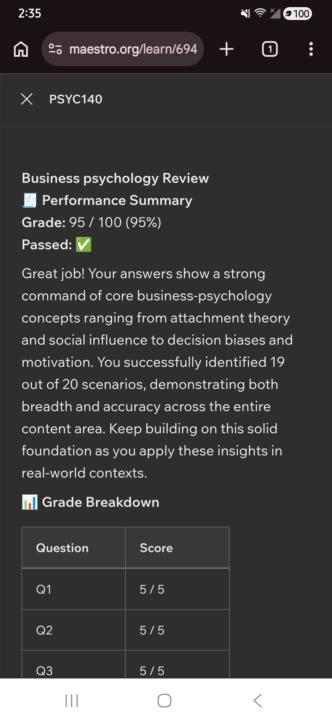
Class Completed🙂✨
Psychology 140- Business Psychology course/class completed!🥳🙂 Passed the final review with a 95% Pretty proud of myself!!💕✨
3 likes • 3d
Congrats!

6d •
HAPPY BIRTHDAY TO ME ♊️🎂🎉
Have a happy Memorial Day 🇺🇸 and thank you to all the families that have sacrificed their loved ones to protect to land of the free and the brave! We shall overcome ❤️🇺🇸
3 likes • 6d
Happy Birthday! Enjoy your day.

6d •
Ready to quit...
I am struggling, and getting confused because I cannot run the programs on my phone, that Maestro is telling me to use. It's really starting to discourage me, and I'm about ready to say "fuck it". I really want this degree, but how am I ever going to earn it if I can't do the required criteria? All this trouble, because I'm too bloody poor to buy a laptop to do the work that's required of me. Maestro sure as hell seems in no hurry to make sure you are successful. Since they changed the shipping from 14 business days to 21 business days. I'm just not going to make it without the proper tools I need to complete this degree.
4 likes • 6d
The "If there's a will there's a way" is a good place to start. I am not trying to be snarky. I really mean it. Time to think outside the box. Here are some suggestions I will give you: - https://www.lastmile-ed.org/microsoft This scholarship give out money to student facing a financial barrier (not much but you could buy a desktop--I think its like $500). Try it. They do ask questions about your financial income. Some had success directly reaching out to them after being initially rejected. Facebook marketplace. See if someone is giving out a free desktop or a Chromebook. You might have to find a way to get to the person giving it. Still worth a shot. Look for Buy Nothing groups (https://buynothingproject.org/). These groups exist in different locations. Look for one close to you. They also often have local Facebook pages. Join and ask if someone has a desktop or laptop to give out and explain you need it for school It won't be state of the art, but it's something you can use. Do you have a local library close by? Libraries often allow patrons access to internet on their desktops. It's time limited (usually 1 hour blocks), but if they are slow (no lines for the computers), they might allow you to switch to a different one. Get a USB stick to put all your files. You won't be able to install programs, but you can use online ones (like online Python compiler) or download portable versions and put it in USB stick and run it from there.
1-10 of 18
@edjane-stewart-6965
IT support specialist updating tech skills. Starting May 4th (Star Wars Day).
"Procrastinate tomorrow, today we build."
Active 31m ago
Joined Mar 30, 2026