Activity
Mon
Wed
Fri
Sun
Aug
Sep
Oct
Nov
Dec
Jan
Feb
Mar
Apr
May
Jun
What is this?
Less
More
Owned by Dr. Ed
A community of people who are interested in learning how to use Energy Testing and Soul Inquiry to get more clarity on their soul path and to heal.
Memberships
Coaches Life Lab 2.0
782 members • Free
Hyperealistic Drawing Mastery
22 members • Free
Claude for Coaches
1k members • $47
Daily Lines
94 members • Free
Portrait Drawing Course
12 members • Free
Master Realism Drawing (Free)
1.5k members • Free
Non-Fiction Author Lab
1k members • Free
Get Booked and Paid Well
49 members • $33/month
Eran's student/member coaching
418 members • Free
4 contributions to The Free Reiki Basics Course

Apr '25 •
Promote yourself here! 🤩
As you know we have a no self promotion policy within our community. But we want to make an exception in this post. Feel free to promote your socials, website, product, or service here. You may want to use this format: - I help NICHE to get OUTCOME through MECHANISM And feel free to link your socials or website. Then reply to other people's comment giving them advice or motivation 🤗


5 likes • May '25
I help people learn about Energy Testing and how it can help them in their everyday lives and thus I created www.personalenergytraining.com to assist people on their path. My Instagram handle is: @thehealthyhumansproject I also have a non profit called: the healthy human project which helps those who can't afford holistic care a means to get assistance. We're a young non profit but feel free to take a look at that: https://thehealthyhumansproject.org/ so many good peeps in here!! Much love.
1 like • Jul '25
@Fardau Jansma I call it energy testing because it can be done remotely or in person. In person, we use the muscles as a barometer to what is going on with the mind/nervous system. Remotely it's a little different but similar concept.
May '25 •
curious about this...
Who here has sent energy or reiki to others? has anyone ever sent to a group of people at once? Just interested to hear everyone's take on this.
3 likes • May '25
@Fardau Jansma some people claim they can do all kinds of stuff. I'm not denying or confirming whether they can or not but for me, I just like to focus on individuals too. But I was curious if anyone was doing group stuff.
1 like • May '25
@Fardau Jansma yes indeed

Apr '25 •
So many inspiring posts... but how do you find them later?
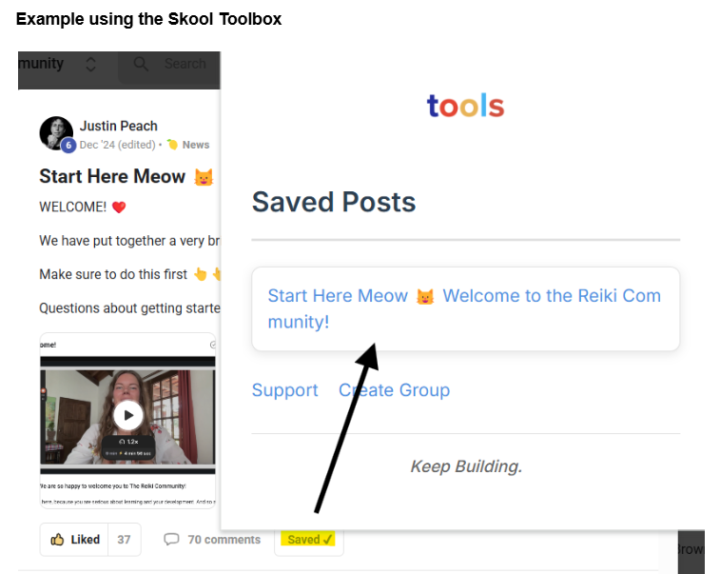
I often see beautiful and inspiring posts here, and then I think: how am I going to find this again later? Of course, you can use the search bar, copy posts, create a list of links, or take screenshots... but perhaps the following options will save you some time. Skool has received many requests for a "Save post" option, but unfortunately, it's not available yet. Fortunately, there are two handy alternatives that allow you to easily save your favorite Reiki articles. I've tried these Chrome extensions, and they work well. I've also added screenshots for reference. 🛠️ Skool Toolbox: With this browser extension in your Chrome browser, you can save posts with one click and find them later in an organized way. You will need to create a free account or sign in with your Gmail account for this one. This is necessary to sync your saved posts and make them accessible on all the devices where you have the extension installed. 🔗URL: Skool Toolbox 📌 Skool Bookmarks: This Chrome extension allows you to create your own collection of Skool favorites. You don't have to create an account, but in that case, you will only be able to find the saved articles on the device where you saved them. 🔗URL: Skool Bookmarks I hope you find these helpful! Feel free to share if you know any other great ways to save beautiful posts!
2 likes • May '25
thanks for sharing
Apr '25 •
Remembering my first attunement..
I remember when I took level 1 reiki years ago. I was in Chicago at the time and after the attunement, I needed to walk back to the train station to go back home. The city is very busy and every corner has a light. As I approached my first intersection, the green walk sign came on. This didn't really phase me as that could just be good timing. Then I approached the next intersection, and the green walk light popped on just as I approached the street. That got my attention!! This continued to happen for 6 straight intersections!! I was smiling internally if you know what I mean. Wishing you all a green light in whatever you are walking through in your life.
2 likes • May '25
@Fardau Jansma thank you!
1 like • May '25
@Nicole Brown likewise. glad it resonated.
1-4 of 4
@ed-leshin-3795
I am a Holistic Chiropractor and Founder of Personal Energy Training. I enjoy connecting with like-minded souls.
www.personalenergytraining.com
Active 2h ago
Joined Apr 24, 2025