Activity
Mon
Wed
Fri
Sun
Aug
Sep
Oct
Nov
Dec
Jan
Feb
Mar
Apr
May
Jun
What is this?
Less
More
Memberships
5minAI
2.9k members • Free
3 contributions to 5minAI

Mar '25 •
OpenAI Updates or How to Build Agents with N8N
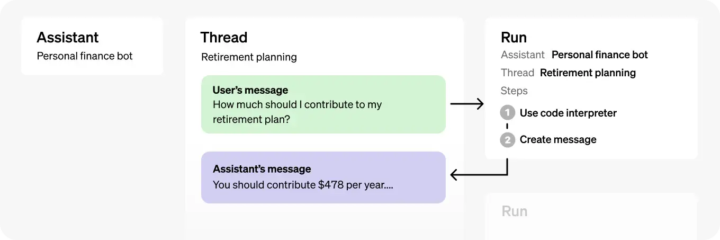
Yesterday, OpenAI dropped an exciting update for AI agents, introducing a new Responses API that'll change how we build assistants. But no worries—if you're using the current assistant flow, you have a full year before it gets phased out. Here's a clear breakdown of the current workflow to keep you in the loop: 🔄 How Assistants Work (Current Approach): 1️⃣ Create Thread: - Keeps your conversation memory intact, just like ChatGPT does. - No need to manually handle memory nodes or constantly pass historical messages (unlike Claude). 2️⃣ Send Messages: - You can send images, text, files—whatever you need, even multiple messages at once. 3️⃣ Run Assistant: - Flexible Assistants: Choose different assistants depending on what you're trying to achieve. - Dynamic Prompts: Easily adjust prompts on-the-fly or throw in extra instructions mid-process. - Tools Integration: - Structured JSON Responses: Perfect if you need consistent results to automate next steps in your workflow. - Custom Tool Requests: Sometimes, your assistant might ask you to run a specific tool externally. When this happens, you'll perform the action, gather the results, and pass them back to the assistant for continued processing. 4️⃣ Retrieve Messages: - Grab the assistant's response directly from your conversation thread. The latest message is always your assistant's reply. Assistants aren't just simple chatbots—they're smart agents capable of handling multiple tasks autonomously until they achieve the desired goal. You've got plenty of time to adjust to the new Responses API, so explore and experiment at your own pace. Happy automating! ✨

1 like • Mar '25
Wow, they also sent me an email today. I just didn’t understand - is this a replacement for which API, Chat Completions or Assistants?
Feb '25 •
📊 Simple Web Interfaces for AI Agents - No UI Builders Needed!
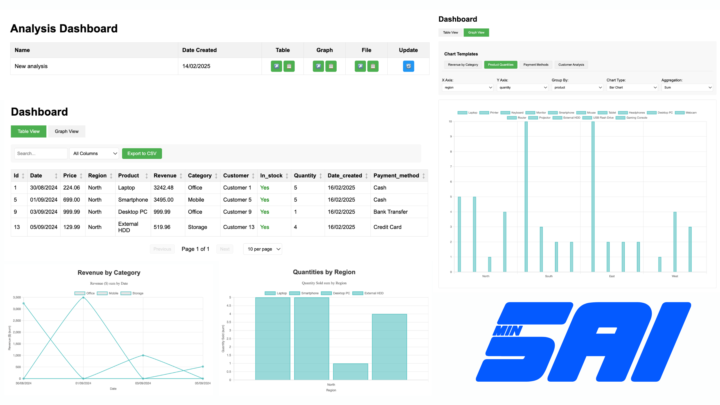
Hi everyone! 👋 Lovable is great for building no-code interfaces for AI agents, but what if you don’t want or can’t create complex UI? Turns out, you don’t have to. 💡 Did you know? You can return HTML directly from an N8N webhook - which means you can generate lightweight, real-time web pages pre-filled with live data and interactive elements. So I decided to upgrade my AI agent that chats with a database - now all the queried data is accessible via N8N webhook as a nice dashboard. Here is a list of all new features: 🔹 Instant Reports in HTML – Ask for specific data, and the AI generates a web page with a sortable, filterable table for analysis. 🔹 Basic Graphs – AI can prebuild visual insights for quick review. 🔹 Dynamic Dashboards – The challenge? Static data. Solution? A refresh button that pulls live data via a saved SQL query—giving you an interactive, real-time dashboard without complex frontend coding. 🔹 Report Management & Sharing – A central page to manage and share reports with teammates or partners. This setup took just a few hours and makes data insights more accessible without needing external UI tools. Check example of dashboard here 🚀 Would this help simplify data analysis in your business? Want a full guide on how to build it? Let me know! 👇
1 like • Feb '25
It is very interesting how this works.
Feb '25 •
SQL You Later. My AI Agent Has Landed!
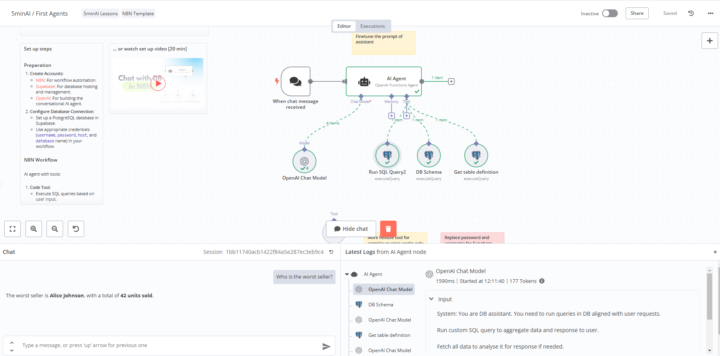
I am sharing a screenshot of my first AI agent. It is really good at its job. There was a small problem with SupaBase, the interface changed a little, but it turned out to be even more interesting. Mark, thank you!
1-3 of 3

Active 379d ago
Joined Dec 13, 2024
Vietnam