Activity
Mon
Wed
Fri
Sun
Aug
Sep
Oct
Nov
Dec
Jan
Feb
Mar
Apr
May
Jun
Jul
What is this?
Less
More
Memberships
AI Automation Society
427.1k members • Free
179 contributions to AI Automation Society

4h •
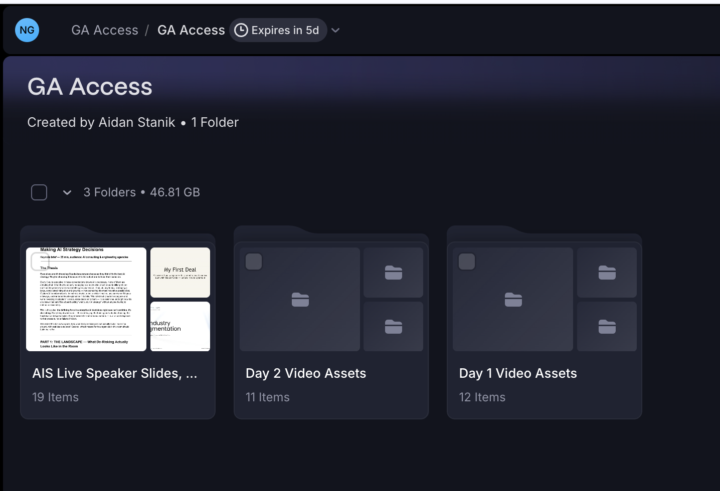
Please help me with the downloading the documents of AIS LIVE
I do not see any sign to download the documents. Can some one help me with this. How do I download the documents presented during the Live Session. Thank you.

0 likes • 2h
Hi Noel, see attached screenshot which I have annotated, it looks like you can place a tick in each of the highlighted tick-boxes. I expect a Download option will only appear AFTER you have ticked the folder(s) you want to download. As a first step, try placing tick in box number 2 that's highlighted, see if option then appears to download that specific folder. If that doesn't work, best raise a support ticket with AIS by emailing details of the issue to the following email: [email protected] Hope this helps.

21h •
Does a Telegram Trigger workflow accept messages from anyone who finds my bot?
I have an n8n workflow that starts with a Telegram Trigger node. I only ever message the bot myself. My question: if someone else finds or guesses my bot's username, can they just start a chat with it and trigger my workflow with their own messages? Or does the trigger only fire for my chat by default? Thanks!
2 likes • 20h
Hi Ven, according to n8n docs, it is possible to restrict your telegram trigger to specific Telegram user IDs. See section near bottom of following n8n doc: https://docs.n8n.io/integrations/builtin/trigger-nodes/n8n-nodes-base.telegramtrigger Quote: "Restrict to User IDs: Only trigger for events with the listed user IDs. You can include multiple user IDs separated by commas." Add that option in your Telegram trigger node within your n8n workflow and paste your Telegram User Id in so it restricts to your use only. To get your specific Telegram User Id, just message @userinfobot on Telegram, hit start, and it'll reply with your user ID. Then just paste that number into the Restrict to User IDs field in your Telegram trigger. I haven't tested this myself so ensure you verify it operates as expected. Hope this helps.

20d •
Example of storm-research skill (applied to investment research)
I tested Nate's storm-research skill (he shared earlier today here https://www.skool.com/ai-automation-society/new-video-stanfords-method-turns-claude-into-a-phd-level-research-team?p=7000fecf) with an genuine use-case: I am trying to decide whether/how to add drone exposure to my portfolio where my leading candidates are two public companies (RCAT, ONDS). I suppose the general prompt could have been something like "what will be the size of the drone market in 5 years and which of the current players are likely to be leaders?" but I gave it a more detailed, specific prompt asking to feature the two candidate companies. Here's the output (you'll see in the video that Nate provided also the report template, which renders the neat green/red supported/challenged tags) https://bionicturtle.github.io/storm-research-reports/storm-reports/drone-industry-rcat-onds-briefing.html My initial, quick impressions: - Excellent product: I am so delighted by this council-of-experts approach, especially for purposes of investment decision-making; e.g., I'm current on all of SeekingAlpha's latest articles on RCAT, but this document is next-level skepticism - The built-in STORM expert panel is Practitioner, Academic, Skeptic, Economist, Historian. For my investment decision-making purpose, next I would REPLACE the Academic with CFA/Forensic Accountant/etc. But in the GENERAL, I think you'd consider swapping an expert(s) depending on the purpose (!). - Maybe because my prompt was detailed (not sure?), I used 75% of my session tokens. I had to interrupt and ask Claude to hurry up and finish. Claude is a revelation every day but now I'm becoming very aware of token usage ;)
0 likes • 5d
@Lilo Mad Hi Lilo, the "storm-research" skill is attached to the post linked above. The skill is attached in Nate's post, it's not obvious that there are multiple attachments when viewing Skool post on mobile, you need to scroll left/right beside YouTube thumbnail to see all attachments. See attached screenshot for reference.
9d •
X integration
I wanted to integrated X into my n8n workflow. should i pay for X credits or is there a free option?
Poll
3 members have voted
2 likes • 8d
Hi Ven, I saw the following site recommended recently for fetching from X/posting to X via API: https://twitterapi.io/ It appears to have good pricing and fairly extensive help docs also, haven't tried it myself but worth you checking it out. P.S. I have no affiliation with the site.

💎
⭐
9d •
Who's pumped??
Last day to buy your AIS Live tickets! We brought together real AI business owners to show you guys what they actually sell and how they do it. July 11th and 12th (this weekend) and completely virtual. Get your ticket HERE

2 likes • 9d
@Grant Leclerc Hi Grant, the schedule for AIS Live starting tomorrow is linked via the Calendar page, just click Saturday July 11th there to view: https://www.skool.com/ai-automation-society/calendar Direct link to page with details on AIS Live schedule and speakers: https://events.ringcentral.com/events/build-and-earn-summit/registration
0 likes • 9d
@Grant Leclerc That's great, glad you are sorted 👍
1-10 of 179

@david-potter-4157
Software Developer, exploring AI Automation potential.
Active 16m ago
Joined Feb 18, 2025
Powered by