Activity
Mon
Wed
Fri
Sun
Aug
Sep
Oct
Nov
Dec
Jan
Feb
Mar
Apr
May
Jun
Jul
What is this?
Less
More
Memberships
The AI Advantage
126.6k members • Free
DP
Digital Product Creators Club
766 members • Free
28 contributions to Digital Product Creators Club

3d •
Outline chapter count doesn't match selected chapter structure
I'm working on a contemporary romance novel, and I need a slower-paced outline to allow the relationship to develop naturally. To give the story enough room, I changed the chapter distribution from the default 12 chapters to 15 chapters, with the following structure: - Setup: 7 chapters - Confrontation: 5 chapters - Resolution: 3 chapters The interface correctly shows Total chapters: 15, and each story section also displays the chapter numbers I selected (7 / 5 / 3). However, after regenerating the outline several times, the actual outline still contains only the default number of chapters: - Setup: 3 chapters - Confrontation: 6 chapters - Resolution: 3 chapters So the outline always stops at Chapter 12, even though the project is configured for 15 chapters. Because of this, the story is compressed into only 12 chapters instead of the 15 I selected, making it difficult to properly pace the romance. Is this a bug, or is there another step I need to take to make BookNova actually generate all 15 chapters? Thank you!

1 like • 2d
I'm having a similar issue, and have submitted a ticket about it.
0 likes • 12h
The issue has been resolve, anyone that was having the issue should try again now

1d •
Looking for someone who can make a short review.
Friends! Is there anyone here who films and creates tutorials/reviews for web applications?
2 likes • 1d
I have some experience with Recording Tutorials for computer software, should be that much different for web applications.
3d •
New feature just went live: Find & Replace across your entire book!
Here is the story behind it. One of you (Deborah 😉) - a writer right here in this community - reached out and said something simple but brilliant: "I love the books, but sometimes I just want to change a character's name or fix a small detail without regenerating the whole thing and spending credits." That is exactly the kind of feedback I build on. So I sat down and made it happen. Now you can search your whole book and change any word, name, or phrase - instantly, everywhere it appears. Rename a character, fix a recurring term, correct a small detail - done in seconds. No regenerating. No credits spent. Full control, right in your hands. It comes in two modes: Simple - find an exact word or phrase and replace it everywhere in the book. Smart - perfect for renaming a character. It updates every form of the name so nothing slips through and your book stays consistent from cover to cover. You will find it right in the writing view - look for the Find & Replace button, or just press Ctrl+H. This is exactly why I love building BookNova as a solo founder, together with you. You share an idea, and it becomes a real feature - fast. So keep them coming. The next feature might be the one you suggested. Go give it a try, and let me know what you think.

1 like • 3d
The fact there is a smart version, that can change names based on how it shows up is great.
4d •
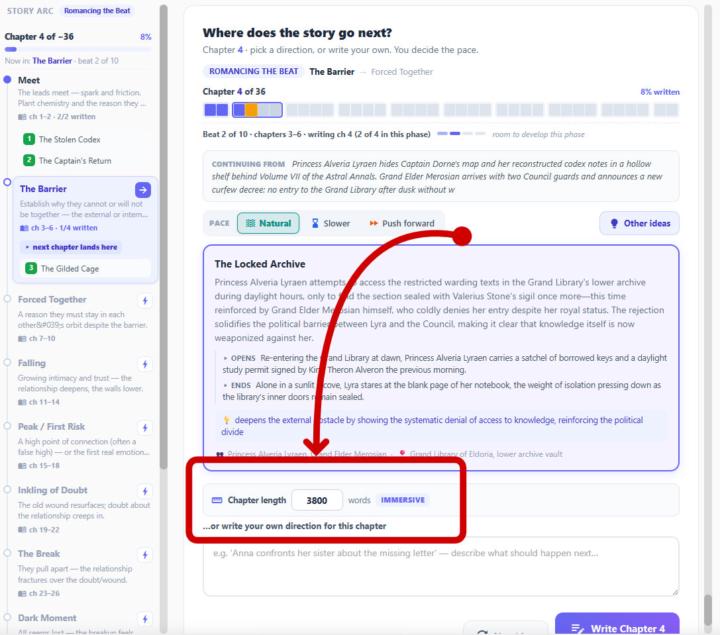
Feature preview - Sail Mode: variable chapter lengths, adjustable for every chapter
One of the features coming with Sail Mode (our chapter-by-chapter writing flow, currently in development) is per-chapter length control. Here's what it does and how it works. The idea In published fiction, chapters aren't all the same length. Length is used to control pace: tense or fast-moving scenes tend to run short, while setup, immersion, and emotional depth run longer — and the climax is often the tightest section of the book. A fixed word count per chapter (total ÷ chapters) hits a target length but produces an even, mechanical rhythm that real novels don't have. Sail Mode varies chapter length instead — automatically, with a manual override. The automatic part For each new chapter, Sail sets a target length from three inputs: 1. Pace — the pace you pick for the chapter (linger / natural / push) shifts the length. Lingering runs longer; pushing the plot forward runs tighter. 2. Story position — where the chapter sits in the arc. Opening/setup chapters get more room; chapters in the climax zone run shorter and faster. 3. Length budget — your book's overall target. If earlier chapters ran long or short, later targets adjust to keep the whole book on the length you planned. The result is a natural variation from chapter to chapter, with the total still landing on your intended book length. No setup required — it works by default. The manual part Every chapter shows its suggested length in the writing panel, labelled punchy, standard, or immersive. If you want a specific chapter shorter or longer, type in your own word count — that number is used for that chapter. A reset option returns it to the automatic suggestion. So the length is decided for you when you don't care, and editable per chapter when you do. Status Sail Mode is still in development; this feature will ship with it. More previews to follow.
1 like • 4d
Very cool feature. Excited to try it out when it goes live.

10d •
Just for fun!
Let’s write a story together. This is how it works. Look at the comments. Write a sentence in your comment that continues the story from previous comment. So, if we read the comments in sequential order we should have a group story! I will start it with the first comment…

1 like • 7d
@Joe Wadas How often should we allow people to comment and continue the story?
1 like • 7d
@Joe Wadas I think maybe we say people have to wait for 4-5 other people to post, AND to have to wait 24+ hours. That way no one person can over dominate the story.
1-10 of 28