Activity
Mon
Wed
Fri
Sun
Jul
Aug
Sep
Oct
Nov
Dec
Jan
Feb
Mar
Apr
May
What is this?
Less
More
Owned by David
Teachers: Everyone else Learner: Top n8n creator
Teacher: Top n8n creator Learners: The few who go beyond just nodes
Memberships
Claude for Everyone
2 members • Free
Public Speaking - Vocal Power
320 members • Free
🚌 The Bus
25 members • $9/month
GOOSIFY 🍎🐛🦋🌈⭐️🩷
13k members • Free
Ghostcoders
77 members • $29/month
Skoolers
183.9k members • Free
Social Selling with Sam
841 members • Free
Synthesizer: Free Skool Growth
42.4k members • Free
37 contributions to (n8n) Nodes Automation Lab

Jan 18 •
What do you want / need?
This community is growing faster than ever and I am committing to know *your* needs and wants. Why are you here? What do you want (big picture)? What is the 1 thing stopping you from building your dream *right now*?

0 likes • 2d
@Jake Janapon getting likes on your comments or having people like your post or commenting on a post you make
2d •
I need your honest help with something
I need your help with something real. I'm struggling with my offering - and I'd rather ask you than guess. I want to be available to you guys. Hours in calls, helping you solve your automation blockers. That's the dream. I thought selling workflows would be the way to fund it. A little over a year ago I started building. Soon I was on n8n's top creators page. A couple months later, leading it. Then it clicked: It doesn't matter how many tools I make if you don't know how to use them to change YOUR life. That individual transformation? That's the only thing I actually *want* - it's why I'm here. This isn't about money. I just want to afford the time to sit in calls and unblock as many of you as I can. ⁉️ What would you do in my situation? ⁉️ Every answer will directly shape the community
2
0
5d •
🛑 Stop Limited Thinking
If you could pay $75-$200 of credits to run a prompt, but it could be as complicated, as detailed, and as long as you wanted, and it will build anything even remotely realistic; what is your 1 prompt? - Make no mistakes
3
0


Jan 26 •
We Do Magic — What Automation Really Is — and What We Actually Do
When most people hear the word automation, they think of something simple: a repetitive task that gets done automatically so they can save time. And honestly? That part is true. At its most basic level, an automation is a system that takes Task A, applies a defined set of rules, and reliably delivers Result B — every time, without human intervention. No breaks. No forgetting. No inconsistency. That alone already has value. But that definition barely scratches the surface of what automation really means in a business context. Automation Is Not the Tool — It’s the Outcome A common mistake businesses make is focusing on the tool instead of the outcome. Automation is not: - n8n - Zapier - Make - AI agents - APIs - Scripts Those are just instruments. Automation is the intentional design of a process that removes friction, reduces waste, and produces consistent results aligned with business goals. The real question is never: “Can this be automated?” The real question is: “What business result do we want to achieve, and how do we design a system that gets us there reliably?” What Actually Happens Behind the Scenes This is where we come in. We are not “button clickers” or “workflow builders.” We are architects of business flow. Our job is to take something that exists in your business — an idea, a task, a process, a bottleneck, or even pure chaos — and design a structured path from Point A to Point B, based on your desired outcome. That “thing” can be: - A lead coming in - An email being received - A form submission - A customer action - A manual internal process - A recurring operational chore - A creative workflow - A reporting requirement Once the goal is defined, we design the logic, rules, validations, fallbacks, and integrations that make the system work reliably in the real world, not just in theory. The “Magic” Is Just Well-Designed Systems From the outside, automation often looks like magic. An email triggers a workflow. A lead gets scored automatically. A report is generated and sent. A video is created, branded, and posted across multiple platforms. A customer receives the right message at the right time.

0 likes • Feb 25
@Hector Diaz Do I have your permission to create a video from this post?

Feb 1 •
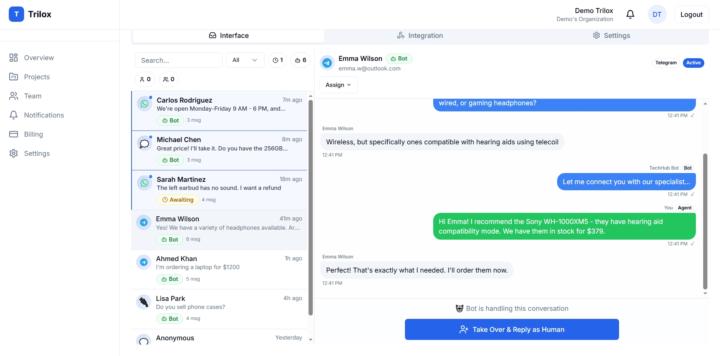
👀✨ How do you handle human takeover in n8n chatbots?
When building chatbots with n8n, one question kept coming up from clients: “Can I see the conversations?” “Can I jump in when the bot messes up?” The bot itself wasn’t the problem. The real challenge was giving clients a clean, simple way to be involved without digging through executions, logs, or raw webhook data. So over the last few months, I’ve been building Trilox. Trilox is a shared inbox for n8n chatbot conversations with human takeover: * Bots handle chats by default * Humans can jump in instantly when needed * Conversations can be handed back to the bot * WhatsApp, Telegram, Messenger, web widget — all in one inbox I’m also building a dedicated n8n community node that plugs directly into workflows: * Record bot + visitor messages * Check who’s handling the conversation * Escalate to a human when needed * Receive human replies via webhook We’re currently pre-launch and sharing progress publicly. If this is something you’d use, you can join the waitlist to be the first to know when it opens: 👉 https://trilox.io Would love to hear how others are handling human-in-the-loop chatbots in n8n 👀
1 like • Feb 25
This is a fantastic solution to a common pain point, Shafik. Integrating a shared inbox directly with n8n workflows would streamline human-in-the-loop automation significantly. Could you share a bit about how you're handling the handoff trigger from n8n to Trilox?
1-10 of 37

@david-ashby-7018
Girl Dad x 2 | Top 3 creator on n8n x 7
Online now
Joined Aug 6, 2025
INTP
Salt Lake City, Utah