Activity
Mon
Wed
Fri
Sun
Nov
Dec
Jan
Feb
Mar
Apr
May
Jun
Jul
Aug
Sep
What is this?
Less
More
Tax Gen
29
$25/m
AI Experts Club
4.8k
$47/m
Creator's MBA Boardroom
1.1k
Free
Membership School
239
5.0
$19/m
AI Revenue Engine
573
$7/m
Tax Resolution Pros
5.8k
Free
Accelerator 014
188
Free
Practice Builders
333
Free
Tax Maverick
580
Free
3 contributions to Passive Hyperfocus AI

May 17 •
MAKE . COM
🚨 Quick Heads Up Everyone! 🚨 If you’re planning to learn how to use Make with us, please go ahead and create your account before Tuesday’s training so you’re ready to follow along live 👏 Promo: Anyone who registers for Make using your link will automatically receive 1 month of the Pro plan with 10,000 operations for FREE! Let me repeat this 10,000 FREE We’ll be walking through:✨ The basics of Make✨ How automations actually work✨ Beginner-friendly workflows✨ The exact plans/tools we’ll be using moving forward✨ How to start connecting your apps together to save HOURS 👉 Create your account here https://www.make.com/en/register?pc=bestie This is gonna be HUGE for anyone wanting to automate content, leads, emails, social posting, workflows, AI systems, and more 🔥 Make sure you get signed up early so you’re not scrambling at the last minute

1 like • May 18
Hello everyone. I have been MIA due to work, work, work. I may still not be able to join on Tuesday, but just wanted to say that I already use Make and it is so easy to use you will love it. I use it mainly to pull data from Gmail or Google drive and the data into a Notion database on an schedule. Then Claude runs some skills with the data from Notion and provides be daily updates in several topic areas. Have fun y'all.
Apr 15 •
HELP?
LOL okay… I need help 😩 You all know I’ve been building behind the scenes… And yes funnels, forms, automations, booking systems, content creation schedule… all that is DONE 👀 BUT what I haven’t told you yet… I’ve ALSO been creating a print-on-demand shop setup that’s literally ready to plug into everything. So this isn’t just about being organized…it’s about actually having something that can generate income too. And now it’s launch time. And guess what I’m stuck on… COLORS 😭 I cannot decide on the final look. 👉 So I’m putting it in your hands… What kind of vibe would make you feel like “okay yeah… I’d actually use this”? Drop your ideas below 🎨 Because if I’m building this for you…you should help decide how it looks. I can not wait to see you all tomorrow as i have MISSED EVERYONE THIS WEEK!!!!!!!!! You are all my Family! I also have some secrets shhhhhhhhhhh........ Can not wait to see you at 6pm EST Thursday Night . . . . .
1 like • Apr 16
#3

Mar 25 •
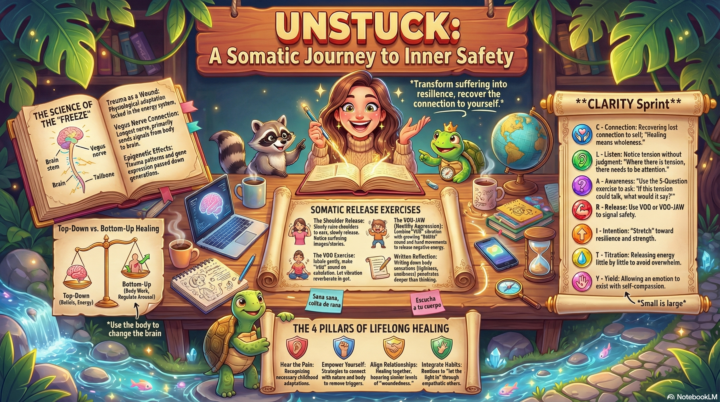
Customized my NotebookLM Visuals - Tonight's Lesson
Thanks for teaching us how to customize our NotebookLM Artifacts tonight @Rodgina Wheeler ! Used one of Anne's styles and got one of my old therapy notes to give me this graphic. Love that we now have a work flow, copied for you all below: 1. Take a picture of say an infographic that you like, e.g. the awesome Aibestie images. 2. Attach it in Gemini and add this prompt: “Please extract the entire detailed style of this infographic.” Use Gemini as the other LLMs like ChatGPT don’t do as good a job of detailing the graphic style. 3. Copy and paste the chat result into the settings for infographic or whatever artifact you create and save either as a permanent setting or you can toggle it on and off. ****Y'all share your pics when you try it as well!****
2 likes • Mar 27
@Julie N This looks fantastic Julie. Good work. @Rodgina Wheeler which session (recording) was the NotebookLM discussion? I must have missed that session, and would love to go back and watch the recording. I have been struggling with creating infographics. NotebookLM is producing better results than most other solutions, but mine still look subpar.
1-3 of 3

@darla-petteway-7189
I help business owners and high-income professionals build wealth by reducing tax liability through customized tax strategies and tax resolution.
Active 4h ago
Joined Mar 12, 2026
Pearland, Texas