Activity
Mon
Wed
Fri
Sun
May
Jun
Jul
Aug
Sep
Oct
Nov
Dec
Jan
Feb
Mar
Apr
What is this?
Less
More
Memberships
3D Printing BusinessExperience
534 members • Free
28 contributions to 3D Printing BusinessExperience
1d •
3️⃣ Week 3 is here. Let's get it listed. 🚀
Now we have a product. This week we turn it into a listing that actually sells. I will also add some useful prompts in the comments :) This week is all about: ✅ Product photos that convert ✅ A title that gets found on Etsy ✅ A description that makes people buy ✅ Tags that bring the right traffic And yes, AI can help with almost all of this. We will use it! 🚀 VIP and Premium members: my complete listing process goes live in the course this week. Photos, copy, tags, SEO, prompts... Everything I use for my own products. Your task this week: - Take your first product photos - Write a draft title and description - Get your listing live before the week is over For your title, description and tags use Gemini. It is free, has the best connection to Google and understands search intent better than most tools out there. Give it your product, your niche and your target buyer and let it generate a first draft. Then refine it. For product photos use AI tools like Nano Banana to turn a simple photo into a professional product shot. If you do not have a good background setup remove the background completely. A clean transparent or white background still looks better than a messy one. The best photos show all of this: ✅ Size reference so buyers know how big it is ✅ Colors and surface detail ✅ Use case in context, show it at a real wedding table or event setting ✅ Variations if you have them ✅ Close up detail shot Share your listing draft or your product photos in the comments. Let's give each other feedback. 👇🏼

0 likes • 5m
@Tobias Ulbrich here`s some more videos I made with pixverse. you can really make some high quality videos if you put in the rights prompt. for video prompts just use chat gpt or gemini.
0 likes • 4m
and I use capcut to edit and cut the videos if needed.
5d •
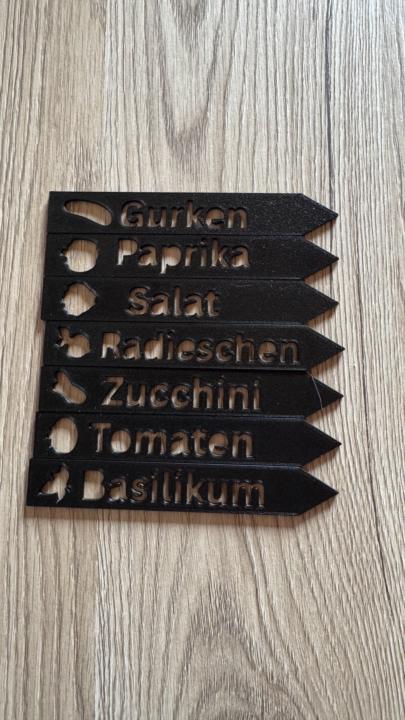
Plant signs
So my mom asked me if I could make her some plant signs for here vegetables garden. So I made this simple ones here (they are in german if someone wonders). I printed the prototypes in PLA, but that‘s not good enough for putting into soil. Would PETG be good enough to put into soil for several months? I also thought about selling these in sets of 10 and 15 pieces.
0 likes • 22h
@Marcel Sibilitz yeah I‘m on it to make them different. :)
0 likes • 17h
@Dmytro Vlasov Yes that‘s what I want to do. But I need to wait for the white petg. Only have black here
9d •
2️⃣ Week 2 has started. Let's build. 🚀
From Zero to First Sales: 6 Week Sprint This week is all about Design, Print & Prototype. You have your idea. Now it's time to make it real. Most people overthink this step. The goal is not a perfect product. The goal is a first version you can hold in your hand, look at and improve. ✅ Your task this week: - Sketch or model your product, it doesn't need to be perfect, it needs to exist - Print your first prototype - Look at it critically: what works, what doesn't, what needs to change - Print a second version if needed - Share your prototype in the comments: photo, screenshot or sketch 🚀 Premium members: I'll share my full design process this week - how I construct the product, what software I use, my decisions and my first printed result. Don't have anything yet? Drop where you're stuck: that's just as valuable! Drop your ideas and prototypes in the comments to get some feedback! :)
1 like • 5d
So I changed my sprint subject, to personalized gamertags.
0 likes • 2d
@Dmytro Vlasov yeah and not too many requests for such things. most people want gamertags with lights.

6d •
In a dilemma… a good one
Hey everyone, I’m looking for some opinions here. Currently my Etsy store has taken off and doing pretty well. My problem is currently I’m at a 4-5 day turnaround time after an order is placed. I only have time to start and swap prints and night so production is slow because of that and being limited to the four printers I have so I’m looking to buy more printers. Currently I have four p2s combos and I’m debating on buying four more to keep the entire line the same for parts on hand etc.. or save $1,100 usd and buy the p1s combos.. if you were in my shoes what would you do?
Poll
6 members have voted
0 likes • 3d
I have another question for you. I‘m just curious what you did to get your shop to take off? Have you changed something or what happened? 🤔 I still get barely any views on my listings
3d •
CAD problem
Hi. Can someone explain how to stop a 3 mm filet/chamfer before the bottom edge in Fusion? The part is supposed to be inserted into a base plate, so I need 3 mm from the bottom edge to remain sharp, without any rounding or bevel. I can’t get it to work, unfortunately. I’m still a beginner.
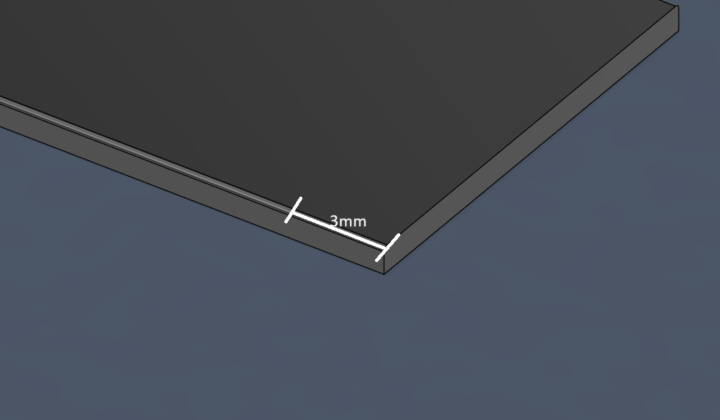
0 likes • 3d
@Danyo S. yeah I could but I found another better way, by just creating a new sketch und extrude it, then do the camfer and extrude it back to zero.
1-10 of 28