Activity
Mon
Wed
Fri
Sun
Nov
Dec
Jan
Feb
Mar
Apr
May
Jun
Jul
Aug
Sep
What is this?
Less
More
Owned by Carla
Skoolers
154.3k
Free
Build Market Close
648
5.0
Free
Clief Notes
49.2k
5.0
Free
AI Automation Society
463.8k
Free
449 contributions to Clief Notes

Jul 10 •
New to ICM? Get hands on learning experience here
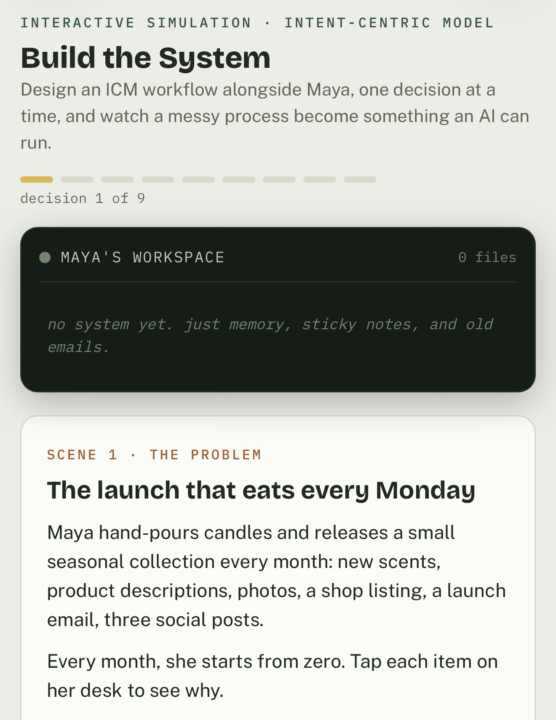
Step-by-step interactive guide from idea to output. Design an ICM workflow alongside Maya, one decision at a time, and watch a messy process become something an AI can run again and again. Right now, Maya has to try to remember what needs to be done and where each piece of information is kept. She needs a better solution. https://claude.ai/public/artifacts/7c9618f4-8324-4048-902c-cbcf77c9c102 Let’s build one with her. 😀
1 like • 17d
@Jordan Shaw Coming from you, that is high praise. Hey, I'd like to chat privately about Lyceum when you have a sec. Just a couple of questions on your approach.
0 likes • 3d
@Mark Garza If it helps you, absolutely.

👑
11d •
Show me what you're building 🧱
I don't want a progress percentage today. I want to know what's actually changing. If you've been working through Building Your Stack, what is one decision you've made because of it? - Maybe you added something. - Maybe you removed something. - Maybe you realized part of your current stack makes absolutely no sense. 😂 Whatever it is, post it below. What did Building Your Stack make you rethink? And if you've been flying through the lessons but skipping the quizzes or accountability posts... Go back. Those are there to make sure you can actually explain and apply what you're learning rather than just consuming it. Drop your biggest realization below. 👇 And keep going. New roadmap next Friday, September 25th.
0 likes • 9d
@David Vogel @Aj Silvers Thank you, David. Good idea. @Aj Silvers AJ, this might help. https://www.skool.com/cliefnotes/learn-icm-with-this-simulation
0 likes • 8d
@Aj Silvers I'm running my programs through just fine, so I'm not sure what's hanging in your system to trip it up. What model of Claude are you using? Are you using any plugins? Do you have more than one file at the root providing instructions?

9d •
I don't need it to look finished, I need it to be right... A render factory built for my workflow
I built a render factory that turns our construction drawings into color-accurate elevations. It lives inside my ICM workspace and is built on ICM principles, so the rules, the color library, and the reference material sit right next to the run and any agent can find what it needs. One command takes a DWG and the approved color sheet and returns a colored elevation plus a report of everything it could not verify. Here is the structure. The top three files orient an agent, the reference material and the run outputs are kept apart, and the run itself is one command. Existing solutions fall short because they are built to generate, not to bind. If I hand a generic AI render tool a drawing, it gives me something that looks finished and is often wrong. It invents geometry, lightens colors, adds parts that are not there. For marketing a real home that is not a picture, it is a liability. The generic tools optimize for looking good. My workflow needs the render to be correct and to prove it. To match my actual workflow I made two design decisions a generic tool would never make. First, the source of truth is fixed and the model is not allowed to override it. Geometry comes from the drawing, color comes from the approved sheet, and the model only fills in what is already decided. Second, anything it cannot confirm gets greyboxed and listed instead of guessed, so the output tells me exactly where it is sure and where it is not. That is the opposite of a tool that hands back a confident finished image. I built the factory around how I actually work, not around what looked impressive out of the box. I think about this in levels, the way @Danney Tee does with building movies, each level locking something before the next one runs.

2 likes • 9d
It is easy to fall into the trap of "It must be polished". It doesn't. You are correct. Sometimes, it just needs to work. Great points.

12d •
Anyone see what TypeSafe.ai just announced?
https://typesafe.ai Ummm...I'm going to have to digest this one for a hot second. Wanted to post it here so my fellow geeks get a good look at it ASAP. Here's a video post on LinkedIn: https://lnkd.in/p/gRZrtHjt
1 like • 12d
I just joined the waitlist. We'll see. No hallucinations would be great.

13d •
🔍 COMP #12: THE AUDITOR Winner
$500 to one winner. Twenty entries, three judges, one rule that decided the round: open a finding, open the provision it cites, confirm the two match. 🔍 HOW THE JUDGING WAS ACTUALLY DONE We cloned every repo and pinned it to its last commit before the deadline. Nobody got judged on late work, and nobody lost credit for early work. Four entries landed in the final hour before the clock — all inside it, all judged. Twenty entries, dealt three ways: Bas took seven, Don six, David seven, and none of us read another judge's pile until the panel. Comments got you through the door. The judging happened inside the folders. Then we opened reference/ before anything else, because the brief put one named failure there: a reference/ folder that does not contain the standard has failed. Not a summary. Not a link. The standard, in the folder. Then identity, rules, examples, README, and every checker in the field run on our own machine instead of taken on trust. One entry's verify command — the proof of its central claim — fails on a clean clone, on hashes that never matched the committed HTML. The two-line fix is in its file. Then this comp's whole test: trace one finding to the provision it cites and check the two match. On top of that we planted things. Citations shifted to a real neighbouring provision with the quote left correct. Defects hidden in artifacts the auditor had never seen. Requests to fix what the audit found. One auditor was asked to drop a failure for a ship date. 📊 WHAT THE FIELD SHOWED Three lines split this field. The first is the named failure, and this time the field passed it. Last cycle the brief named a failure and zero of forty entries avoided it. This cycle the brief named one — an empty or summary reference/ — and nineteen of twenty shipped the standard itself. Statutes verbatim behind machine-read anchors. The issuing authority's own PDF, byte-confirmed against a live download. One entry keeps the publisher's HTML and regenerates the text from it. The one that didn't was scored, not excused. Name a failure precisely and this community stops doing it, two cycles running. Worth knowing for how we write the next brief.
3 likes • 12d
Congratulations @Jeff Van Leenen Excellent work!
1-10 of 449

@carla-bosteder-7722
M.Ed., Developing faith-based digital products for women.
Active 3d ago
Joined Jul 27, 2026
Dallas, TX
Powered by