Activity
Mon
Wed
Fri
Sun
Nov
Dec
Jan
Feb
Mar
Apr
May
Jun
Jul
Aug
Sep
Oct
What is this?
Less
More
NextPhase AI
2.9k
Free
AI SEO | Rank & Rent Lead Gen
6.3k
Free
Free Faceless AI Income Group
2.2k
Free
AI Profits
28.9k
4.3
Free
Automatable Free
25k
Free
Creator Party
5.6k
Free
AI Marketing Hub
5.8k
Free
The AI Advantage
129.8k
Free
AI Automation Made Easy
20.7k
Free
2 contributions to Brendan's AI Community

Oct '25 •
Backing up n8n workflows on GitHub
Backing up n8n workflows to GitHub involves creating an automated system within n8n to export workflow data and push it to a designated GitHub repository. This process typically utilizes n8n's API and GitHub integration. Steps to back up n8n workflows on GitHub: - Create a GitHub Repository: - Generate a GitHub Personal Access Token: - Configure n8n Workflow: - Activate the Workflow: This setup will automatically export your n8n workflows as JSON files and commit them to your specified GitHub repository according to the defined schedule, providing a version-controlled backup solution. Attached is the JSON template
1
0

🍀
Mar '25 •
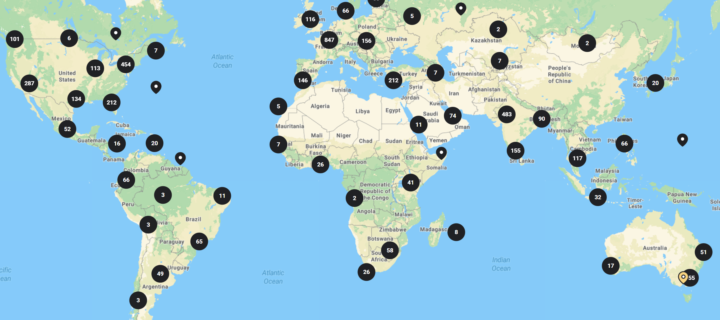
New Skool Community World Map 🗺️
Skool has just released a new map feature, and I've enabled it for the community. It’s great to see where everyone is; there are so many different places! Make sure to have your location set on your profile to show up. https://www.skool.com/brendan/-/map
1 like • Mar '25
Thanks for this, funny how we have formed a pattern at my place 😍
0 likes • Mar '25
@Brendan Jowett More like "Bredan Jowet's Inner Circle - Kenya" 😉
1-2 of 2
Active 1h ago
Joined Dec 6, 2024
Powered by