Activity
Mon
Wed
Fri
Sun
Aug
Sep
Oct
Nov
Dec
Jan
Feb
Mar
Apr
May
Jun
Jul
What is this?
Less
More
Memberships
Chemistry Physics Engineering
130 members • Free
EngineeringTech
41 members • Free
Lots Of Projects - Engineering
246 members • Free
Offroad Design Crew SOLIDWORKS
499 members • Free
1 contribution to Offroad Design Crew SOLIDWORKS

Feb 8 •
Help needed with STL files / 3D-Scan
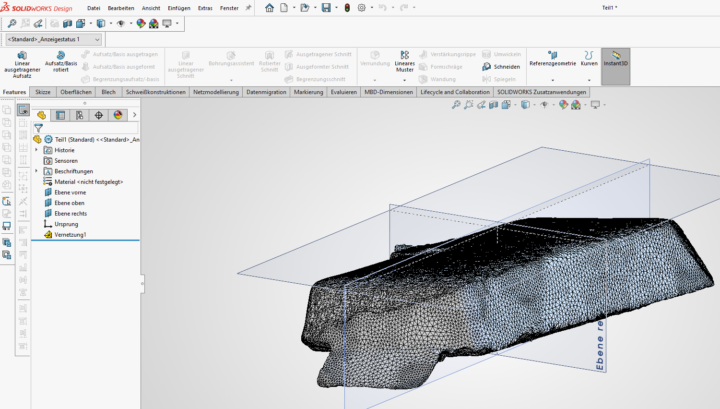
Hey guys, i need your help. I am trying to work with a 3d-scan. I already have the stl files cleaned up in the revo scan 5 software. Now i am trying to import the stl into solidworks 2026 (makers license) with the goal of reorientating it. If i import the stl without the scanto3d option activated i am not able to add a plane based on 3 points, because i can only select the hole face, not the intersection points of each polygon. When i open the stl file with the scanto3d option activated i am able to create a new plane and new koordinate system. My idea is saving the stl with my new koordinate system and set the output origin to the new created one, so my stl is oriented properly. Unforunately this doesnt work. Every time i try to save it, it either doesnt save anything or it doesnt reference it to my new koordinate system. Which means it is in the same wrong orientation... Would really appreciate i anyone has a tip how to fix this. Thanks a lot Pic1: stl imported into a new file with the scanto3d option actived (polygon lines are visible and i am able to select the knots to create a plane)

1 like • Apr 19
@Cameron Warech Yes, thank you! I frequently work with 3D meshes, so I’d love to share my experience and help support the community.
1 like • Apr 19
@Cameron Warech At the moment, I mainly work with 3D mesh tools in SolidWorks, but I think the core principles are quite similar across different software.
1-1 of 1

@cuong-nguyen-van-duy-1889
Mechanical Design | CAD (SolidWorks) | Learning vehicle design | Passionate about chassis & suspension | Looking to learn from the community
Active 13d ago
Joined Mar 23, 2026
Vietnam