Activity
Mon
Wed
Fri
Sun
Mar
Apr
May
Jun
Jul
Aug
Sep
Oct
Nov
Dec
Jan
Feb
What is this?
Less
More
Memberships
AI SEO Engine
55 members • $47/m
3 contributions to Airtable Community

Nov '25 •
Merging bases workflow?
What is best practice when you want to merge two independent bases together? I have two working 'prototype' bases and the time has now come to join them together. What's the best way to do this?
0 likes • Dec '25
@Jake Wilson Thanks Jake. Both bases have a number of tables, scores of fields, linked records, lookups, rollups and automation triggers so the thought of building from scratch is anything but appealing! In the absence of finding solutions in various communities my own solution roughly followed this path: 1. Choose the base with the most existing complexity attached to it as the host base. (In this case, it was the one that fired a lot of Make.com automation triggers). 2. Set up the second base to share and sync all it's Tables and Views and Fields. (Hindsight) Pro tip#: Name every View including the default 'Grid View' to match the source Table name so it's more easily identifiable in the new target synch base. Especially if you're synching more than one Table. Pro tip #2: Unhide all the fields and remove filters from the primary View so you can easily see and check everything you need comes across (as filters/sorting do not). 3. Identify the Table with most linked records. This proved helpful as Airtable will automatically prompt you to synch the linked tables and means you don't have to manually synch all the tables. (Otherwise, just synch one Table at a time). 4. After synching tables, if applicable, check all the records reached the target base. (I simply switched on Filled/Unique in the Summary for a quick reference to compare each field's records in the source/target bases). 5. Once you're happy the source base is effectively duplicated in the target base, unlink the 'remove' the synch source (synch settings) and prepare to 'rebuild' the base. (While they are synched you can't make major changes to the target tables and once the synch is removed the field types are all basic. For example, no formulas, lookups or rollups will remain). 6. Rebuild the base #1. This is the step where you have to check the settings of each target field and compare it to the source and make all the appropriate changes; e.g. formulas, lookups, rollups, etc. (In my experience, this was still a painstaking process, (especially making sure you don't make mistakes), but it was definitely easier having completed all the above steps). 7. Rebuild the base #2: This is the step where you'll need to rebuild all the parts you can't synch such as filter/group/sort settings and any automations you may have built. (I can't comment on whether or not you can synch Interfaces or Forms).

Nov '25 •
Hello from a fellow (obsessed) Airtable Builder!
I'm so happy I found this group. I'm a full-time, certified Airtable Builder, and I am completely obsessed with the platform. It's great to finally have a place to geek out with other people who know and use it as well! I'm also certified in Softr and typically work with clients in the real estate and construction industries. One thing I'm really passionate about is the future of Airtable's AI. I'm really hoping they start to ramp up their AI capabilities to be on par with what we're seeing from other platforms. Looking forward to connecting and learning from you all! :)
1 like • Nov '25
Same with Airtable AI. I have been impressed with how useful Omni has been to help me with several base builds, but when I hear what my Notion pals can do, I realize Airtable still has plenty of upside to come.
Nov '25 •
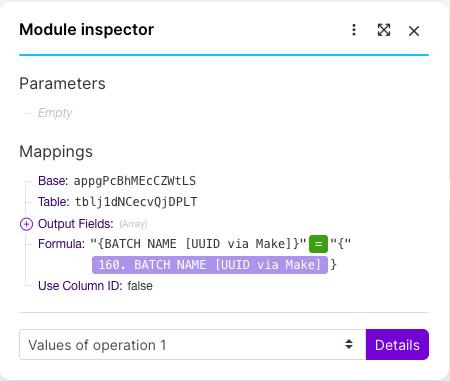
Make.com Airtable 'Search Records' module filtering challenge
Can any of you bright folks help me format a filter formula correctly in a Make.com Airtable 'Search Records' module? I realise now that four of my efforts were completely off the mark, but I still am going round in circles with the proper syntax needed to make this formula work. I'm just getting error after error every time I run this scenario and it reaches this module. I've tried different AI models but their very confident answers have just lulled me into a false sense of hope! So time to ask the real experts! In a nutshell my goal is that when I search records at this point in the scenario, I only want those records with the UUID we set earlier in the workflow (that was subsequently mapped to Airtable).
3 likes • Nov '25
I fixed it... Single curly brackets for the Airtable field name, no spaces, typed "=" (not Make (green) "=") and typed quote marks around the variable.
1-3 of 3
@colin-clapp-1624
Growth enabler behind the 'one-click' SEO/AEO/GEO philosophy: Systemised content optimization that compounds content ROI 🚀
Active 3h ago
Joined Oct 10, 2025
Powered by