Activity
Mon
Wed
Fri
Sun
Apr
May
Jun
Jul
Aug
Sep
Oct
Nov
Dec
Jan
Feb
Mar
What is this?
Less
More
Owned by Cassie
˗ˏˋ ★ 順流變現・玩家基地 ★ ˎˊ˗ 把網路創業變成 RPG 闖關冒險 解鎖你的順流獲利模式! 📍 商模玩創 × 廣告實測 📍 獲利解鎖 × 持續升級 ✔ 商模闖關・拆解熱門變現攻略 ✔ 流量變現・低成本廣告實測室 ✔ 玩家共創・共享創業模版資源 挑戰變現關卡・玩創數位獲利!
Memberships
3 contributions to AI x 自動化 x 創業 Skool

🔥
Dec '24 •
AI 進化再升級!ChatGPT「Jawbone」任務排程新功能,解鎖你的專屬智慧管家!
此為 OpenAI 可能正在開發的一項代號為「Jawbone」的功能(目前皆為傳聞與測試資訊,尚未正式公布),該功能與 ChatGPT 的「Tasks」計畫有關。 主要功能概述: 「Jawbone」(Tasks)功能的核心概念是在 ChatGPT 中新增「任務排程」的能力。使用者可指派特定任務(對話指令)在未來指定時間自動執行,並可設定定期重複的週期,例如每日、每週、每月、每年,甚至可延伸至最長約2年的預定執行時間。 例子: • 每週六凌晨 00:00 自動彙整過去一週的 AI 新聞並推送給使用者。 • 每月提醒使用者更換空調濾網,並在適當時候提醒重新購買耗材。 使用者界面與操作方式: 根據測試資訊,未來 ChatGPT 介面可能新增一個「Tasks」管理頁面,使用者可透過該介面: 1. 檢視所有已設定的任務列表。 2. 編輯任務名稱、指令內容、執行週期、執行時間。 3. 自訂通知方式(桌面通知、手機推播、Email)。 4. 設定任務的重複頻率:每日、每週、每月、年度或其他自訂週期。 5. 使用者可在對話中直接以自然語言要求 ChatGPT 建立此類任務,而無需繁瑣設定程序。 未來發展方向與應用場景: 1. 從對話式 AI 邁向代理式 AI(Agents): 「Tasks」功能代表 ChatGPT 從純被動回應朝向主動任務執行的演化,是發展成「AI 代理人(Agents)」的重要里程碑。未來的代理式 AI 能夠在無人監督下,基於長程目標持續執行任務。 2. 各種應用可能: • 個人生活管理:如家庭維護待辦事項、健身計畫提醒、生日或特殊紀念日通知。 • 工作自動化:定期產出報表、追蹤專案進度、安排會議提醒。 • 資訊推送:在特定時間提供新聞摘要、財經報告、研究回顧。 3. 與其他工具及服務的整合: 雖然尚未確認與外部服務整合,但未來可能透過 Plugins 或 API 與行事曆、電商平台、社群媒體、自動化工作流程(Zapier/Make.com)結合,讓 ChatGPT 主動執行更複雜的任務(如購物下單、預約餐廳、發布社群貼文)。 4. 競爭格局: Google 的 Gemini 模型也被傳正開發類似的 Scheduled Prompts 功能。這象徵未來 OpenAI 與 Google 都將在「可排程自動化 AI 功能」領域競爭,以提升使用者生產力並打造更智慧的個人助理體驗。 5. 長遠目標與價值主張: OpenAI 執行長 Sam Altman 曾談論未來 Agents 的願景: • AI 不僅是簡單的任務執行者,更是能理解使用者全貌、能進行長期協作與決策的「智慧夥伴」。 • 隨著模型能力提升與功能擴張,AI 將可處理更高價值任務,如商務決策、人員招聘協調、大規模資料分析等。 • 最終,藉由「Tasks(Jawbone)」功能的基礎,未來的 AI 代理人可能成為使用者個人生活與專業工作的核心支援系統,減少認知負擔、節省時間、提高決策品質。 總結: 「Jawbone」代號所指的 ChatGPT 任務排程新功能標誌著從靜態的對話互動走向動態的長程任務執行,並朝「代理式 AI」邁進。此功能將讓使用者得以透過簡單的對話指令設定自動化任務,使 AI 不只是回答問題的工具,更成為主動協助日常生活與工作的智慧助理。未來若與行事曆、通知系統及外部服務整合,將可望大幅降低用戶的時間成本與負擔,並提供更高階、更個人化、更多元的服務體驗。


1 like • Dec '24
太期待了,最喜歡每天更新☺️
🔥
Dec '24 •
驚喜的第七天 - OpenAI 的「12 天驚喜」: Projects
第七天亮點:ChatGPT 專案功能 🎉 可參照 大禮包 ⬅️ (⬇️要向下看喔~ 有更多有用資訊} OpenAI 推出了全新功能 「專案」(Projects),幫助用戶更輕鬆地整理工作、檔案和對話,讓生產力直線提升!💼✨ 專案功能特色: 1 工作空間管理更有條理: - 專案讓你可以將相關的對話、檔案和指令分組整理,像「智慧資料夾」一樣方便。 - 可自訂專案名稱、顏色,並上傳相關檔案,所有資料一目了然。📂 2 ChatGPT 功能升級: - 檔案整合:可以上傳如試算表、文件等,讓 ChatGPT 幫你讀取、互動並處理。 - 自訂指令:可為每個專案設定專屬指令,讓 ChatGPT 依照需求提供特定語氣或回應。 - 搜尋整合:在專案中使用 ChatGPT 的搜尋功能,快速找到所需資訊或點子。 3 支援 Canvas 編輯: - 和 Canvas 無縫結合,讓你輕鬆編輯文字或程式碼。 - 範例:快速撰寫活動通知、修正程式碼,甚至修改網站模板。 實際應用場景: 1 策劃聖誕交換禮物 🎄: - 建立專案,匯入參加者的偏好和活動細節。 - 用 ChatGPT 隨機分配禮物對象、驗證結果,並撰寫活動通知。 2 家庭維修紀錄 🛠️: - 跟蹤家庭維修任務和設備使用說明。 - 範例:詢問 ChatGPT 冰箱濾水器何時需要更換,並根據自訂筆記教你如何操作。 3 網站開發 🌐: - 上傳模板、履歷和社交連結。 - 使用 ChatGPT 快速修改網站設計,支援特定的程式語言格式(如 Astro)。 功能可用性: 即日起開始推出: 現已開放給 Plus、Pro 和 Teams 用戶。 免費用戶將於稍後開放,企業及教育計畫用戶將於明年初獲得。 結尾亮點: 直播中,專案功能已正式開放!🎉 OpenAI 期待看到大家如何利用 專案 功能來優化工作流程,提升效率!🚀✨ Projects in ChatGPT OpenAI introduced Projects, a new feature in ChatGPT designed to help users organize their work, files, and conversations seamlessly. 🎉 Key Features of Projects: 1 Organized Workspaces: - Projects allow you to group related conversations, files, and instructions together for streamlined collaboration. - You can create folders, assign colors, and upload relevant files for easy reference. 2 Enhanced ChatGPT Functionality: - File Integration: Upload files like spreadsheets or documents, and ChatGPT can reference and interact with them. - Custom Instructions: Tailor ChatGPT’s behavior for each project, such as defining specific tones or tasks. - Search Integration: Use ChatGPT’s search capabilities within projects to find relevant information or brainstorm ideas. 3 Canvas Support: - Projects work seamlessly with Canvas, making it easy to refine text or code collaboratively. - Example: Writing emails, debugging code, or editing web templates directly in Canvas. Real-Life Use Cases: 1 Secret Santa Planning: - Create a project with participant preferences and event details. - Use ChatGPT to randomly assign gift-givers, validate results, and draft event announcements.
1 like • Dec '24
終於有專案和資料夾了!!👏
🔥
Dec '24 •
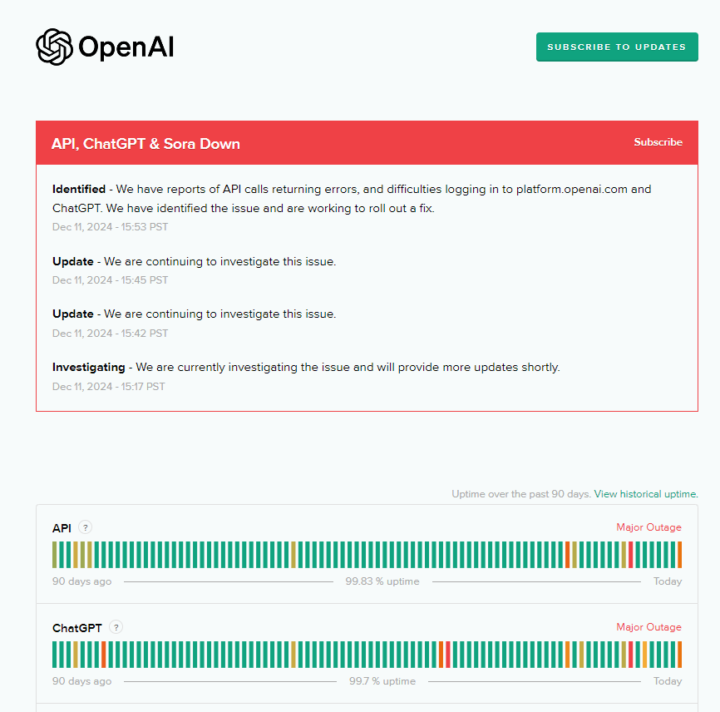
ChatGPT 當掉?? (活起來了!!!!!)
ChatGPT is currently unavailable. Status: Identified - We have reports of API calls returning errors, and difficulties logging in to platform.openai.com and ChatGPT. We have identified the issue and are working to roll out a fix. 如何知道ChatGPT 目前的連線是否正常狀態? 由此開始來了解!
1 like • Dec '24
對呀,chatgpt.com首頁已經這樣超過一小時了! 我今天才剛升級到 ChatGPT Pro $200/月耶 😂
1 like • Dec '24
@Jelord Chien 真的哈哈,想試試應用 Pro 無上限 o1-pro 做 custom GPTs綁自動化系統的成效~明天大概會寫信給 OpenAI 客訴看看 😄
1-3 of 3

@cassie-hsieh
宅創業 15 年|三寶媽&多重潛能者|因實踐 40+ 多重收入&商業模式,我更認識自己!
Turning multi-passion into 40+ income streams for 15+ year | Mom of 3
Active 3h ago
Joined Dec 11, 2024
INFP
Toronto 🇨🇦
Powered by