Activity
Mon
Wed
Fri
Sun
Nov
Dec
Jan
Feb
Mar
Apr
May
Jun
Jul
Aug
Sep
What is this?
Less
More
Owned by Cameron
Bring a problem. Build a solution. Turn ideas into real projects using a proven engineering process and a community that helps you get unstuck.
Design Lab™
111
Free
3D Printing & Design
230
Free
3D Printing Pro
516
Free
Skoolers
154k
Free
The 3D Printing Hub
1.2k
Free
3D Maker Lab - Skettislayers
285
Free
3D Printed Car Parts
260
Free
Aluminum TIG Academy
14
Free
EngineeringTech
44
Free
2 contributions to Offroad Design Crew SOLIDWORKS

Jun 17 •
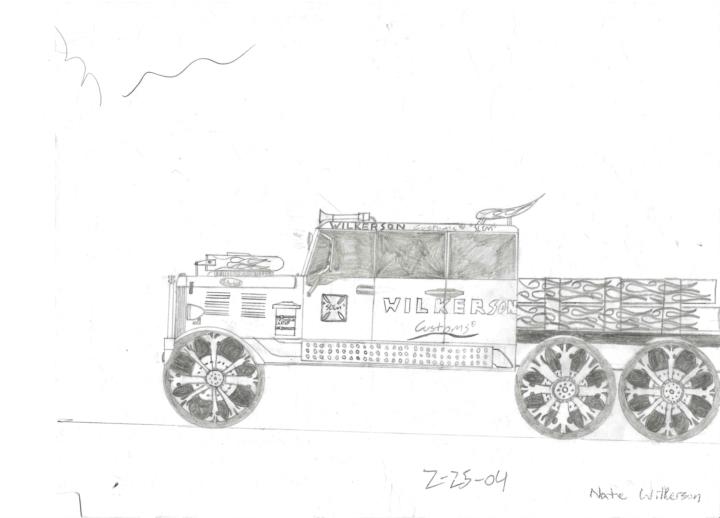
I found old sketches from more than 20 years ago
Check these out, my mother found these in their storage unit. These were sketches I did circa 2004 and she saved. I remember most of these, but some were really surprisingly cool that I had forgotten about. Some have morphed over time, but all have lived in my head since then, and some have made it into solidworks. Check it out, let me know what you think, and post some of your sketches if you still have them.

🔥
2 likes • Jun 17
@Nate Wilkerson Dude. These are pretty cool. How old were you when you drew these up?

Feb 8 •
Help needed with STL files / 3D-Scan
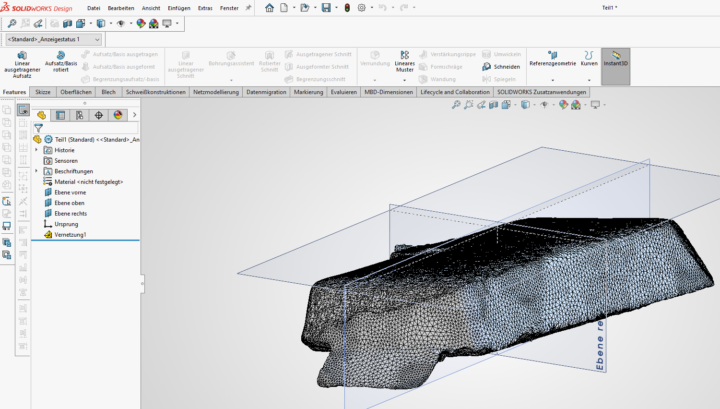
Hey guys, i need your help. I am trying to work with a 3d-scan. I already have the stl files cleaned up in the revo scan 5 software. Now i am trying to import the stl into solidworks 2026 (makers license) with the goal of reorientating it. If i import the stl without the scanto3d option activated i am not able to add a plane based on 3 points, because i can only select the hole face, not the intersection points of each polygon. When i open the stl file with the scanto3d option activated i am able to create a new plane and new koordinate system. My idea is saving the stl with my new koordinate system and set the output origin to the new created one, so my stl is oriented properly. Unforunately this doesnt work. Every time i try to save it, it either doesnt save anything or it doesnt reference it to my new koordinate system. Which means it is in the same wrong orientation... Would really appreciate i anyone has a tip how to fix this. Thanks a lot Pic1: stl imported into a new file with the scanto3d option actived (polygon lines are visible and i am able to select the knots to create a plane)
🔥
1 like • Apr 19
@Cuong Nguyen Van Duy Super helpful. Thanks
🔥
1 like • Apr 19
@Cuong Nguyen Van Duy Do you have any experience manipulating meshes in other softwares? I use Fusion 360 and it doesnt always work as expected
1-2 of 2

🔥
@cameron-warech-3257
Engineer your life! Mechanical Engineer teaching you how to solve your problems with skills like 3D printing, 3D modeling, and Product Design.
Active 11h ago
Joined Apr 7, 2026