Activity
Mon
Wed
Fri
Sun
Aug
Sep
Oct
Nov
Dec
Jan
Feb
Mar
Apr
May
Jun
Jul
What is this?
Less
More
Memberships
Just Start Creators Club
31 members • Free
Coaching Resource Room
1.4k members • Free
Activity Book Creator Lab
167 members • Free
Magnetic Memberships
3.9k members • Free
Deal Hub
395 members • Free
Women of Increase
7 members • Free
Reframe & Rise Women
172 members • Free
Rooted & Wild
136 members • $9/month
Growing Happy Kids
14 members • Free
12 contributions to Start a Business with No Money

🔥
Jun 2 •
How I made $300 without making or sending a single thing
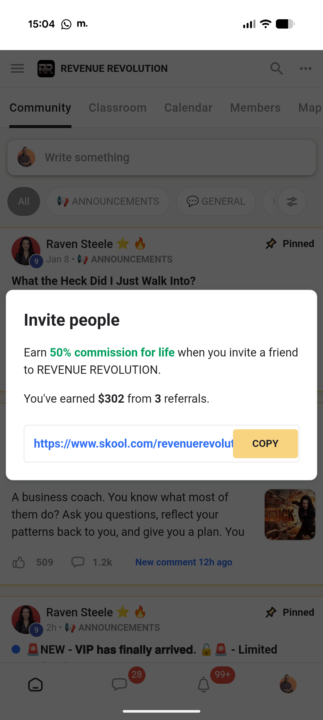
Here's another example of how easy it is to make money without even making anything. Last year just while I was learning the ropes of skool, I invited a few of my friends to come inside my first digital marketing friend's brand new community I was active in, Revenue Revolution. I was never even trying to make money from anyone, I literally just said come along for the fun, this is where the party's at right now. 😍 A few months later she started adding mini courses, on how to make money without showing your face online. Just three of those people decided to buy some courses and things, so when I just clicked the link to invite someone else Skool now shows how many people have bought things and how much you've made. I was pleasantly surprised. 😁 The best bit, I didn't have to create, make, send it do anything, apart from just nmbe my usual social butterfly. I wouldn't rely on it as a business model, but for some side hustle money it's very welcome. It could be a perfect strategy for funding your startup if you are time rich and cash poor. If you have the attention of a large audience, however, then just recommending one thing you believe in can make you thousands, but that's a post for another day. Join Revenue Revolution

6 likes • Jun 2
@Adam McCollough I am starting to do affiliate with Pinterest Skool but I have to be more consistent and use it for the other communities I am in. It’ll be great to recommend your community!
5 likes • Jun 2
@Adam McCollough sounds like fun!!
🔥
Jun 1 •
Not really how I wanted to start the week ...
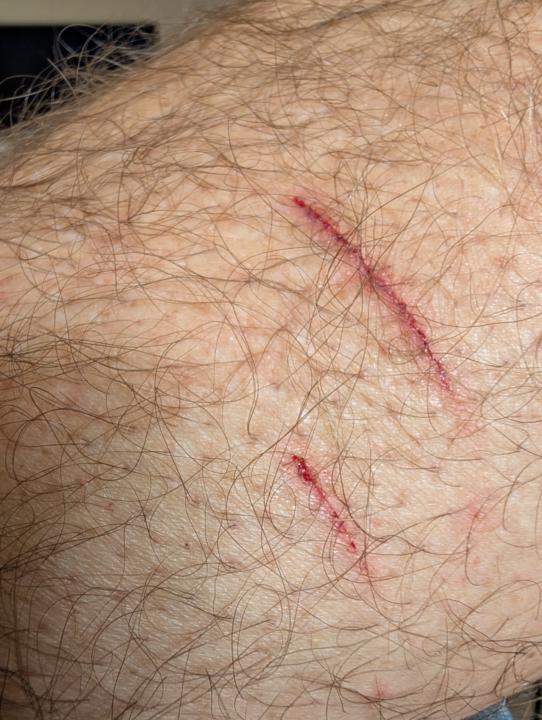
Do we arrived back just after midnight last night, and our 18yr old had decided to lock us out of all four doors and was not answering his phone or the doorbell ringing... Ot me shouting up into his open bedroom window. Eventually when we do get in we are welcomed with the delightful aroma of cat deposits and a few wet patches on the carpets along with teenager dishes and empty cat food tins piled high in the sink which I clear this morning before the cleaner arrives (but then they didn't). But it's law to clean the house before the cleaner arrives apparently. This afternoon that I was just walking through the hallway whilst looking up at my son who was walking down the stairs and I didn't see where I was going and I accidentally stepped on a bundle of kittens, then mum angriiy attached herself to my leg and starting hissing and clawing me frantically... 🙀 Luckily for me, I had jeans on but one claw was stuck in the back of my leg. I felt so bad, but Yuki and her kittens are all checked over, happy and fine and manma has now forgiven me...😻 I also have an intention to prosecute for speeding on my desk to sort out amongst a load of other really not fun paperwork. And now my laptop has decided to do this, it's frozen and I have calls to make on it... 😞 I'm gonna go to work and make a wooden sign, and come back with a more positive mindset... Urgh. 😖 Mondays ..! (I usually love them!) Welcome back Adam! 😂 Hopefully your start of the week is a lot more productive than mine today, but however, your Monday is going, if yours is not going so well then maybe seeing this will make you feel a little better knowing that in other people's gardens it's not always a bed of perfect roses!
1 like • Jun 1
[attachment]
May 26 •
✨ MY WEBSITE IS FINALLY LIVE! ✨
✨ MY WEBSITE IS FINALLY LIVE! ✨ I'm not going to lie — it took me way longer than it should have 😅😂 But you know what?! It's DONE and I am SO proud! 🙌🎉 Done beats perfect every single time 💪 👉 claresartycreations.co.uk I create beautiful hand-crafted digital products for junk journalers and paper crafters 🧡📖✂️ AND I run a membership helping Etsy digital product sellers research demand BEFORE they design — so they stop wasting time making things nobody is searching for 🔍💡 🎁 To celebrate the launch I've got a FREE fairy fussy cuts pack on the site — gorgeous whimsical fairy illustrations ready to clip, layer and paste straight into your next junk journal page 🧚✨ Next up — getting my Skool community properly out there 🚀 One step at a time! 💃 Anyone else here been sitting on something waiting for it to be perfect? 👀

2 likes • May 26
[attachment]
1 like • May 26
@Clare Goodall I just subscribed ☺️your website looks great!
🔥
May 18 •
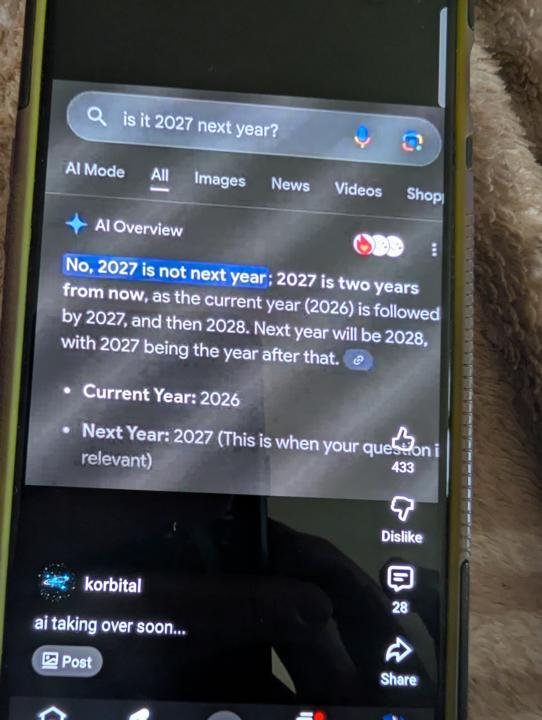
A prime example of why we should not trust AI as fact
My son just showed me this on his phone a few minutes ago and so I had to share it with you, since I know a lot of us are heavy users of AI to help us in our businesses. This is a very obvious error, but it is so CONFIDENTLY wrong so often, that such errors and mistakes are not always so clear. This problem will only get worse since people are using AI to write entire blogs and articles, (without manual input or review in some cases) which will also contain incorrect data and facts, that is then used as a source by AI and so the inaccuracies can compound. Remember, it's just a tool. But a quirky tool that is often wrong. Please always review and question AI output. Especially when brainstorming critical business or life changing decisions.
2 likes • May 18
I had created a word search for my Sunday school class and yesterday while the students were doing it, we realized it didnt include all of the words on the list and the ones it did were almost all misspelled 🙄
0 likes • May 18
@Adam McCollough yes 😁
🔥
May 15 •
I don't want to get obsessed but..
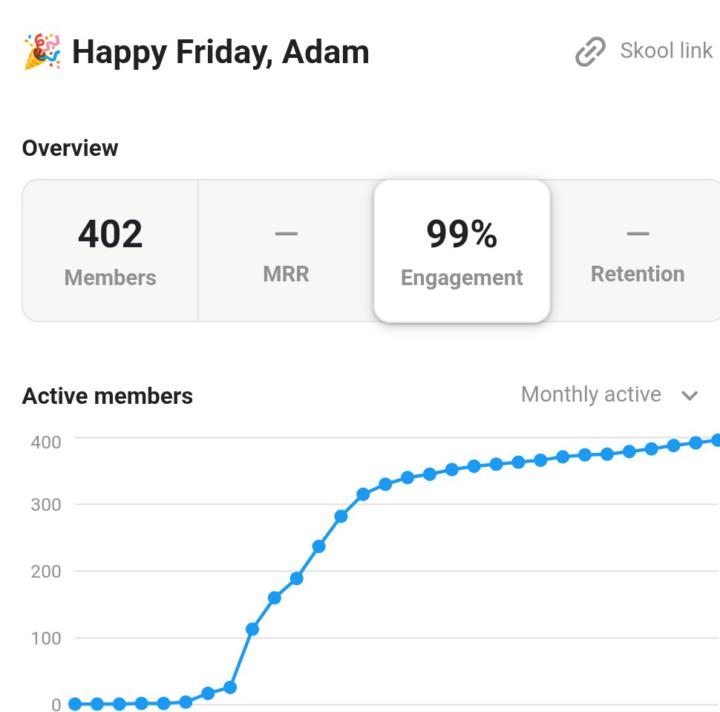
Let's talk about engagement. WOW - You amazing members have achieved the highest engagement I have EVER seen in a skool community. At 95%. I was amazed and waiting for it to go down At 96%. I was grilling from ear to ear and so proud of you At 97% okay, I may be started to check it a little bit more At 98%. I wondered if the thing was completely broken and really tried hard not to become obsessed.. There's a pattern here... Guess what it's on today? 👀 𝟵𝟵 % 😁 Is it just me that feels like such a tease to be 1% away...? Do you think it's even possible..?
3 likes • May 15
[attachment]
2 likes • May 15
@Adam McCollough
1-10 of 12

@berenice-sanchez-8020
•God first•Pastors Wife•Homeschool mom of 3 precious kids•New to digital marketing/creating but doing my best to be financially free and help others
Active 4d ago
Joined Apr 23, 2026
Powered by